

 Flat 1


Project Proposal Presentation: How to Make One That Gets Approved
Quick Answer:
A project proposal presentation is a slide deck that pitches a project to decision-makers — investors, management, or stakeholders — to win approval, funding, or resources. It covers the problem, your solution, scope, timeline, budget, risks, team, and a specific ask. Most run 10–17 slides and take 15–25 minutes to deliver.
Introduction
Most project proposals are rejected not because the idea is bad, but because the presentation makes the audience work too hard to say yes.
Decision-makers have limited time and considerable risk aversion. If your slides force them to hunt for the ask, reverse-engineer your logic, or fill in gaps you left open, their safest move is to defer. “Let’s revisit this next quarter” is rarely about timing. It’s about a presentation that didn’t make the yes feel safe.
This guide is about fixing that — not by adding more slides or polishing the design, but by understanding what decision-makers actually need to believe before they can approve something, and structuring every section to build toward that belief.
What Is a Project Proposal Presentation?
A project proposal presentation is a persuasive slide deck that outlines a proposed project — its purpose, scope, budget, timeline, and expected outcomes — to an audience that must decide whether to approve or fund it.
It sits at a specific moment in a project’s life: after you have an idea worth pursuing, and before anyone has committed resources to execute it. That window is what the presentation is designed to close.
It’s worth distinguishing it from similar-sounding documents:
| Document | When used | Primary goal |
| Project proposal presentation | Before the project starts | Win approval or funding |
| Project kickoff deck | After approval, before execution | Align the team on the plan |
| Project status report | During execution | Update stakeholders on progress |
| Project closure report | After completion | Document outcomes and lessons learned |
The proposal presentation’s sole job is to get the green light. Every slide should answer one implicit question from your audience: “Why should we commit to this?” Once it’s approved, you move to a project kickoff presentation — a different deck with a different purpose.
6 Types of Project Proposals
The type of proposal shapes how you structure and pitch it. Here are the six you’re most likely to encounter:
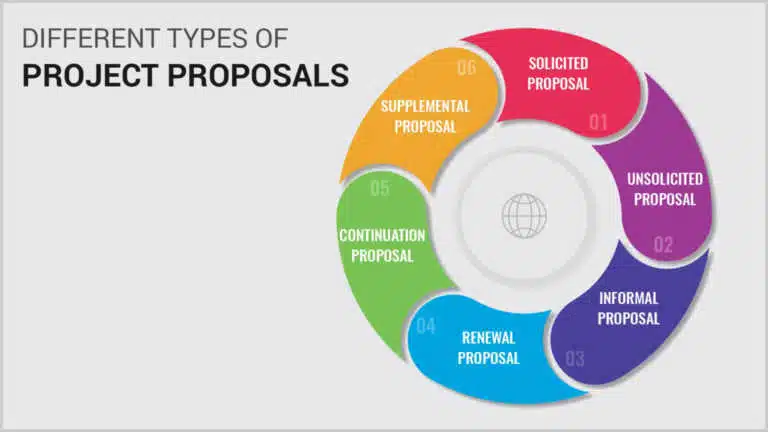
1. Solicited (RFP response)
Submitted in response to a formal Request for Proposal. The organisation seeking work defines requirements; you respond with a tailored submission. These are competitive and scored against defined criteria — read the RFP carefully and answer every section they ask for, in the order they ask for it.
2. Unsolicited
Submitted without being invited. You’ve identified a problem or opportunity and are proactively pitching a solution. These need a stronger opening because your audience wasn’t expecting to evaluate this — you have to create the sense of urgency before selling the solution.
3. Informal
Requested conversationally: a client or stakeholder says, “Send me something about that idea.” These feel low-stakes but are often anything but. People underestimate them, under-prepare, and lose deals they should have won. Treat every informal request with the same rigour as a formal one, just with a lighter format.
4. Renewal
Proposes extending or continuing an existing project or contract. The strongest element here is your track record: what did you deliver in the previous period, and what’s the ROI? Stakeholders approving a renewal are partly buying past performance, not just future promise.
5. Continuation
Requests more time on a project near its original deadline. Be honest about why more time is needed — vague justifications destroy trust here. Specific progress, specific gap, specific new timeline.
6. Supplemental
Requests additional scope, resources, or budget mid-project. These are triggered by scope creep, unexpected complexity, or new opportunities. Frame it as an investment decision, not a cost overrun: show what the additional resource unlocks, and what happens if it isn’t approved.
The Slide-by-Slide Structure That Works
There’s no universal rule on slide count, but there is a logical sequence. These 13 slides cover what decision-makers need, in the order they need it:
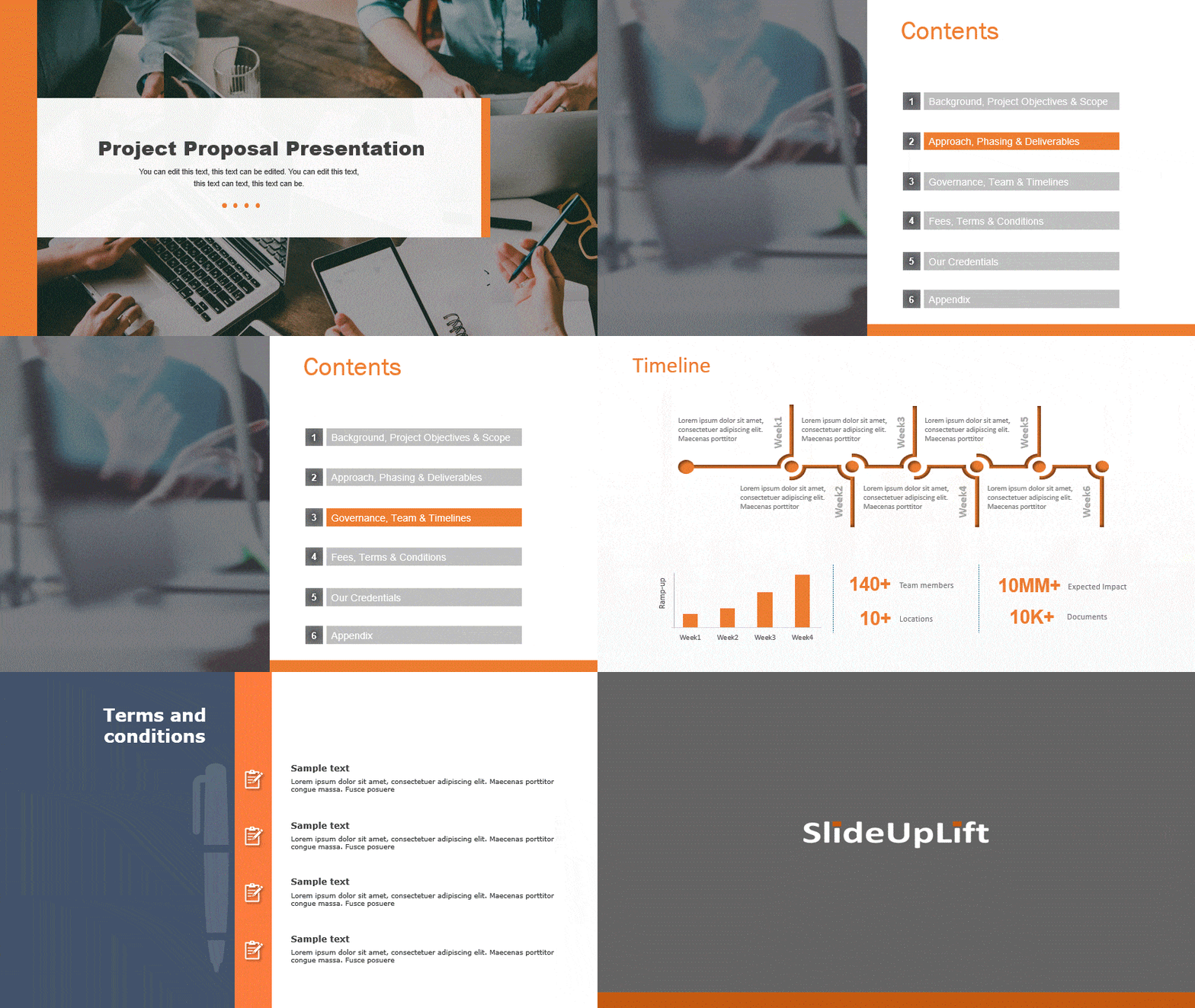
Slide 1 — Title
Project name, presenter, organisation, and date. Keep it uncluttered. A visually heavy title slide signals a visually heavy deck.
Slide 2 — Agenda
A one-slide roadmap of what you’re covering. Limits: five to seven items maximum. If your agenda is longer than that, your deck probably is too.
Slide 3 — Executive summary
The most important slide in the deck — write it last. It should compress the entire proposal into one slide: the problem, your solution, the expected outcome, and the specific ask. If a stakeholder reads only one slide, this is it. See our guide on how to write an executive summary for more on structuring this slide.
Slide 4 — The problem
State the problem specifically and back it with data. “Our churn rate is 23%, vs. an industry benchmark of 14%” lands differently than “customers are leaving.” The goal of this slide isn’t to explain the problem — it’s to make the audience feel its cost. Urgency, not information.
Slide 5 — Your solution
Describe what you’re proposing, specifically. What exactly will be built, done, or changed? Anchor the solution directly to the problem you just named — don’t let the audience have to make that connection themselves. A simple diagram of how the solution works beats a paragraph every time.
Slide 6 — Scope and deliverables
Define what’s in scope. Also define what’s explicitly out of scope — this is the detail most proposals omit and later regret. List the specific deliverables. This slide is the document you’ll refer back to if scope creep becomes an issue.
Slides 7–8 — Timeline and milestones
Show phases, not just a completion date. A Gantt chart or phase timeline is clearer than a list of dates. Frame milestones around deliverables (“prototype reviewed by steering group”) rather than activities (“prototyping phase”). Deliverables are verifiable; activities are vague.
Slide 9 — Budget
Break it down by category: personnel, technology, third-party costs, contingency. Include a one-line justification for each significant line item. A number with no rationale invites questions; a number with a rationale invites approval. State the total clearly at the top of the slide.
Slide 10 — Risks and mitigation
List the three to five most material risks and your plan to manage each. This is the single strongest trust signal in the deck. Decision-makers who see a proposal with no risks listed assume the risks were never considered.
| Risk | Likelihood | Impact | Mitigation |
| Budget overrun | Medium | High | 10% contingency built in; monthly cost reviews against plan |
| Resource unavailability | Low | High | Backup resources identified; phased team ramp-up scheduled |
| Stakeholder misalignment | Medium | Medium | Fortnightly steering group; signed the scope document from day one |
Slide 11 — Team
Introduce key people and their relevant credentials. One to three lines per person. The audience is buying the team as much as the plan — they need to believe the people in front of them can actually execute.
Slide 12 — Expected outcomes and ROI
What does success look like, and how will you measure it? Specific KPIs tied to business objectives. If you can project an ROI figure — even a conservative range — include it. It reframes the budget slide from “cost” to “investment.”
Slide 13 — The ask
One slide. One specific ask. “We are requesting approval to proceed to Phase 1 with a budget of £X and a start date of [date].” Ambiguous closings are the most common reason proposals get deferred rather than approved.
Quick Reference: All 13 Slides
| Slide | Name | Core content | Write order |
| 1 | Title | Project name, presenter, date | 1st |
| 2 | Agenda | 5–7 section overview | 2nd |
| 3 | Executive summary | Problem, solution, ask, outcome | Last |
| 4 | The problem | Data-backed problem and its cost | 3rd |
| 5 | Your solution | What you will do and how | 4th |
| 6 | Scope | Deliverables, in scope, out of scope | 5th |
| 7–8 | Timeline | Gantt or phase diagram with milestones | 6th |
| 9 | Budget | Breakdown by category + justification | 7th |
| 10 | Risks | Top risks and mitigation for each | 8th |
| 11 | Team | Key people and credentials | 9th |
| 12 | Outcomes / ROI | KPIs and projected return | 10th |
| 13 | The ask | Specific decision + next steps + deadline | 11th |
How to Build It: 8 Steps Before You Open a Slide Tool
Step 1: Write the decision sentence first
Before you open PowerPoint or Google Slides, write one sentence at the top of a blank page: the exact decision you want your audience to make. “Approve Phase 1 of Project X with a budget of £Y and a start date of Z.” Every slide you build should make that sentence feel safer to say yes to. If a slide doesn’t do that, it doesn’t belong.
Step 2: Start with the problem, not the solution
Most proposals open with “we would like to propose…” and immediately describe what they want. Open with the problem instead. Make the audience feel the cost of inaction before you reveal the solution. The sequence that works: problem → consequence of not acting → your solution.
Step 3: Know exactly who is in the room
A CFO cares about ROI and downside risk. An operations director cares about resource impact and disruption. A CEO cares about strategic fit. The same project should be framed differently for each. If you’re presenting to a mixed group, lead with strategy and put the detailed financials in the appendix — available if asked, not forced on people who don’t need them.
Step 4: Write the executive summary last
It appears second in the deck, but must be written after everything else is done. You can’t compress something you haven’t fully articulated yet. Our executive summary guide walks through how to distil a full proposal into a single compelling slide.
Step 5: Anchor every key claim in evidence
Every significant assertion — the problem’s severity, the budget’s reasonableness, the timeline’s feasibility — should have a source, benchmark, or precedent behind it. “This market is growing” is ignorable. “This market grew 28% last year (Gartner, 2025)” is not.
Step 6: Use conclusions as slide titles, not topics
“Budget Analysis” is a topic. “Budget is 12% below comparable projects in this category” is a conclusion. Conclusions-as-titles make slides self-sufficient — someone reviewing your deck without you can still follow the argument. Proposals are often reviewed without the presenter present.
Step 7: Build a timeline with a realistic buffer
Optimistic timelines are one of the fastest ways to lose credibility with people who have approved projects before. Build in a 15–20% buffer and frame it as standard practice. See our project timeline guide for how to visualise phases and milestones clearly.
Step 8: Prepare for the questions you’d least like to face
Before you present, list the three questions that would be hardest to answer. Then prepare concise, honest responses for each. The most common: “What happens if this goes over budget?” “Why this approach instead of X?” “What’s the fallback if the timeline slips?” Preparing these means you answer calmly, not defensively.
How to Deliver It: 6 Tips for the Room
Lead with the outcome, not the background
Most presenters spend the first five minutes establishing context. Decision-makers who already know the context disengage immediately. Open with what you’re proposing and what it will achieve, then bring in the background only where it’s needed to support a specific point.
Set a clear agenda and question protocol at the start
Tell the room what you’re covering and when you’ll take questions. Either invite them throughout or hold them to the end — both work, but be explicit. Audiences who don’t know when they can ask hold their doubts internally, and those doubts compound.
Your slides are not the presentation — you are
Never read from your slides. Each slide should represent one idea you can explain without looking at the screen. If you can’t do that, the slide has too much on it. White space is not wasted — it’s what gives your spoken explanation room to land.
Treat questions as engagement, not interruption
A question in the middle of a proposal isn’t a disruption — it’s a sign the audience is involved. Listen fully before answering. If you don’t know the answer, say so and commit to a follow-up time. Guessing destroys the credibility that the rest of your presentation built.
Leave a one-page document behind
Decision-makers often deliberate after you’ve left the room. A printed one-page summary — the executive summary slide, essentially — gives them a physical reference during that discussion. It is the anchor for everything you said.
Follow up within 24 hours with a deadline
Send the deck, the one-pager, and an email that states the decision you’re requesting and the date by which you need it (tied to your start date). Proposals without deadlines drift. A concrete “we’d need approval by [date] to begin on schedule” converts a general ask into a time-sensitive one.
5 Proposal Scenarios: What Each One Gets Right
The 13-slide structure applies to every proposal. What changes is emphasis — which slides carry the most persuasive weight depends on your audience and context.
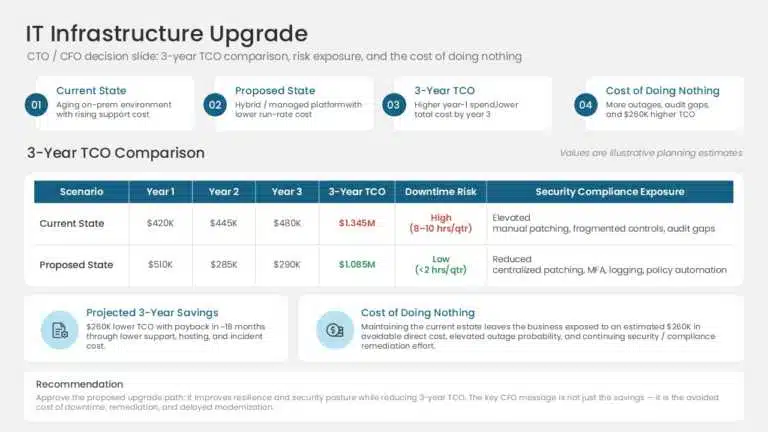
IT Infrastructure Upgrade
Audience: CTO and CFO. What carries the weight: the cost comparison. Build a clear current-state vs. proposed-state TCO table covering three years. Add a column for downtime risk and security compliance exposure. The strongest slide in this deck is always the “cost of doing nothing”
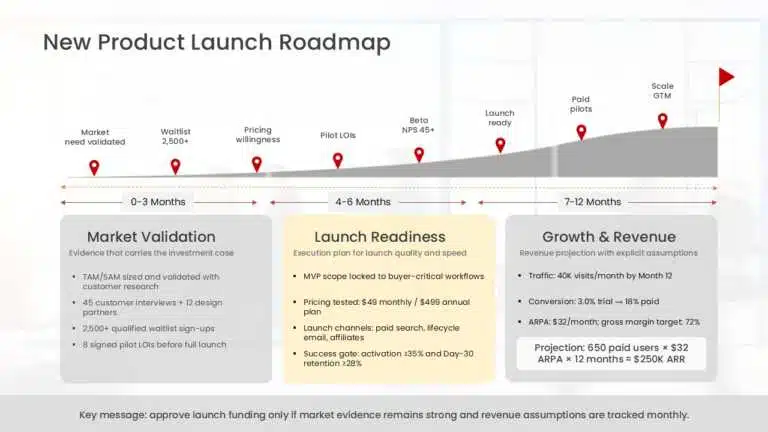
New Product Launch
Audience: Senior leadership or board. What carries the weight: market evidence. Revenue projections must include stated assumptions. See our business presentation examples for how to structure a market opportunity slide that lands.
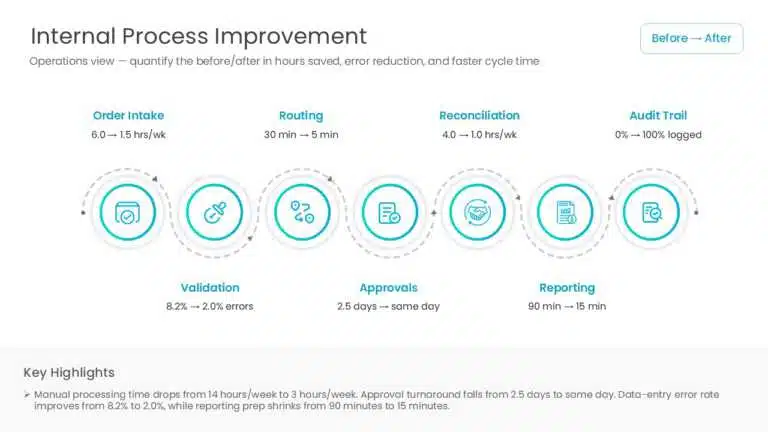
Internal Process Improvement
Audience: Operations director or COO. What carries the weight: the before/after. Quantify in hours per week or error rate reduction, not in vague efficiency language. “Reduces manual processing time from 14 hours/week to 3 hours/week” is a compelling slide. “Streamlines the process” is not.
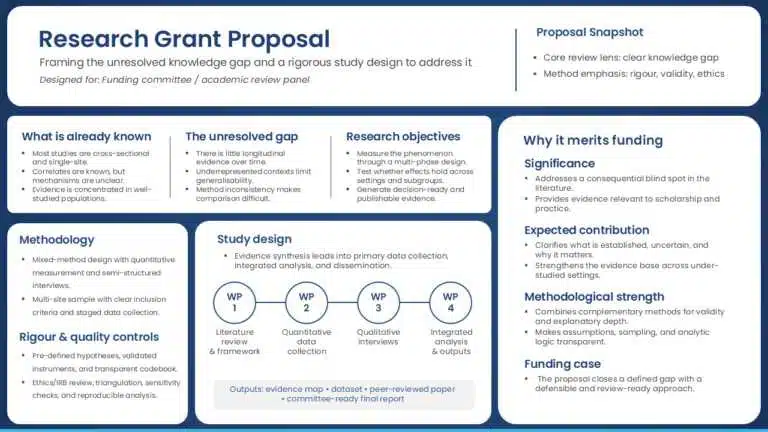
Research Grant Proposal
Audience: Funding committee or academic panel. What carries the weight: the gap in existing knowledge. Show what has been studied, what hasn’t, and why your proposed research addresses that gap. Methodology rigour matters more here than in any other proposal type — reviewers are often domain experts who will scrutinise your approach.
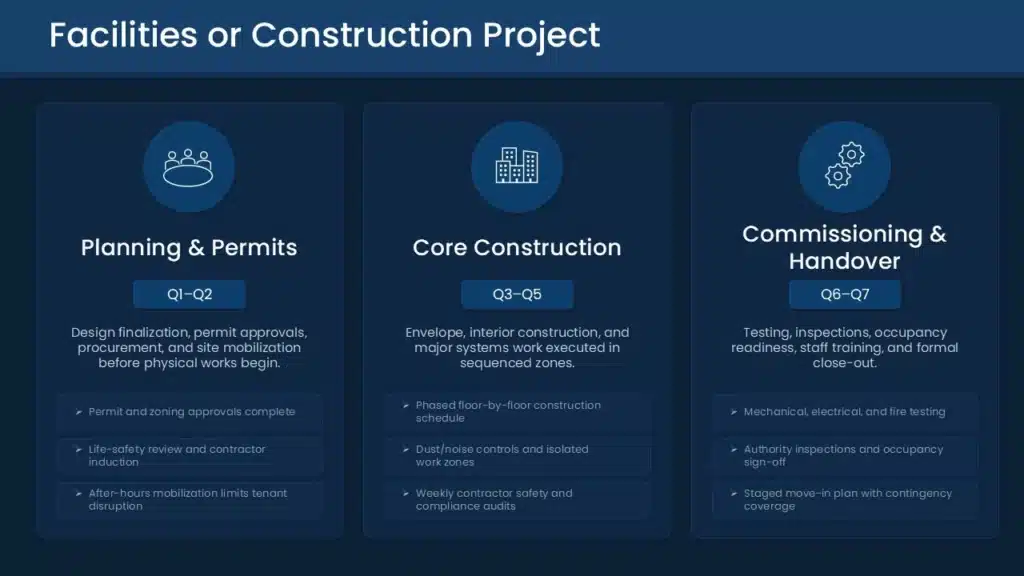
Facilities or Construction Project
Audience: Board or property committee. What carries the weight: the project timeline and compliance risk. Show exactly when construction phases occur and how operational disruption is minimised. Boards respond to liability risk more quickly than to improvement opportunities.
5 Mistakes That Kill Proposals
Burying the ask
If decision-makers don’t know what you’re asking for until slide 15, they’ve been processing your entire presentation without the context they need. State the ask in the executive summary slide. Restate it in the close. Make it impossible to miss.
Treating slides as documents
Slides with five paragraphs of text are documents in slide format. They make the audience read while you talk, which means they’re doing neither well. Slides carry the visual argument; your voice carries the explanation. One main idea per slide, supported by a visual or data point.
Presenting no risks — or only trivial ones
Experienced decision-makers have seen projects fail. When a proposal lists no material risks, they assume the presenter didn’t look hard enough. Presenting real risks with real mitigation plans doesn’t weaken your case — it proves you’ve thought the project through.
An unjustified budget
“£180,000” by itself invites negotiation. “£180,000: £130K personnel (3 FTEs x 6 months), £30K technology, £20K contingency” is defensible. Every significant line item should have a rationale. The goal isn’t to justify the total — it’s to make each component feel reasoned.
Ending without a specific close
Ending with “any questions?” is not a close. A close is: “We’re requesting approval to begin Phase 1, budget £X, starting [date]. We’d need that decision by [date] to hit our planned launch.” Specificity creates a decision moment. Vagueness creates a deferral.
Start With a Template
Building a proposal deck from scratch takes hours of formatting time you don’t need to spend. SlideUpLift’s project proposal templates come pre-structured with all 13 slides above, fully editable in PowerPoint and Google Slides.
FAQs
-
What is a project proposal presentation?
A slide deck used to pitch a project to decision-makers before it has been approved or funded. Its job is to win the green light. It is different from a written project proposal (longer, more detailed, usually follows the presentation if approved), and different from a project kickoff deck (which assumes approval has already been given and focuses on aligning the team).
-
How many slides should a proposal deck have?
For most business contexts, 10–17 slides is the right range. A useful test: if you removed five slides, would the decision still be clear? If yes, those slides probably aren’t essential. Longer decks work for complex capital projects where a full written tender is expected.
-
What should every proposal include?
At minimum: a problem statement (with data), your proposed solution, project scope and deliverables, timeline with milestones, budget with justification, key risks and mitigation, team overview, and a specific call to action. The executive summary slide — written last — compresses all of this into one page.
-
How do I structure the budget slide?
Break costs into categories — personnel, technology, third-party, contingency — with a one-line rationale for each significant line. State the total clearly at the top. If you can frame it as a cost-benefit comparison (cost of the project vs. cost of inaction, or projected ROI), do that. It reframes the number from expense to investment.
-
How do I make one in PowerPoint?
Start with a template that already has the slide structure in place — it saves formatting time and ensures you don’t miss anything structural. SlideUpLift’s project proposal PowerPoint templates are pre-built with this structure and are fully editable. Write slides in this order: problem, solution, scope, timeline, budget, risks, team, outcomes, call to action — then the executive summary last.
-
What is the standard format?
Title → Agenda → Executive Summary → Problem → Solution → Scope → Timeline → Budget → Risks → Team → Outcomes → Ask. Some proposals add an appendix with supporting data or detailed models — material that’s available if questions arise, but doesn’t need to be presented in the main flow.
-
How do I present it to senior leadership?
Lead with the outcome and the ask — don’t save it for the end. Prepare specific answers to the questions you’d most like to avoid. Close with a concrete deadline tied to your start date. Follow up within 24 hours with a one-page summary and the specific decision you’re requesting.
-
What actually makes a proposal get approved?
Three things, in order: the audience feels the problem (not just understands it); the solution feels specific and executable, not aspirational; and the team feels credible enough to be trusted with the budget. Design helps — a polished deck signals professionalism. But design is packaging. These three things are the product.
Table Of Content


Related posts from the same category

17 Mar, 2026 | SlideUpLift
How to Create a Project Presentation That Gets Stakeholder Approval
In any business environment, the ability to create a project presentation that actually moves people — securing approvals, aligning teams, and building client confidence — is one of the most

20 Dec, 2023 | SlideUpLift
How to Introduce Project Members In a Team Presentation?
The introduction of a project team in a team presentation is not only a formality but a deliberate undertaking with significant consequences in the ever-changing field of project management. It
21 Dec, 2023 | SlideUpLift
25+ Project Management Presentation Topics for 2026
Project management presentation topics span everything it takes to deliver work successfully — planning methods, team collaboration, risk management, leadership, and the trends reshaping how projects get done. Whether you're

10 Oct, 2025 | SlideUpLift
What Is A Project Charter? Definition, Examples & Best Practices
Launching a project without adequate planning can result in confusion, delays, and misaligned expectations. A project charter is a key document in the project documentation process that lays the groundwork

31 Oct, 2022 | SlideUpLift
The Savvy Project Manager Series: 5 Steps To Successful Project Planning
We encounter projects in our everyday lives. You might be building or contributing to a deliverable like a report, a website, a tool, or a product. These are real projects
12 Sep, 2025 | SlideUpLift
What is KPI? Step-by-Step Guide with KPIs Examples That Work
Is it hard for you to know if your business is getting to the level it should be? That's where key performance indicators (KPIs) come into play. KPIs indicate how

5 Jul, 2022 | SlideUpLift
Communicate With Authority Using These Highly Effective Project Presentations
Project management is the application of resources, techniques, and talent to create the required deliverables. Yet, mere delivery is not sufficient- a key differentiator within Project Management is seamless communication

8 Jul, 2021 | SlideUpLift
Avoid Making These 7 Project Management Mistakes
Making mistakes is not a bad thing; tons of lessons can be learned from them. And in the field of Project Management, lessons abound. Projects, unfortunately, seldom go smoothly. There
6 Jun, 2024 | SlideUpLift
Project Kickoff Meeting: Agenda, Checklist & Best Practices
A project kickoff meeting is the first formal meeting held after a project is approved. Its purpose is to align stakeholders, clarify objectives, confirm roles, and set expectations before execution

28 Sep, 2022 | SlideUpLift
Project Initiation Phase: Definition, Process & Key Documents
This blog explains the project initiation phase in project management and why it’s critical for defining goals, scope, and feasibility. It covers key initiation documents like the project charter and