
 Spring Sale
  Flat 10% off on our Unlimited Access Yearly Membership plan!


Cool PowerPoint Templates
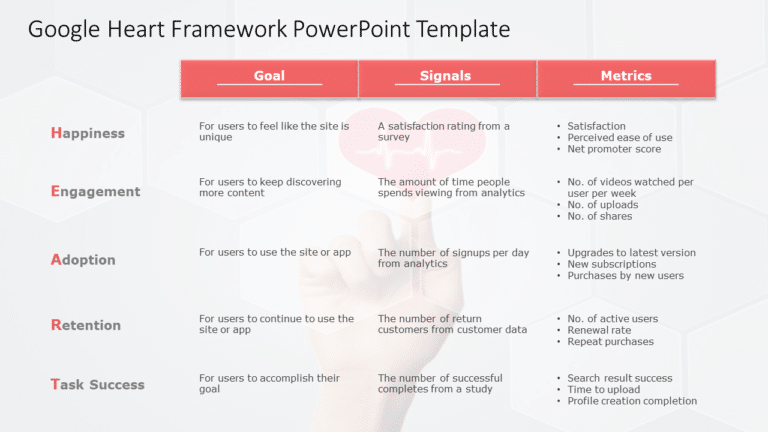
Make it easier to understand concepts, with this captivating summary slide tailored for the Google HEART framework design template. This layout o....
 Download

Elevate your meetings using this captivating roadmap template tailored for career growth conversations! Displayed on a slide, with a mountain the....

Share your teams vision using this stylish and contemporary team introduction design! This layout is crafted to present your team members in a wa....

Enhance your storytelling with this appealing infographic created for presentations, on cloud computing tailored to catch the eye of your audienc....

The Strategic Roadmap PowerPoint template offers column layouts to convey strategic objectives and priorities. A strategic roadmap is a tool for ....

Boost your productivity using this must have scheduling tool crafted for meeting coordination! This format provides an user friendly design to he....

Enhance your storytelling, with this captivating roadmap template created to present your project features in an compelling manner‚Äã‚Äå‚Äã‚Äå‚Äã....

Harvey ball is a circular shape diagram mostly used for comparison in PowerPoint presentations. Harvey Balls provides richer information to the a....

Boost the effectiveness of your presentations by using this Venn diagram template comprising five sections to showcase connections and key insigh....

Boost your storytelling, with this handy checklist template tailored for project management purposes! Ideal for supervisors and teams aiming to s....

Elevate your information with this template that highlights the importance of transformation and growth in an appealing way! Crafted with a sleek....

Here’s a handy checklist to help you break down concepts and get your team on board! This guide gives you a way to evaluate how well your t....
How To Make Cool PowerPoint Slides?
Infographics are probably the best way to make your business presentations more attractive and attention-grabbing. It results in increased engagement as compared to other visual media. And also make sure to choose the font size appropriately, use strong contrast with the text, and try not to use too much text and too many colors on your PowerPoint slides.
How to make Cool PowerPoint presentation?
To make your presentations more appealing and memorable you need cool backgrounds, simple transitions, clean fonts, & attractive graphics to make the presentation more engaging.
Here are a few ways to make a cool presentation,
- Use a consistent theme
- Use more images & less text
- Use animations to highlight each bullet point
- Convey one message in each slide
- Use 2/4/8 rule - The 2/4/8 rule is-don't spend more than 2 minutes on a one slide, don't use more than 4 bullets per slide, and no more than 8 words per bullet.