
 Flat 4


What Is a Project Roadmap? A Complete Guide With Examples and Free Templates
A project roadmap is a high-level visual plan that shows a project’s goals, major milestones, key deliverables, and timeline at a glance. Unlike a detailed project plan that tracks tasks and assignees day-by-day, a project roadmap gives stakeholders a bird’s-eye view of where the project is heading and why — without overwhelming them with execution detail.
Project managers use roadmaps to align teams before work begins, keep stakeholders informed during execution, and communicate progress to leadership without scheduling status meetings. A well-built project roadmap replaces a wall of text with a single, scannable visual that anyone in the room can understand in under a minute.
What Is a Project Roadmap?
A project roadmap is a high-level visual overview that communicates a project’s strategic goals, major milestones, key deliverables, and timeline to the project team and stakeholders.
Think of it as a bird’s-eye view of your project. It does not go into task-level details such as who is doing what on which day. Instead, it answers the big-picture questions: What are we building? Why does it matter? What are the major phases? When should key outcomes be delivered?
A project management roadmap serves two core purposes:
- Internal alignment — It ensures everyone on the team understands the goals, the sequence of work, and how their contributions connect to the bigger picture.
- Stakeholder communication — It gives executives, investors, clients, and cross-functional partners a clear, at-a-glance view of the project’s status and direction. When stakeholders ask for a status update, they typically want a strategic-level summary — which milestones have been hit, whether the project is on track, and what is coming next — not a task-by-task walkthrough.
A well-constructed roadmap is a living document. As the project evolves — priorities shift, timelines change, new information surfaces — the roadmap should be updated to reflect the current reality. It is not a static artifact created once during project kickoff and then shelved.
Explore Templates: Browse our Roadmap PowerPoint Templates library for hundreds of professionally designed, editable layouts.
What Is Project Roadmapping?
Project roadmapping is the process of planning, building, and maintaining a project roadmap. It is not a one-time task — it is an ongoing practice of turning project objectives into a visual plan, getting alignment on that plan, and updating it as conditions change.
At a high level the process moves from defining scope and objectives, to identifying milestones and phases, to choosing a format, to sharing and iterating with stakeholders — each step is covered in detail in the step-by-step section below. Done well, project roadmapping is what keeps a project team and its stakeholders working from the same picture of reality throughout a project’s life.
Why Do You Need a Project Roadmap?
Before starting any project, clarity matters more than speed. A project roadmap gives teams a shared direction from day one. Here is why roadmaps are essential in project management:
- Keeps everyone aligned. A roadmap shows what needs to happen and when. Teams move in one direction without confusion or duplicated effort. When multiple departments are involved, a roadmap ensures that everyone is working toward the same objectives.
- Clarifies project goals early. It connects everyday tasks to bigger strategic objectives. Every team member understands why the work matters — not just what needs to be done.
- Improves planning and prioritization. You can spot what is urgent and what can wait. This prevents teams from spending time on low-priority work when critical-path items need attention.
- Reduces risks and surprises. By highlighting dependencies and potential blockers upfront, issues get addressed before they become full-blown problems. If Task B cannot start until Task A is complete, the roadmap makes this visible.
- Supports better decision-making. When priorities conflict or timelines shift, a clear roadmap makes trade-offs easier to evaluate.
- Builds stakeholder confidence. Progress becomes easy to explain and track. Stakeholders — whether executives, clients, or investors — trust the plan and the team behind it.
- Sets and manages expectations. A roadmap communicates realistic timelines and scope. This prevents the common problem of stakeholders expecting deliverables that the team never committed to.
Who Needs a Project Roadmap?
A project roadmap is not exclusive to project managers. Multiple roles across an organization rely on roadmaps for planning, coordination, and communication.
| Role / Team | Why They Need a Roadmap | What They Focus On |
| Executives / C-Suite | Track progress against company goals and make resource allocation decisions | Business scope, major milestones, budget indicators |
| Project Managers | Plan, coordinate, and communicate the project’s trajectory | Tasks, deliverables, deadlines, dependencies |
| Product Managers | Connect product initiatives with project timelines | Feature releases, milestones, scope |
| IT / Engineering Managers | Plan system upgrades, migrations, and technical projects | Technology scope, dependencies, risk windows |
| Marketing Managers | Align campaigns and launches with project timelines | Campaign deliverables, launch milestones |
| Cross-Functional Teams | Understand how their work connects to other teams | Dependencies, handoff points, shared milestones |
Key Components of a Project Roadmap
Every effective project roadmap includes these core elements. Missing any of them weakens the roadmap’s ability to align teams and communicate progress clearly.
The key components of a project roadmap are: goals and objectives, milestones, deliverables, timeline, dependencies, risks, and key contacts. Together, these elements provide the structure needed to align teams, communicate progress, and keep the project on track. Below, we explain each component in detail.
1. Goals and Objectives
Goals define the desired outcomes of the project and give direction to everything else on the roadmap. They should be specific, measurable, and tied to broader business objectives. For example: “Reduce customer onboarding time from 14 days to 5 days” or “Launch the redesigned checkout flow by Q3.”
2. Milestones
Milestones are significant markers of progress — events or achievements that signal the completion of a critical phase. Examples include completing user research, reaching code freeze, receiving regulatory approval, or hitting a beta launch date. They can be categorized into early-stage (planning and approval), mid-project (completing critical deliverables), and final-stage milestones (testing and final sign-off).
3. Deliverables
Deliverables are the tangible outputs the team must produce — documents, designs, working prototypes, finished code, marketing assets, or trained staff. Each deliverable should be linked to a milestone and have a clear owner.
4. Timeline
The timeline sets the schedule for when goals, milestones, and deliverables should be completed. It can span weeks, months, or quarters, depending on project complexity. A clear timeline keeps expectations realistic and dependencies manageable.
5. Dependencies
Dependencies show which tasks or milestones must be completed before others can start. For example, user interface design must be finalized before front-end development begins. Identifying dependencies early helps prevent bottlenecks and cascading delays.
6. Risks
Identifying potential risks — budget overruns, technical challenges, key personnel unavailability, vendor delays — allows the team to build contingency plans. Strong roadmaps call out risks explicitly so stakeholders can prepare.
7. Key Contacts
Including the primary contacts for each phase or workstream ensures that stakeholders know who to reach out to for updates, decisions, or feedback.
Project Roadmap vs Project Plan — What’s the Difference?
| Aspect | Project Roadmap | Project Plan |
| Level of detail | High-level, strategic overview | Granular, task-level execution details |
| Audience | Executives, stakeholders, cross-functional teams | Project team members, direct contributors |
| Focus | What needs to happen and why | How it will happen, who does it, and when exactly |
| Time horizon | Weeks to months (or quarters) | Days to weeks |
| Includes | Goals, milestones, deliverables, and phases | Tasks, assignments, budgets, resources |
| Update frequency | Updated as strategy or priorities shift | Updated daily or weekly |
| Format | Visual timeline, swimlane, or phase diagram | Gantt chart, task list, PM tool |
In simple terms: If the roadmap is a photograph of your project from 10,000 feet, the project plan is the same photograph under a microscope — showing every pixel.
You need both. The roadmap sets direction and earns stakeholder buy-in. The project plan translates that direction into executable work.

Project Roadmap vs Product Roadmap
A project roadmap focuses on a single initiative with a defined start and end date — for example, launching a new website, implementing an ERP system, or executing a marketing campaign. Once the project is delivered, the roadmap is complete.
A product roadmap is a longer-term strategic document that shows how a product will evolve over time. It spans multiple projects and release cycles, covering planned features, enhancements, and market-driven changes. A product roadmap rarely has a fixed “end date.”
For example, a project roadmap might cover the 4-month timeline to build and launch a mobile app. A product roadmap would show how that app evolves over the next 2 years — new features, integrations, platform expansions, and customer-driven improvements.
For a deeper dive, read our guide: What Is a Product Roadmap? A Comprehensive Guide With Examples
Project Roadmap vs Gantt Chart
A Gantt chart is a detailed project management tool that displays specific tasks, their durations, assigned resources, and dependencies on a horizontal timeline. It is a tactical execution tool primarily used by the project team to track daily progress.
A project roadmap, by contrast, is a strategic communication tool designed for a broader audience. It shows phases, milestones, and high-level deliverables — not individual tasks.
When to use which:
- Use a Gantt chart when you need to manage task-level scheduling, identify critical paths, and track resource allocation.
- Use a project roadmap when you need to present progress to executives, earn stakeholder buy-in, or align cross-functional teams.
Many project managers use both the roadmap for communication and the Gantt chart for execution.

How to Create a Project Roadmap (Step by Step)
Follow these seven steps to create a roadmap for a project of any size or complexity. Whether you need to create roadmap for project tracking, stakeholder updates, or cross-team coordination, the process is the same.
Here is a quick overview of the 7 steps to create a project roadmap:
- Define the project scope and objectives
- Identify key stakeholders and their information needs
- Break the project into logical phases
- Set milestones and deliverables for each phase
- Build the visual timeline
- Map dependencies and risks
- Share with stakeholders, get feedback, and iterate
Each step is explained in detail below.
Step 1: Define the Project Scope and Objectives
Start with the project’s purpose. What problem are you solving? What outcome does success look like? Document 3–5 clear, measurable objectives. Focus on what and why, not how.
Step 2: Identify Key Stakeholders
Determine who needs to see the roadmap and what level of detail they require. Executives want high-level milestones. The project team needs phase-level deliverables. Cross-functional partners need to see handoff points and dependencies.
Step 3: Break the Project Into Phases
Divide the work into logical stages. For a software project: Discovery, Design, Development, Testing, Launch. For a marketing campaign: Research, Creative Development, Execution, Analysis. Clear phases make large goals feel manageable.
Step 4: Set Milestones and Deliverables
Within each phase, identify the key milestones that mark completion of critical work. Attach specific deliverables to each milestone.
Step 5: Build the Timeline
Place your phases, milestones, and deliverables on a visual timeline. Estimate durations for each phase and set target dates for milestones. Leave buffer for uncertainty.
For guidance, see our tutorial: How to Create a Roadmap in PowerPoint
Step 6: Map Dependencies and Risks
Identify which milestones depend on others. Flag potential risks and their mitigation plans.
Step 7: Share, Get Feedback, and Iterate
Present the roadmap to stakeholders. Collect feedback. Refine. Once approved, commit to regular reviews — monthly for long projects, biweekly for fast-moving ones.
Ready to build your roadmap? Browse our Roadmap PowerPoint Templates library.
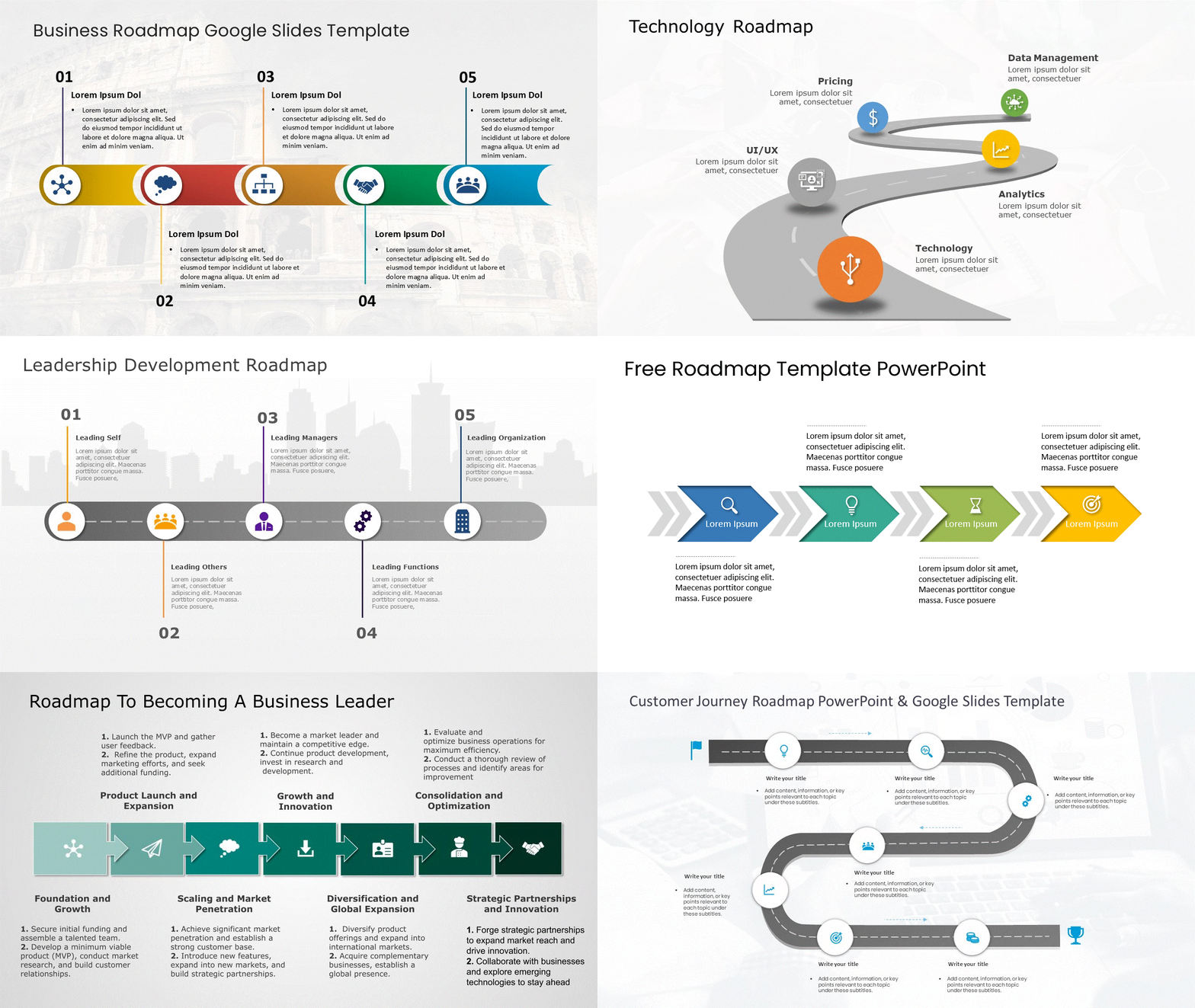
Explore the Full Roadmap PowerPoint Templates and Get Your Roadmap Today!
Types of Project Roadmaps
| Type | Description | Best For |
| Agile Roadmap | Work is organized into sprints/iterations. Emphasizes flexibility. Features can be reprioritized between sprints. | Software dev, Scrum/Kanban teams. See Agile Templates. |
| Timeline-Based | The most common format. Phases, milestones, and deliverables along a horizontal timeline by weeks, months, or quarters. | Projects with firm deadlines |
| Gantt Chart Roadmap | Tasks are shown as horizontal bars with start/end dates, durations, and dependencies. | Complex scheduling-heavy projects |
| Strategic Roadmap | Goals and outcomes are organized by themes rather than tasks or dates. | Executive communication |
| Swimlane Roadmap | Horizontal lanes for different teams or workstreams running in parallel. | Cross-functional projects |
| Kanban Roadmap | Continuous flow columns: To Do, In Progress, Review, Done. | Ongoing operations |
For visual design inspiration, see: 11 Best Visual Roadmap Ideas & Design Examples
For agile-specific layouts, browse our Agile PowerPoint Templates.
Project Roadmap Examples by Industry
Below are examples of project roadmaps across five common industries. Each one illustrates how the roadmap format adapts to different project types, team structures, and timelines.
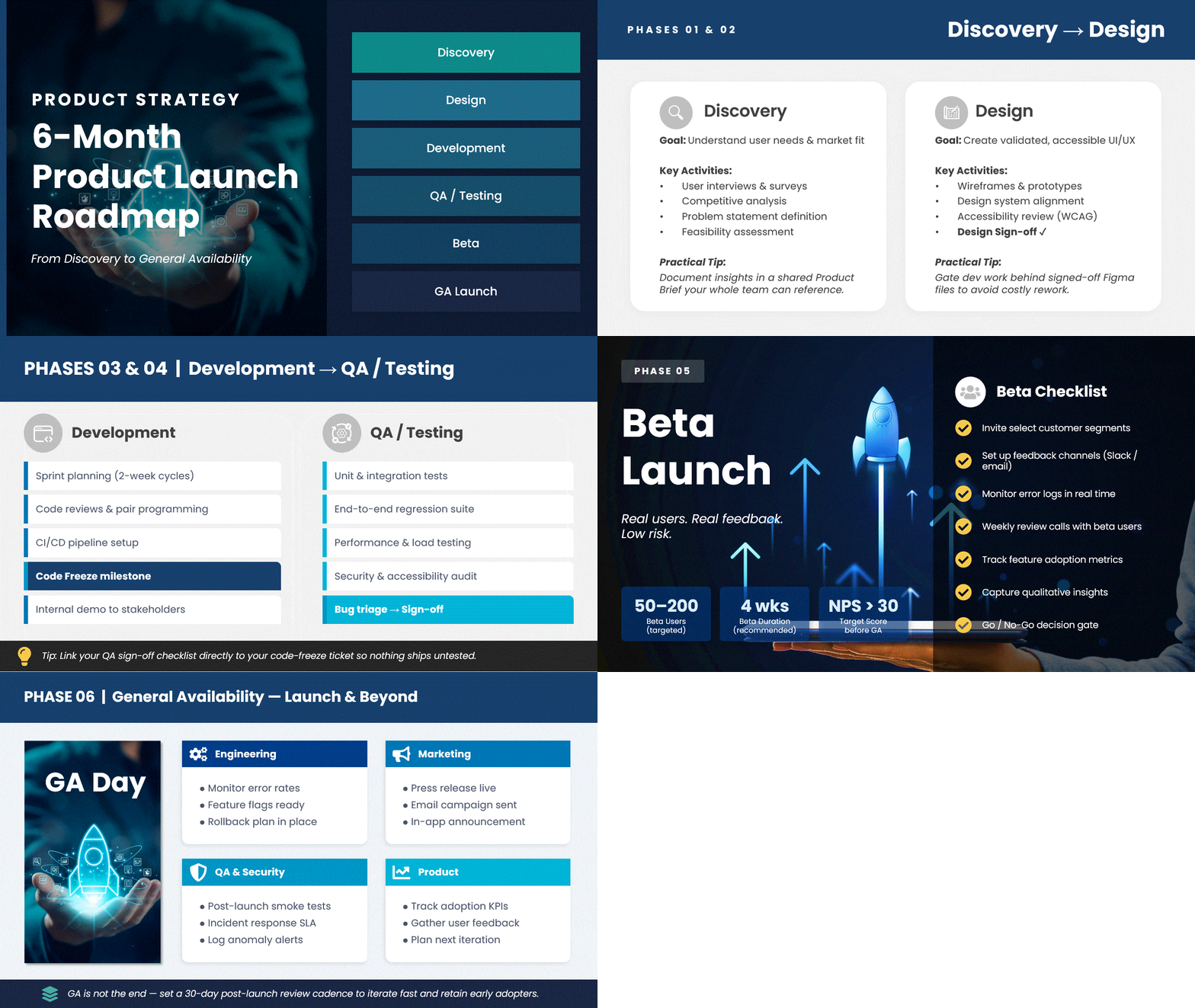
Software Development — Product Launch Roadmap
A 6-month roadmap tracking the development and launch of a SaaS feature. Phases: Discovery → Design → Development → QA/Testing → Beta → General Availability. Key milestones: design sign-off, code freeze, beta launch, GA launch. Format: Agile or timeline. Teams: Engineering, Design, Product, QA, Marketing.
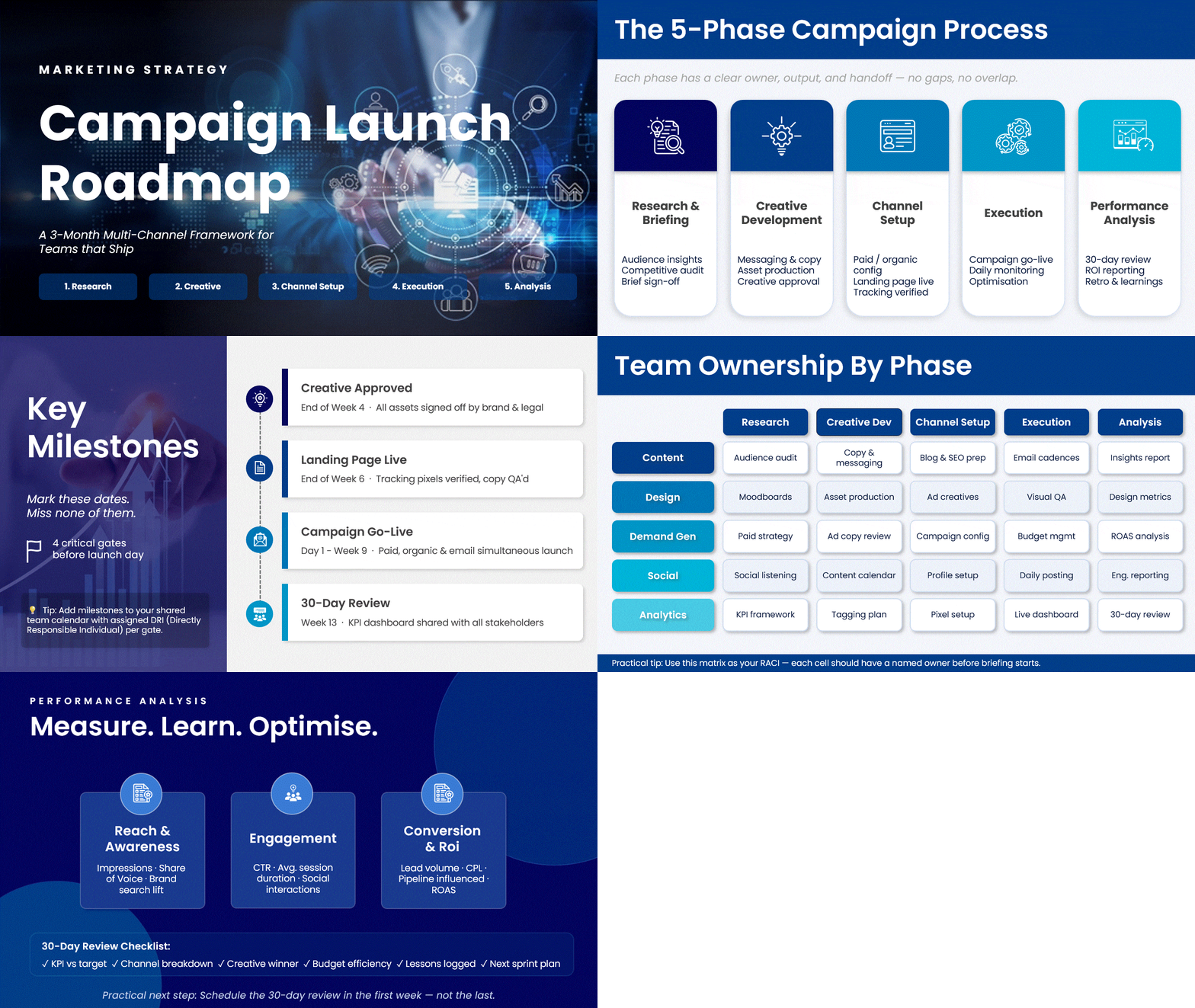
Marketing — Campaign Launch Roadmap
A 3-month roadmap for a multi-channel product launch campaign. Phases: Research & Briefing → Creative Development → Channel Setup → Execution → Performance Analysis. Key milestones: creative approved, landing page live, campaign launch date, 30-day review. Format: Timeline. Teams: Content, Design, Demand Gen, Social, Analytics.
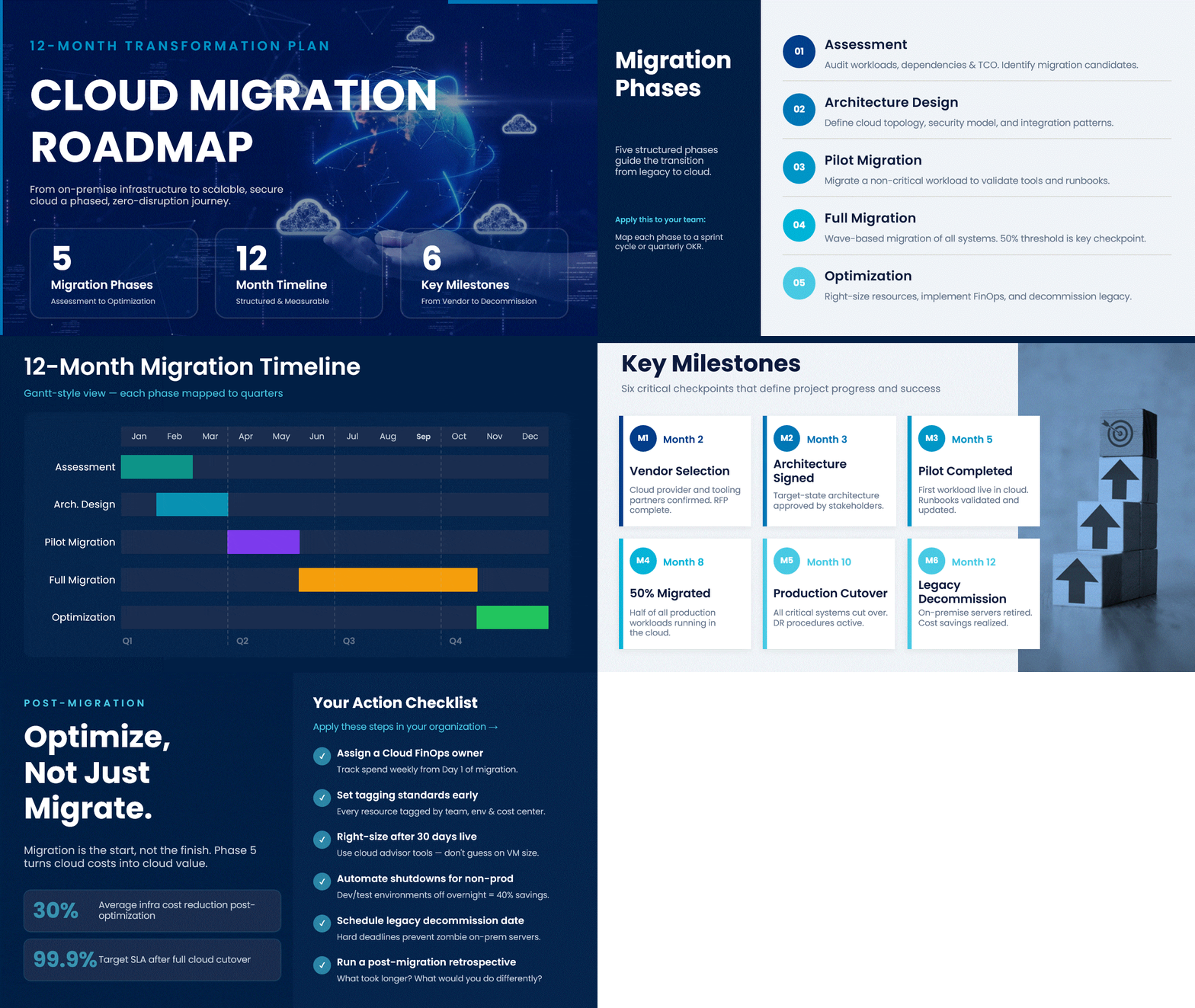
IT — Infrastructure Migration Roadmap
A 12-month roadmap for migrating from on-premise servers to cloud infrastructure. Phases: Assessment → Architecture Design → Pilot Migration → Full Migration → Optimization. Key milestones: vendor selection, pilot completed, 50% migrated, production cutover, legacy decommission. Format: Gantt chart or swimlane.
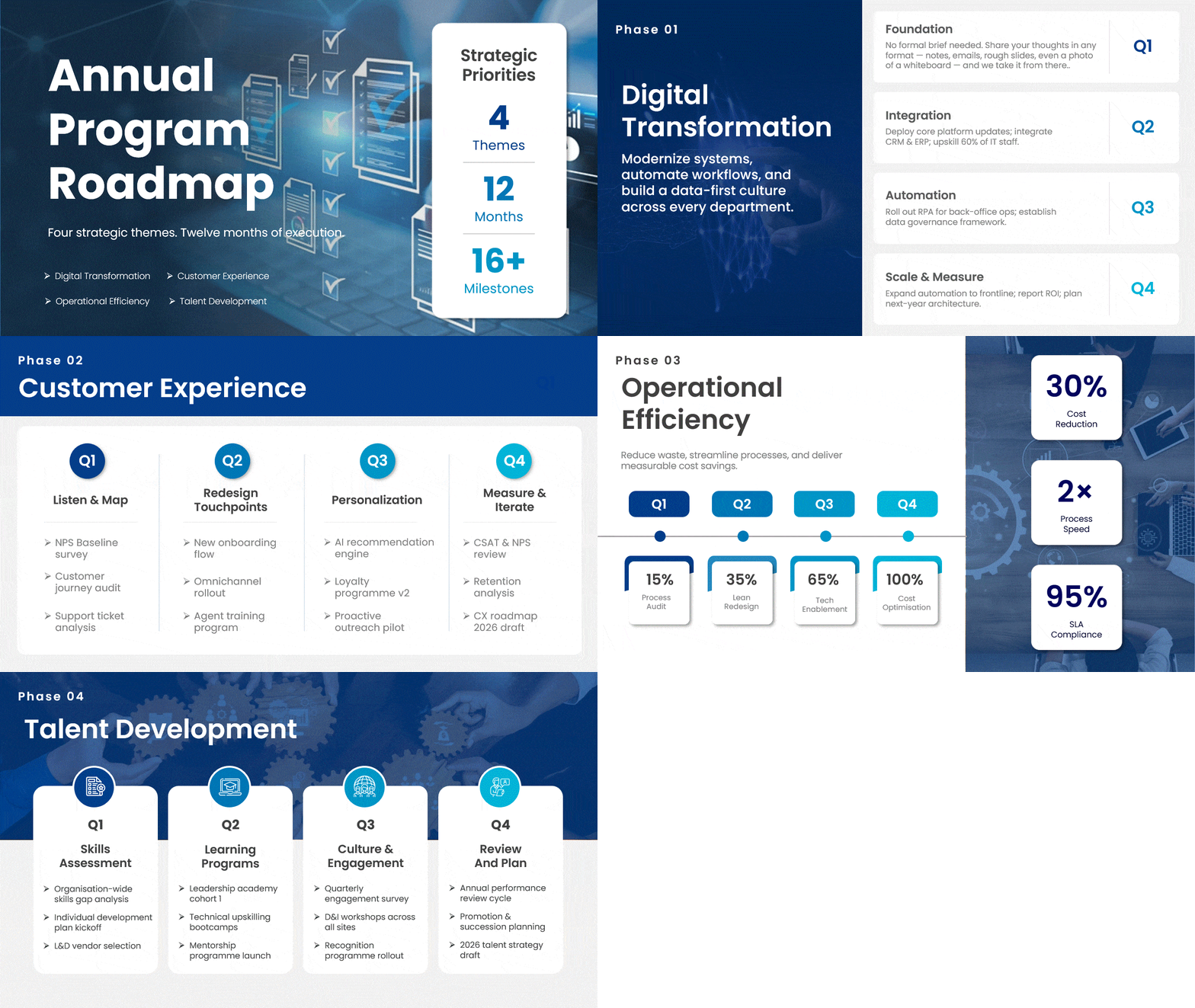
General Business — Annual Program Roadmap
A 12-month program roadmap mapping the organization’s key strategic initiatives. Themes: “Digital Transformation,” “Customer Experience,” “Operational Efficiency,” “Talent Development.” Each theme has quarterly milestones. Format: Strategic or swimlane.
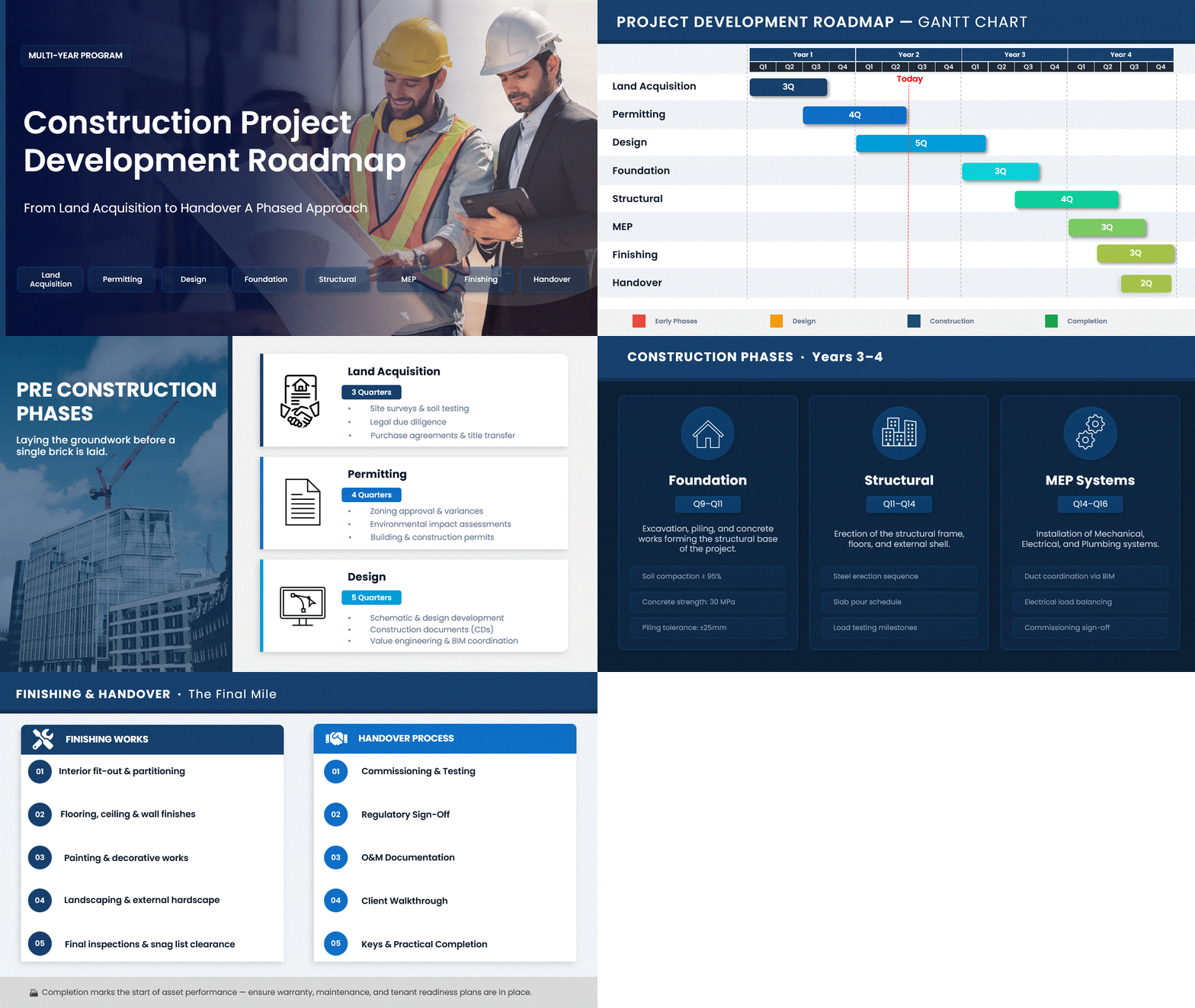
Construction — Project Development Roadmap
A multi-year project development roadmap. Phases: Land acquisition → Permitting → Design → Foundation → Structural → MEP → Finishing → Handover. Format: Gantt chart.
Best Practices for Project Roadmaps
- Start with goals, not tasks. Begin with strategic objectives, then work backward to milestones and deliverables.
- Keep it visual and scannable. Good project roadmap visualization relies on color coding, clear phase labels, and milestone markers. Executives should grasp the project’s status in 30 seconds.
- Tailor details to your audience. Create different views for different audiences.
- Build in flexibility. Use time ranges (“Q2” instead of “April 15”) for items further out.
- Update regularly. Set a biweekly or monthly cadence for reviewing and refreshing.
- Use a dedicated template. Professionally designed templates save hours. See our Roadmap PowerPoint Templates.
How to Present a Project Roadmap to Stakeholders
Building the roadmap is only half the job. The other half is presenting it so it earns alignment and keeps stakeholders confident in the plan. Here is how to present your project roadmap well.
- Match the format to the audience. A board needs a milestone-only view; a delivery team needs a swimlane with dependencies. The same project roadmap should look different depending on who is in the room. For format options, see our guide to visual roadmap layouts.
- Lead with the goal, not the timeline. Open your project roadmap presentation with “The goal is X. We are here. Here is how we get there,” then show the roadmap. Opening with dates makes stakeholders fixate on dates rather than strategy.
- Be explicit about what is NOT on the roadmap. A sentence like “We are not covering Y in this phase” prevents most of the questions you would otherwise face.
- Use a pre-built template. A well-designed project roadmap slide signals preparation before you say a word. Browse SlideUpLift’s project roadmap templates, editable in PowerPoint and Google Slides.
For the complete delivery playbook — tailoring the story for executives vs. the delivery team and handling pushback on dates — see How to Make a Roadmap Presentation That Wins Buy-In.
Common Challenges and How to Overcome Them
The roadmap becomes static. Schedule recurring review sessions and assign an owner responsible for keeping it updated.
Stakeholders treat it as a commitment contract. Be explicit that it communicates direction, not guarantees. Use flexible time horizons for items further out.
Too much detail. Keep the roadmap high-level. Move task detail into your project plan.
Multiple teams interpret it differently. Hold alignment sessions when the roadmap is first shared and after each major update.
Free Project Roadmap Templates
Get started without building from scratch. Download any of these professionally designed, editable templates:
- Roadmap PowerPoint Templates — Full library of timeline, swimlane, and phase-based roadmap layouts for any use case
- Project Management Templates — Broader collection including status dashboards, RACI charts, and program roadmap template layouts for multi-project tracking
- Product Roadmap Templates — Release-focused and phase-based product roadmap layouts
- Gantt Chart Templates — Detailed scheduling layouts with task dependencies and resource tracking
- Agile Templates — Sprint and iteration-focused layouts for Scrum and Kanban teams
Every template is 100% editable in PowerPoint and Google Slides.
FAQs
-
What is a project roadmap in simple terms?
A project roadmap is a high-level visual plan that shows a project’s goals, major milestones, deliverables, and timeline. It keeps teams aligned and gives stakeholders a clear view of progress.
-
What is the difference between a project roadmap and a project plan?
A roadmap is a strategic overview (the “what” and “why”). A project plan is the detailed execution document (the “how,” “who,” and “when”).
-
Who is responsible for creating a project roadmap?
Typically, the project manager, in collaboration with key stakeholders.
-
How often should a project roadmap be updated?
At a minimum, monthly. For fast-moving projects, biweekly.
-
How do you create a project roadmap step by step?
Yes. See our guide: How to Create a Roadmap in PowerPoint
-
What is a program roadmap?
A program roadmap tracks multiple related projects under a single umbrella — for example, a digital transformation program with separate projects for CRM, website redesign, and data warehouse migration.
-
What are the key components of a project roadmap?
Goals, milestones, deliverables, timeline, dependencies, risks, and key contacts.
-
What is the difference between a project roadmap and a Gantt chart?
A project roadmap is a high-level strategic overview showing phases, milestones, and goals. A Gantt chart is a detailed execution tool showing individual tasks, durations, dependencies, and resource assignments. Roadmaps are designed for stakeholder communication; Gantt charts are for day-to-day project tracking. Many teams use both together — the roadmap for alignment and the Gantt chart for execution.
-
What should a project roadmap include?
A project roadmap should include goals and objectives, milestones, deliverables, a timeline, dependencies between tasks, identified risks, and key contacts. The level of detail depends on your audience — executives need high-level milestones, while the project team needs phase-level deliverables and dependencies.
-
What is the difference between a project roadmap and a timeline?
A project timeline shows every task, who owns it, and exactly when it happens — it is granular. A project roadmap shows phases, milestones, and goals at a high level — it is strategic. Timelines are for the delivery team. Roadmaps are for stakeholders and leadership.
Table Of Content


Related posts from the same category

15 Apr, 2021 | SlideUpLift
11 Best Visual Roadmap Ideas & Design Trends for 2026
This blog shares the best roadmap examples and PowerPoint roadmap templates for presenting plans, timelines, and goals clearly. It explains different roadmap styles and when to use them. The guide

10 Oct, 2025 | SlideUpLift
What Is A Project Charter? Definition, Examples & Best Practices
Launching a project without adequate planning can result in confusion, delays, and misaligned expectations. A project charter is a key document in the project documentation process that lays the groundwork
4 Mar, 2026 | SlideUpLift
What Is a Product Roadmap? A Complete Guide With Types, Examples, and Templates
A product roadmap is a high-level strategic document that communicates a product’s vision, direction, priorities, and planned progress over time. It shows the product team and stakeholders what is being

17 Mar, 2026 | SlideUpLift
How to Create a Project Presentation That Gets Stakeholder Approval
In any business environment, the ability to create a project presentation that actually moves people — securing approvals, aligning teams, and building client confidence — is one of the most

24 Apr, 2024 | SlideUpLift
How to Create a Project Timeline: Steps, Types & Examples
A project timeline is a visual schedule that lays out a project's phases, tasks, milestones, and deadlines in chronological order, so your team can see what is due and when.

12 Sep, 2025 | SlideUpLift
What is KPI? Step-by-Step Guide with KPIs Examples That Work
Is it hard for you to know if your business is getting to the level it should be? That's where key performance indicators (KPIs) come into play. KPIs indicate how

31 Oct, 2022 | SlideUpLift
The Savvy Project Manager Series: 5 Steps To Successful Project Planning
We encounter projects in our everyday lives. You might be building or contributing to a deliverable like a report, a website, a tool, or a product. These are real projects

24 Jan, 2024 | SlideUpLift
How to Make a Roadmap Presentation That Wins Buy-In
Quick answer: To make a roadmap presentation that lands, tailor it to your audience, build it around a narrative instead of a list of dates, present at the right level

13 Oct, 2022 | SlideUpLift
Agile vs Traditional Project Management: Key Differences and Which Is Better
Agile project management is an iterative, flexible approach that delivers work in short cycles and adapts to change as it goes. Traditional (Waterfall) project management is a linear, plan-driven approach

6 Jun, 2024 | SlideUpLift
Project Kickoff Meeting: Agenda, Checklist & Best Practices
A project kickoff meeting is the first formal meeting held after a project is approved. Its purpose is to align stakeholders, clarify objectives, confirm roles, and set expectations before execution