
 Flat 4


Start Stop Continue Retrospective: A Complete Guide With Examples, Templates & Exercises
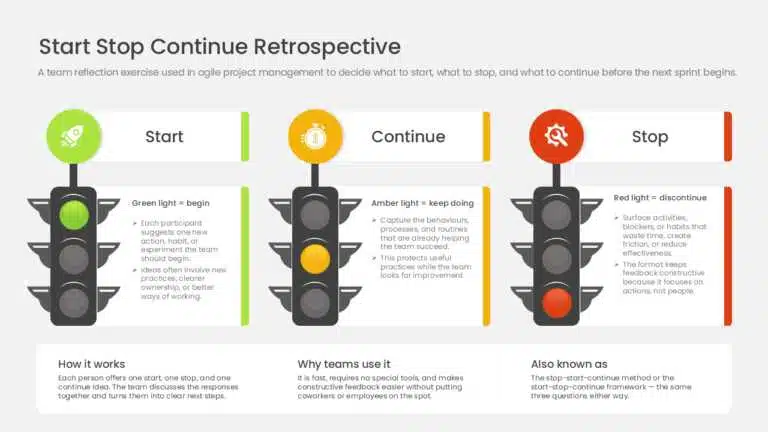
A Start Stop Continue retrospective is a team reflection exercise where each member names one thing the team should start doing, one it should stop, and one it should continue. It is usually run at the end of a sprint or project phase, takes 15–30 minutes, and turns individual feedback (often collected on sticky notes) into a short, prioritized list of action items for the next iteration.
Introduction
Giving and receiving honest feedback is hard. Most of us find it uncomfortable to point out what isn’t working on a team — and just as uncomfortable to hear it about our own work. Because of that, many managers quietly put feedback off, worried it will land badly and hurt performance rather than help it.
That hesitation is costly. In a Gallup study of 65,672 employees, those who received strengths-based feedback had turnover rates 14.9% lower than employees who received none (Gallup). The challenge is giving feedback in a way that feels safe and leads to action — and that is exactly what the Start Stop Continue retrospective is built for.
This guide explains what the format is, why teams use it, how to run one step by step, and includes ready-to-use examples for sprints, managers, and employees — plus a free PowerPoint template you can download.
What Is a Start Stop Continue Retrospective?
A Start Stop Continue retrospective is a team reflection meeting used in agile project management, where the team decides what to start, stop, and carry forward from the last sprint or iteration before the next one begins. It is a simple, effective way to ask coworkers or employees for constructive feedback without putting anyone on the spot.
Each participant suggests one action the team should start, one it should stop, and one it should continue. The responses are collected and discussed as a group, so the team can assess where it stands and pinpoint opportunities to improve. The exercise traces back to corporate team-building practices in the 1970s and remains popular today because it is fast, requires no special tools, and produces clear next steps.
Also known as: the stop-start-continue method or the start-stop-continue framework. Whatever the label, it asks the same three questions.
The Three Elements of a Start Stop Continue Retrospective
Start
What new action should the team take on that it isn’t already doing? This covers new approaches, processes, or tools the team believes will improve its work, or fresh solutions to existing problems.
Stop
What is the team doing now that should stop? This includes anything slowing progress or placing an unnecessary burden on the team.
Continue
What is working well and should be kept going? This acknowledges what the team is doing right and keeps the momentum behind practices that deliver results.
Why Use the Start Stop Continue Retrospective?
Here are the main reasons teams adopt this format:
- Actionable feedback: Every item maps to a behavior the team can start, stop, or continue — not a vague observation.
- Finds areas for improvement: Leaders can surface and explain group issues, then build workable plans to address them.
- Empowers and unites the team: Everyone gets a say in what to change, which builds ownership of the outcome.
- Builds self-awareness and trust: Framing feedback as actions (“stop X”) rather than criticism of a person keeps the conversation safe.
- Drives behavior change: Teams leave with a short, prioritized list they can act on immediately.
Feedback like this is still rarer than it should be — Gallup finds only about one in five employees receive meaningful feedback weekly, which is part of why a lightweight, repeatable format is so valuable.
Who Is the Start Stop Continue Technique For?
The format works for almost any group that wants structured, low-pressure feedback. The most common users are:
1. Project Teams
Sprint-based teams use it as a built-in checkpoint. After each sprint, members flag what slowed delivery, what to drop, and what’s working — then carry that list into sprint planning so the next iteration starts with clear priorities.
2. Educational Settings
Students note study habits to start, distractions to stop, and revision routines to continue, while instructors use the same structure to refine lesson plans, assignment formats, or pacing based on direct feedback.
3. Corporate Teams
Teams apply it in quarterly reviews or post-project debriefs, where it surfaces process issues — slow approvals, unclear ownership, duplicate reporting — that wouldn’t otherwise get raised.
4. Personal Development
As a self-review: one habit to start (planning the day each morning), one to stop (checking email first thing), and one to keep (a workout routine that’s sticking). Done weekly or monthly, it turns vague goals into a trackable list.
5. Community Groups
Organizers use it to keep volunteers engaged — what to start doing differently, what’s burning people out, and what traditions are worth repeating. Because every member contributes a note, quieter voices are represented too.
When Should You Use the Start Stop Continue Exercise?
The exercise fits a range of scenarios, including:
1. The start of a new year
Whether it’s the calendar or fiscal year, it gets the team thinking about improvement and sets a tone of continuous progress for the year ahead.
2. After a pattern of mistakes
When you need to address recurring errors without damaging the team’s confidence, ask what they could start, stop, and continue to prevent the errors from recurring. This keeps everyone focused on moving forward rather than on the mistake itself.
3. During a change initiative
When introducing a change, use the exercise to clarify what needs to start, stop, and continue to execute it well. It also eases adoption by involving employees directly.
4. When work is falling short
Use it to help the team work out why goals aren’t being met and what to change.
5. Annual planning
Use it to support decision-making while setting budgets, defining goals, and planning the year.
How to Run a Start Stop Continue Retrospective (Step by Step)
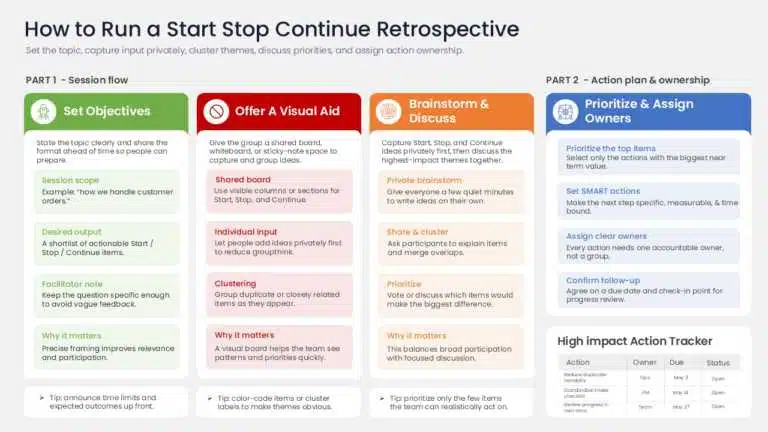
To run a Start Stop Continue retrospective: set a clear topic, give everyone a few minutes to write their Start, Stop, and Continue items privately, group similar items, discuss the highest-impact ones, and assign owners to two or three action items. In detail:
- Set precise objectives. State what you want the session to cover (for example, “how we handle customer orders”). Share the topic and format ahead of time so people can prepare.
- Offer a visual aid. Give everyone something to focus on — a shared board, Kanban board, whiteboard, or sticky notes — to group ideas and connect related ones.
- Brainstorm individually, then together. Let people write privately first to avoid groupthink, then share. Cluster duplicate or similar ideas as they come up.
- Review input and build an action plan. Prioritize the most impactful items, set SMART goals, and assign owners with a follow-up date.
Start Stop Continue Examples
Below are three worked examples: a team sprint retrospective, plus two personal-effectiveness lists. Use them as models for your own session.
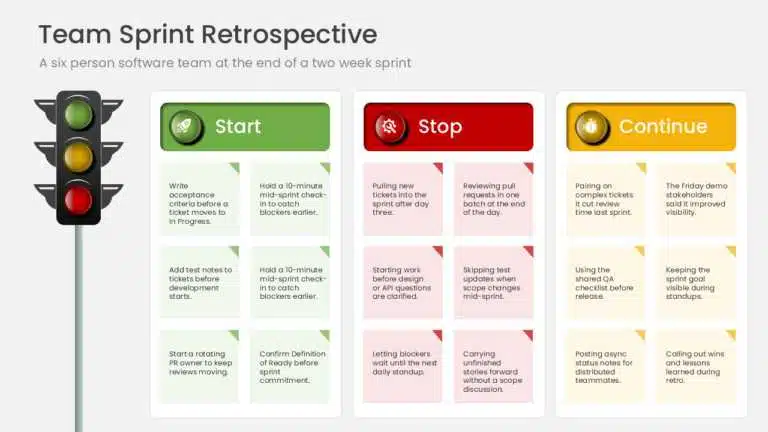
Example 1: Team Sprint Retrospective (filled board)
Context: a six-person software team at the end of a two-week sprint.
| Start | Stop | Continue |
| Write acceptance criteria before a ticket moves to “In Progress.”Hold a 10-minute mid-sprint check-in to catch blockers earlier. | Pulling new tickets into the sprint after day three.Reviewing pull requests in one batch at the end of the day. | Pairing on complex tickets — it cut review time last sprint.The Friday demo — stakeholders said it improved visibility. |
Example 2: Personal Effectiveness
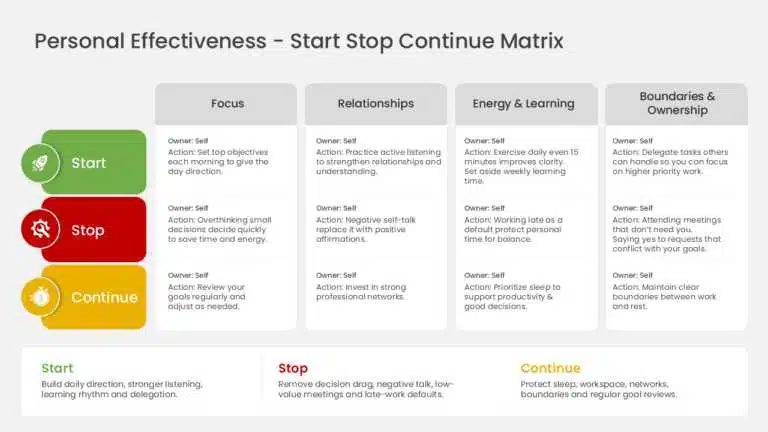
Start:
- Set your top objectives each morning to give the day direction.
- Practice active listening to strengthen relationships and understanding.
- Exercise daily — even 15 minutes improves mental and physical clarity.
- Set aside time weekly to learn something new.
- Delegate tasks others can handle so you can focus on high-priority work.
Stop:
- Overthinking small decisions — decide quickly to save time and energy.
- Negative self-talk — replace it with positive affirmations.
- Attending meetings that don’t need you.
- Saying yes to requests that conflict with your goals.
- Working late as a default — protect personal time for balance.
Continue:
- Prioritizing sleep — it underpins productivity and good decisions.
- Keeping a clean, clutter-free workspace.
- Investing in strong professional networks.
- Maintaining clear boundaries between work and rest.
- Reviewing your goals regularly and adjusting as needed.
Example 3: Daily Productivity
Start:
- Use a timer (25 minutes focus, 5-minute break) to beat procrastination.
- List the top three things to finish each morning.
- Give one task your full attention — stop multitasking.
- Spend the first hour of the day on your most important work.
- Take a real lunch break to avoid the afternoon slump.
Stop:
- Multitasking across several tasks at once.
- Working through lunch.
- Saying yes to work that doesn’t fit your priorities.
Continue:
- Tidying your workspace at the end of each day.
- Updating and reviewing your to-do list regularly.
- Scheduling your hardest work for your most productive hours.
Start Stop Continue Feedback Examples for Managers and Employees
The best Start Stop Continue feedback is specific, tied to one behavior at a time, and worded as an action rather than a judgment. Below are worked examples for the three most common directions of feedback. Notice each item is a single, concrete behavior — that is what makes it easy to act on.
Manager → Employee
- Start: flagging risks in our weekly 1:1 instead of waiting for the status report.
- Stop: taking on side requests without checking they fit this quarter’s priorities.
- Continue: the detailed release notes — other teams have started using them.
Employee → Manager
- Start: sharing the “why” behind shifting priorities so the team can re-plan.
- Stop: scheduling reviews with less than a day’s notice.
- Continue: protecting our no-meeting Wednesdays.
Peer → Peer
- Start: tagging me earlier when a task depends on my work.
- Stop: resolving review comments before the reviewer confirms they’re addressed.
- Continue: documenting decisions in the ticket — it saves re-explaining later.
If you’re building a recurring feedback template, keep each column to one sentence per item. Doing this every one-on-one means you’re working from a living list rather than starting from scratch each time.
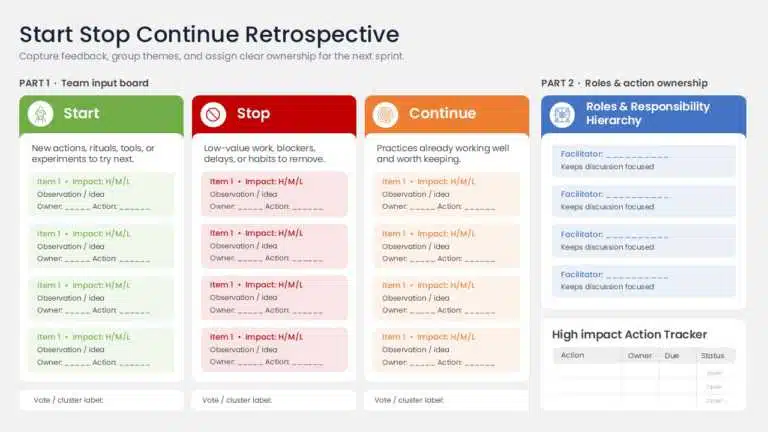
Free Start Stop Continue Template
Building slides from scratch is time-consuming, so we’ve created a ready-to-use Start Stop Continue PowerPoint template. Use it for organizational reviews, team meetings, project retrospectives, or individual reflection — just drop in your team’s notes.
The template has three sections:
Start
Aim: identify new approaches, behaviors, or tactics to adopt. Focus: untapped potential, fresh ideas, and process improvements.
Stop
Aim: identify and remove actions, attitudes, or habits that are harmful, outdated, or unproductive. Focus: what’s blocking progress or effectiveness.
Continue
Aim: maintain and reinforce what’s already working. Focus: recognizing and keeping effective practices.
How to Present Start Stop Continue Findings
Once the team has worked through the three questions, put the findings into action. A clear way to present the findings is to walk the team through them in priority order, using a simple visual format everyone can follow:
- Capture key findings. Note the most important conclusions so nothing gets lost.
- Sort by priority. Rank items by impact and how easy they are to implement; tackle the most critical first.
- Describe doable steps. For each finding, define what changes, who owns it, and the intended result.
- Assign tasks. Make sure everyone understands their role in the improvement.
- Track progress. Monitor action items and check in regularly.
- Revisit next time. In the next retrospective, review whether the changes worked and what still needs attention.
Start Stop Continue vs Other Retrospective Formats
Start Stop Continue is the most action-oriented retrospective format — every item maps to a behavior change. Here’s how it compares with other popular formats:
| Format | Focuses on | Best for | Trade-off |
| Start Stop Continue | Actions & behaviors | Fast, action-oriented next steps | Can miss emotional context |
| Mad Sad Glad | Emotions | Surfacing team morale and sentiment | Less directly actionable |
| 4Ls (Liked, Learned, Lacked, Longed for) | Reflection & learning | Deeper learning review | Takes longer; needs more facilitation |
| DAKI (Drop, Add, Keep, Improve) | Process changes | Refining an existing process | Overlaps with Start Stop Continue |
Alternatives to the Start Stop Continue Exercise
Even a popular format can get repetitive. To keep retrospectives fresh, rotate in alternatives:
- Mad Sad Glad — explores the emotions a team felt during a tough stretch.
- DAKI (Drop, Add, Keep, Improve) — adds an “improve” dimension beyond pure start/stop/continue.
- Soccer Retrospective — a lighter, themed take for variety.
Whichever you choose, regular sprint retrospectives matter because they give teams a recurring moment to assess progress and plan ahead together.
Tips to Run Your Start Stop Continue Session Smoothly
- Be specific. Vague feedback leaves people unsure what to change. “Stop scheduling back-to-back meetings” beats “stop wasting time.”
- Be objective. Focus on behavior and its impact on the team, not on personality.
- Be respectful. Mind your words, tone, and timing — the goal is to support growth, not to criticize the person.
- Practice saying no. A good Stop item often comes down to saying no to low-value requests before they take up the team’s time.
How Often Should You Run It?
Most agile teams run one at the end of every sprint — typically every one to two weeks — so feedback stays current and changes can be tested in the next iteration. Teams without fixed sprints can tie it to milestones: the end of a project phase, a quarter, or a major launch. Consistency is what builds a culture of constructive feedback.
Conclusion
The Start Stop Continue retrospective is a simple exercise with an outsized payoff: a short, prioritized list of action items ready for the next cycle. Run it regularly, keep feedback specific and respectful, and close every session with owners and a follow-up date — that’s how good ideas turn into real change.
FAQs
-
What is a Start Stop Continue retrospective and how does it work?
It’s a structured team reflection where each person lists one thing the team should start, one to stop, and one to keep doing. Notes are collected, grouped by theme, and discussed, with the most common or impactful points turned into action items for the next sprint or phase.
-
What is the purpose of a Start, Stop, Continue Retrospective?
What are the main benefits of agile teams?
It fits naturally at the end of a sprint because it’s fast (15–30 minutes), needs no special tools, and produces a short list of changes. It also reduces blame, since feedback is framed as actions (“stop X”) rather than criticism of a person.
-
How do I run a Start Stop Continue retrospective step by step?
Set a clear topic and timeframe, give everyone 5–10 minutes to write their items privately, group similar items, discuss the most repeated or highest-impact ones, and end by assigning two to three action items with owners and a follow-up date.
-
What are some real examples of Start, Stop, and Continue actions?
Common Start items include setting daily priorities or time-blocking; common Stop items include unnecessary meetings or multitasking; common Continue items include protecting focus time or an end-of-day wrap-up. See the worked examples earlier in this guide.
-
Are there free Start Stop Continue templates I can use?
Yes — SlideUpLift offers free, ready-to-use Start Stop Continue PowerPoint templates with the three sections pre-built, plus space for action items, so you can drop in notes without designing slides.
-
How does it compare to other retrospective formats?
Compared with Mad Sad Glad (emotions) or 4Ls (Liked, Learned, Lacked, Longed for), Start Stop Continue is more action-oriented — every item maps to a behavior change. That makes it faster to convert into a plan, though it can miss the emotional context other formats surface.
-
What tips make a retrospective more effective?
Be specific (“stop scheduling back-to-back meetings”, not “stop wasting time”), keep feedback focused on the work rather than the person, and always close with assigned owners and a follow-up date.
-
What tools work for a remote Start Stop Continue retrospective?
Digital whiteboards like Miro, Mural, or FigJam let everyone add virtual sticky notes at once. For smaller teams, a shared doc or a three-column PowerPoint/Slides template works just as well.
-
Who should participate?
Everyone directly involved in the work being reviewed — the full sprint or project team, not just leads. A facilitator (often the project manager or scrum master) guides the discussion but shouldn’t be the only one contributing items.
-
How often should teams hold one?
Most agile teams run one at the end of every sprint (every one to two weeks). Teams without sprints can tie it to milestones — the end of a phase, quarter, or major launch.
Table Of Content


Related posts from the same category
![9 Box Talent Review Explained [Detailed 9 Box Matrix Guide]](https://slideuplift.com/wp-content/uploads/2024/01/9-Box-Talent-Review-Explained-and-detailed-guide.png "9 Box Talent Review Explained [Detailed 9 Box Matrix Guide]")
30 Jan, 2024 | SlideUpLift
9 Box Talent Review Explained [Detailed 9 Box Matrix Guide]
Quick Answer A 9 box talent review is a talent management tool that plots employees on a 3x3 grid across two dimensions: current performance and future potential. Managers use it

14 Sep, 2021 | SlideUpLift
Learn How To Give A Great Performance Review To Your Employees
This article defines what is a performance review, explains how to write and present a successful employee performance review. If you work in management or as a supervisor, you may

6 Jan, 2021 | SlideUpLift
7 Tips for Remote Employee Onboarding | (Plus Employee Onboarding Templates )
Virtual work setups are quickly rising in popularity amongst companies worldwide. A report by FlexJobs shows that remote work grew by 44% in the last five years. In the last

9 Oct, 2022 | SlideUpLift
5 Organizational Chart Archetypes for PowerPoint Presentations (including Templates)
When we think about organizational charts, we frequently think of top-down, pyramid-like charts represented visually. The fact remains, that this is only one of many different variants of business organizational
![Org Chart Examples: 12 Real Examples by Type & Industry [+ Free Templates]](https://slideuplift.com/wp-content/uploads/2024/08/COVER-PAGE_12-Org-Chart-Examples-You-Need-To-Check-Out-Templates_JULY26.jpg "Org Chart Examples: 12 Real Examples by Type & Industry [+ Free Templates]")
5 Aug, 2024 | SlideUpLift
Org Chart Examples: 12 Real Examples by Type & Industry [+ Free Templates]
An organizational chart (org chart) is a diagram that shows a company's internal structure — who reports to whom, how teams are grouped, and where each role sits in the

28 Feb, 2023 | SlideUpLift
Gardner’s Theory of Multiple Intelligences: All 8 Types Explained
Quick Answer: Gardner's Theory of Multiple Intelligences proposes that intelligence is not one fixed ability but a set of at least eight distinct types — linguistic, logical-mathematical, spatial, bodily-kinesthetic, musical,

14 Feb, 2024 | SlideUpLift
Complete Guide For Preparing Job Interview Presentation With Examples
This guide gives you a 9-slide outline, guidance on how long to speak, examples for sales, marketing, consulting and teaching roles, delivery tips for in-person and video interviews, and six

9 Feb, 2024 | SlideUpLift
How To Loop A PowerPoint Slideshow? Detailed Guide
Microsoft PowerPoint is a popular application for creating and delivering presentations. PowerPoint has numerous options for adding flair and taking your presentations a notch higher, such as the ability to
![Best Work Plan Templates For Easy Task Organization [With Examples]](https://slideuplift.com/wp-content/uploads/2024/03/Best-Work-Plan-Templates.jpg "Best Work Plan Templates For Easy Task Organization [With Examples]")
6 Mar, 2024 | SlideUpLift
Best Work Plan Templates For Easy Task Organization [With Examples]
A project's success depends on having a detailed task plan. How can you perform tasks without having a plan for them? You and your team can produce the ideal work

5 Mar, 2024 | SlideUpLift
SWOT Analysis Examples: Real-World Examples for Business, Projects & Products
The fastest way to understand a SWOT analysis is to see completed ones. Below are five detailed SWOT examples — two well-known companies, a small business, a project, and a