 Fall Sale
  Flat 40% off on our Unlimited Access Yearly Membership plan!

Cool PowerPoint Templates

About Hoshin Kanri Strategic Planning PowerPoint Template The Hoshin Kanri Strategic Planning PowerPoint Template is a comprehensive and visually....


Enhance your marketing plans using this versatile table format tailored for driving demand growth! This appealing design lets you detail elements....

Craft compelling visual narratives using this captivating presentation template tailored for presenting product attributes effectively. The sleek....

Crafted to ensure clarity and effectiveness, in communication purposes improve your slides with this six month plan template designed for project....

Impress your audience with a statement using this eye catching template created for Hoshin Kanri planning purposes! With its stylish blue and gra....

Streamline the sharing of information, with this captivating matrix crafted for categorizing consumers. Illustrating the VALS framework visually ....

Enhance your storytelling with this flowchart showcasing the 5 stages of the Customer Journey – Awareness, Attraction, Inquiry, Action and Advo....
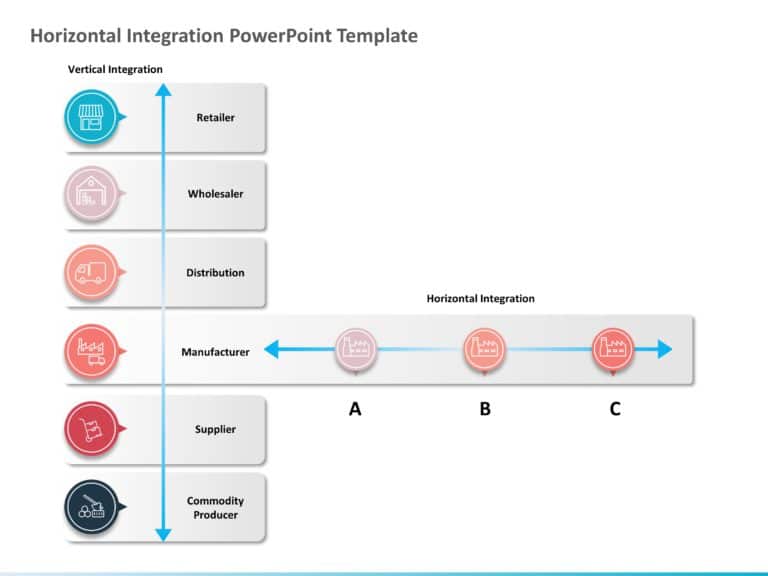
About Horizontal Merger Integration PowerPoint Template The Horizontal Merger Integration PowerPoint Template is a comprehensive tool designed to....

Enhance your presentation, with this survey findings template that highlights data trends effectively using a horizontal bar graph spanning multi....

Enhance your presentations with an edge using this crafted organizational chart template crafted by experts! Ideal, for displaying the structure ....

Team Competition Presentation Template Use this Team Competition PowerPoint template to create visually appealing presentations in any profession....

Make sharing information using this eye catching template created for presentations! It comes with a color scheme of teal and deep purple thats g....
How To Make Cool PowerPoint Slides?
Infographics are probably the best way to make your business presentations more attractive and attention-grabbing. It results in increased engagement as compared to other visual media. And also make sure to choose the font size appropriately, use strong contrast with the text, and try not to use too much text and too many colors on your PowerPoint slides.
How to make Cool PowerPoint presentation?
To make your presentations more appealing and memorable you need cool backgrounds, simple transitions, clean fonts, & attractive graphics to make the presentation more engaging.
Here are a few ways to make a cool presentation,
- Use a consistent theme
- Use more images & less text
- Use animations to highlight each bullet point
- Convey one message in each slide
- Use 2/4/8 rule - The 2/4/8 rule is-don't spend more than 2 minutes on a one slide, don't use more than 4 bullets per slide, and no more than 8 words per bullet.