 Fall Sale
  Flat 40% off on our Unlimited Access Yearly Membership plan!

Cool PowerPoint Templates
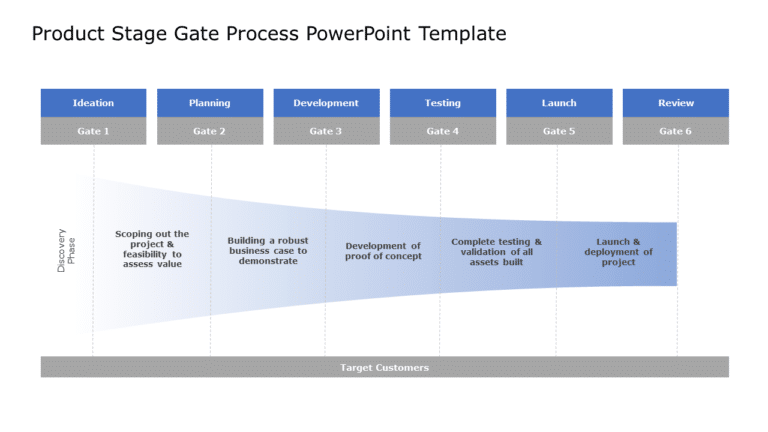
Make the most of this all tool meant to simplify your product development process journey to enhance your outcomes efficiently.The visual guide, ....


Get your message across effectively with this eye catching template tailored for high quality compliance presentations! With a infographic, at it....

Enhance how you share information, with this eye catching template featuring a hexagon design that highlights important product features with sty....

Here is an appealing hexagonal layout specifically crafted for summaries that presents ideas effectively and professionally for corporate meeting....

Enhance the look of your presentations, with this template created to showcase features in different industries professionally and effectively. T....

Scrum Process Presentation Template Use this Scrum Process PowerPoint template to create visually appealing presentations in any professional set....

Enhance your storytelling skills by using this hexagon Venn diagram template! Ideal, for illustrating connections. Shared ideas visually in prese....

Turn your information into insights using this sleek contact information slide thats perfect, for adding a professional touch to your presentatio....

Enhance the flow of your presentation using this captivating template crafted to display data in a way.This template boasts a design, with blue a....

Create a story using this tool, for managing tasks effectively and efficiently!. This layout includes the Eisenhower Matrix to assist you in orga....

Enhance the impact of your presentation, with this GE McKinsey Matrix template crafted for positioning purposes! This captivating slide showcases....

This template is great, for team meetings as it provides a summary of data virtualization in a way that simplifies information for better underst....
How To Make Cool PowerPoint Slides?
Infographics are probably the best way to make your business presentations more attractive and attention-grabbing. It results in increased engagement as compared to other visual media. And also make sure to choose the font size appropriately, use strong contrast with the text, and try not to use too much text and too many colors on your PowerPoint slides.
How to make Cool PowerPoint presentation?
To make your presentations more appealing and memorable you need cool backgrounds, simple transitions, clean fonts, & attractive graphics to make the presentation more engaging.
Here are a few ways to make a cool presentation,
- Use a consistent theme
- Use more images & less text
- Use animations to highlight each bullet point
- Convey one message in each slide
- Use 2/4/8 rule - The 2/4/8 rule is-don't spend more than 2 minutes on a one slide, don't use more than 4 bullets per slide, and no more than 8 words per bullet.