 Fall Sale
  Flat 40% off on our Unlimited Access Yearly Membership plan!

Cool PowerPoint Templates

Grab your viewers interest, from the get go with this captivating format tailored for highlighting business strengths. This design showcases a pu....


Enhance your presentation flow using this template tailored for conducting gap analysis tasks ! Ideal, for professionals in the business world an....

Elevate your meetings with this detailed product roadmap slide that will help you clearly map out your project stages and present a organized pla....

Enhance your influence using this captivating template crafted to examine the intricacies of conflicting personalities in an way! Ideal, for psyc....

Enhance the flow of your presentation using this tool tailored for business planning purposes! This template showcases a design, with a blue grad....
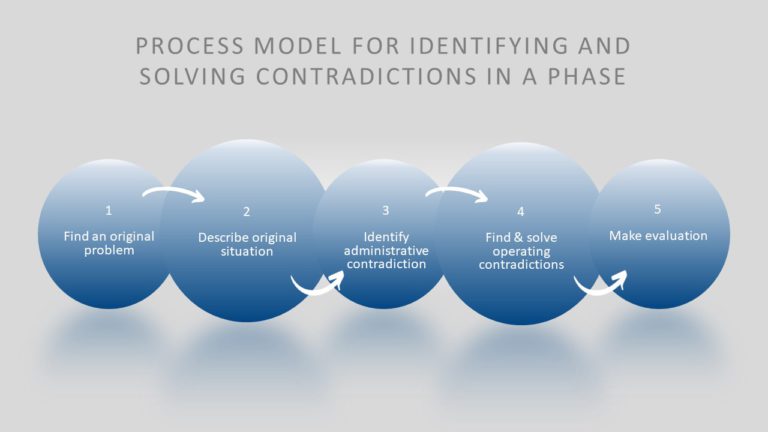
Share your ideas using this captivating process flow template crafted to address conflicts. The seamless blue gradient layout not just enhances t....

Share your perspective using this design created to address conflicts, with precision. This layout presents an arrow motif that navigates viewers....

Wow your audience, by showcasing this method for addressing conflicts, in solving problems effectively! This guide is crafted to lead you through....

Enhance your information into insights using this priority matrix template that is designed to help you organize and rank tasks according to thei....

Enhance your presentation structure using this Agile Development Cycle template tailored for project managers and software development teams. Thi....

Enhance your presentations with a touch using this template crafted to spotlight crucial leadership attributes effectively in four distinct secti....

Create a story using this Agile Scrum Process Flowchart Presentation Template tailored for project managers and agile teams to simplify intricate....
How To Make Cool PowerPoint Slides?
Infographics are probably the best way to make your business presentations more attractive and attention-grabbing. It results in increased engagement as compared to other visual media. And also make sure to choose the font size appropriately, use strong contrast with the text, and try not to use too much text and too many colors on your PowerPoint slides.
How to make Cool PowerPoint presentation?
To make your presentations more appealing and memorable you need cool backgrounds, simple transitions, clean fonts, & attractive graphics to make the presentation more engaging.
Here are a few ways to make a cool presentation,
- Use a consistent theme
- Use more images & less text
- Use animations to highlight each bullet point
- Convey one message in each slide
- Use 2/4/8 rule - The 2/4/8 rule is-don't spend more than 2 minutes on a one slide, don't use more than 4 bullets per slide, and no more than 8 words per bullet.