 Fall Sale
  Flat 40% off on our Unlimited Access Yearly Membership plan!

Cool PowerPoint Templates

Upgrade your presentations using this budget summary template designed for clarity and effectiveness! Ideal, for project leaders and financial ex....


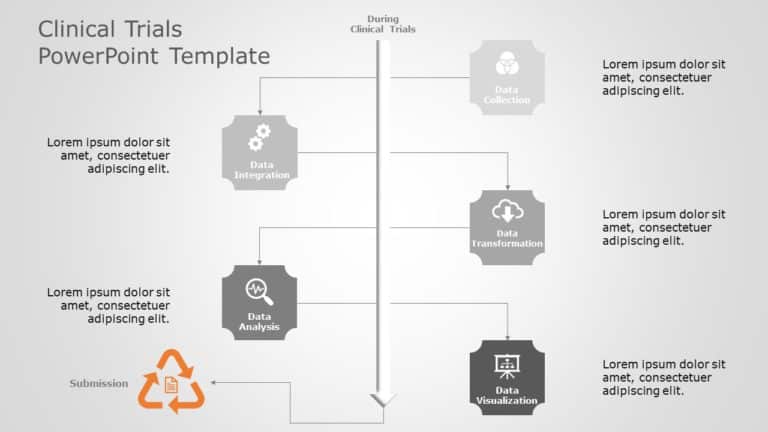
Enhance your narrative with this flowchart tailored for trials usage that visually directs viewers through the key phases of data handling, in tr....

Enhance your data presentation with a dynamic solution selling process flowchart slide that captivates the audiences attention effectively‚Äã Des....

Craft engaging slides using this template crafted for displaying Key Performance Indicators in presentations! Tailored for quality control expert....

Enhance the flow of your presentation using this format that helps maintain your audiences attention and structure information effectively! Ideal....

Present your payment ideas effectively using this attractive presentation template tailored for discussions, on digital transactions and financia....

Turn your information into understandings using this crafted decision making grid template, for leaders and managers alike! This tool streamlines....

Enhance the impact of your presentation using this crafted customer prioritization chart tailored for planning meetings! The template showcases a....

Share your vision using this assessment tool that aims to enrich your conversations effectively! Tailored for business experts seeking to evaluat....

Enhance your influence, with this captivating mentorship infographic design! Crafted to portray the bond between mentors and mentees this templat....

Enhance your information exchange, with this all encompassing project management template crafted for PMBOK specialists in mind.This inviting for....

Craft compelling visual narratives using this strategic alignment template crafted for strategizing and implementation purposes. This captivating....
How To Make Cool PowerPoint Slides?
Infographics are probably the best way to make your business presentations more attractive and attention-grabbing. It results in increased engagement as compared to other visual media. And also make sure to choose the font size appropriately, use strong contrast with the text, and try not to use too much text and too many colors on your PowerPoint slides.
How to make Cool PowerPoint presentation?
To make your presentations more appealing and memorable you need cool backgrounds, simple transitions, clean fonts, & attractive graphics to make the presentation more engaging.
Here are a few ways to make a cool presentation,
- Use a consistent theme
- Use more images & less text
- Use animations to highlight each bullet point
- Convey one message in each slide
- Use 2/4/8 rule - The 2/4/8 rule is-don't spend more than 2 minutes on a one slide, don't use more than 4 bullets per slide, and no more than 8 words per bullet.