 Fall Sale
  Flat 40% off on our Unlimited Access Yearly Membership plan!

Cool PowerPoint Templates

Create a statement using this infographic design that effectively displays gender demographic data in a visually engaging way.The combination of ....


This stunning fact sheet is perfect, for product launches as it makes a statement while effectively highlighting key product information and feat....

Turn your information into to understand insights using the captivating Split Arrows design template! Ideal, for visualizing decision making step....

Craft impactful presentations using this crafted template centered around building strength and fortitude in individuals facing challenges or adv....
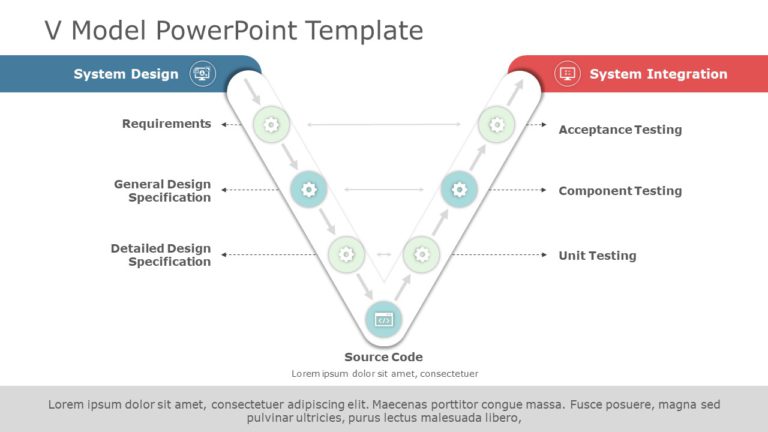
Break down concepts easily using this captivating V model System Design and Integration Diagram which is ideal, for software developers and proje....

Enhance your presentations with this crafted chart template that is ideal, for illustrating succession planning within your organization effectiv....

Wow your audience, with this template showcasing the dynamics of the stock market using vibrant red and green colors! This presentation tool beau....

Enhance communication by utilizing this appealing chart template that aims to clearly define job roles and duties tailored for project managers a....

Check out this user guide, to the DMAIC process that simplifies concepts in a visually appealing way, for project managers and business analysts ....

Start off your presentation by grabbing the audiences interest, with an eye catching cover slide tailored for presentations on human resource man....

Share your ideas using this captivating template created for presentations, on staffing strategies.It showcases an contemporary design, with a bl....

Enhance your presentation with an diagram that emphasizes the important advantages of Corporate Social Responsibility (CSR). This template includ....
How To Make Cool PowerPoint Slides?
Infographics are probably the best way to make your business presentations more attractive and attention-grabbing. It results in increased engagement as compared to other visual media. And also make sure to choose the font size appropriately, use strong contrast with the text, and try not to use too much text and too many colors on your PowerPoint slides.
How to make Cool PowerPoint presentation?
To make your presentations more appealing and memorable you need cool backgrounds, simple transitions, clean fonts, & attractive graphics to make the presentation more engaging.
Here are a few ways to make a cool presentation,
- Use a consistent theme
- Use more images & less text
- Use animations to highlight each bullet point
- Convey one message in each slide
- Use 2/4/8 rule - The 2/4/8 rule is-don't spend more than 2 minutes on a one slide, don't use more than 4 bullets per slide, and no more than 8 words per bullet.