 Fall Sale
  Flat 40% off on our Unlimited Access Yearly Membership plan!

Customer Journey Map Templates for PowerPoint & Google Slides

Map how patients move through your hospital with this editable patient journey map template. The slide follows four phases – Arrival, Asses....


Customer Journey Roadmap PowerPoint & Google Slides Template Understanding customers is a very important aspect of a business. Our Customer J....
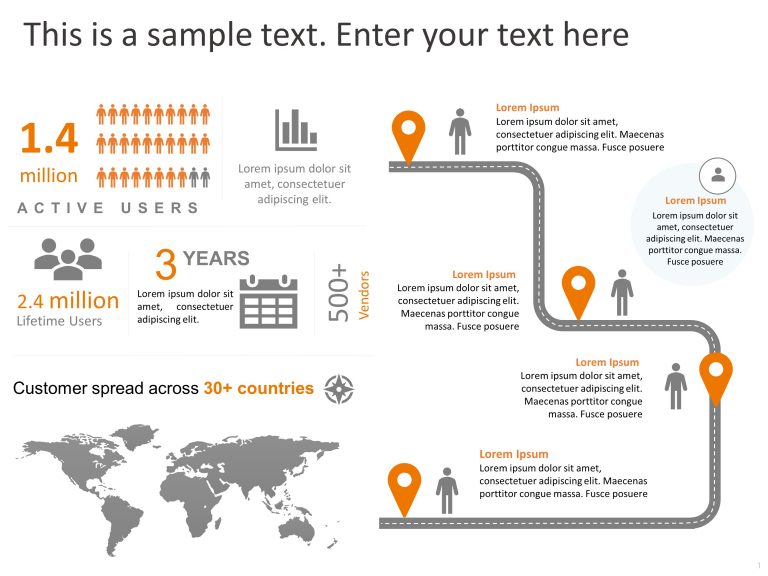
This executive summary PowerPoint template for Customer Journeys is a valuable presentation template for showcasing how customers interact with y....

Customer Journey Map PowerPoint Template helps you represent each step of your customer journey in a Horizontal Format. With this template, you c....

This template is great, for team meetings as it offers an concise summary of the experience—a must have for healthcare workers.Its elegant design....

This customer journey roadmap template helps you effectively represent each step of your customer journey, like Awareness, Consideration, Decisio....

Enhance your presentation style using this template crafted to showcase the customer experience, with precision and flair! With its modern blend ....

Show how patients move toward your brand with this editable pharma patient journey flowchart. Five stages run along one arrow – Awareness &....

Transform your presentation with a journey map tailored for healthcare experts! This captivating layout depicts the patient experience. From init....

Enhance your marketing strategies with this detailed customer journey map illustration that provides an overview of the process! The diagram show....

Customer Journey Map is a visual representation that helps us in mapping the actions taken by the customers. It consists of stages that a custome....
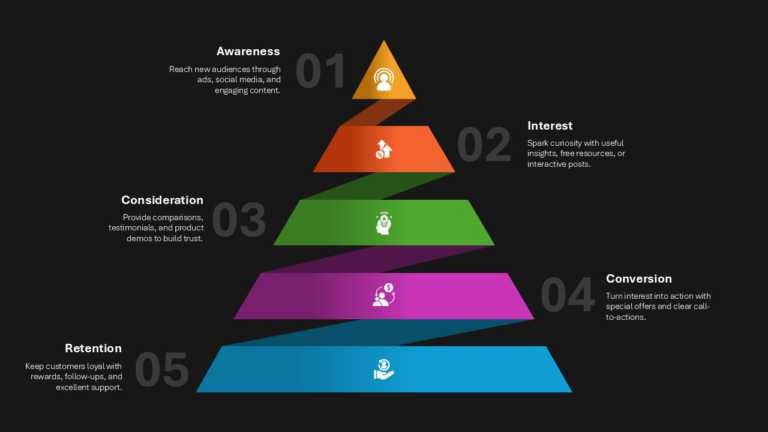
The Funnel Template is designed to present customer journey stages and conversion processes using a structured funnel diagram layout. It enables....
Related Presentations
-

User Story
5 templates>
-

Marketing
2,027 templates>
-

Customer Profile
38 templates>
-

Pain Points
5 templates>
-

Customer Segmentation
22 templates>
Why Do Businesses Need Customer Journey Mapping?
Customer journey mapping is used by businesses to provide better products or services for their customers. First, Customer journey mapping helps companies improve customer relations and create positive feedback. Customer journey templates allow professionals to visualize each stage of their interaction with the customer. These maps also ensure that business processes like sales, marketing, and customer support are well-aligned with the company’s goals. Lastly, they identify and address customer needs, enhancing customer satisfaction, retention, and lifetime value (CLV).
Key Benefits of Using a Customer Journey PowerPoint Template
- Customer journey PowerPoint templates benefit professionals in more than one way. For starters, these templates visually represent the customer experience at various points. It helps people understand how customers interact with your company and allows you to identify areas to improve. Professionals can notice customers’ major issues and find ways to resolve them. Moreover, these templates enable cross-functional teams to work together using insights into customer behavior.
- On top of that, customer journey PowerPoint templates are designed professionally and save time with pre-made, well-structured slides. They also boost your presentation’s storytelling ability and engagement with audience presentations. Customer journey templates have precise visuals that compellingly convey customer insights for the key information to be understood by the audience.
Step-by-Step Guide: How to Use SlideUpLift’s Customer Journey PPT Templates
- Step 1 – Selecting the Right Template for Your Business Needs: Look through SlideUpLift’s options and find the most relevant template to define your customer journey. Decide what kind of journey you need to map, whether a sales process or a service experience. Then, choose the paid or free professional PowerPoint template that simplifies your entire customer experience process.
- Step 2 – Downloading & Opening in PowerPoint: After that, download the selected template and save it on your computer. Then, open the downloaded PPT template in Microsoft PowerPoint or Google Slides. Finally, you can edit your template according to your company’s requirements.
- Step 3 – Customizing Stages, Touchpoints, & Data: Now, modify the different stages of the template according to your customer’s journey. Include the various sources and contact points between your customer and the business. Also, record the different perspectives and responses of your customers at each stage.
- Step 4 – Adding Visuals, Icons & Brand Colors: Look for the icons and images that make your slides more attractive and easier to understand and use suitably. While using your brand’s colors strengthens your brand identity through your presentation.
- Step 5 – Presenting & Analyzing the Customer Journey: After finalizing your presentation, share your customer journey with your audience and discuss the identified challenges. Focus on how to address those problems to enhance the journey of your customers.
- How to Choose the Right Customer Journey PPT Template for Your Business?
- Picking the right customer journey PPT template is the initial and most important step for customer experience. First, evaluate your business and your customers. What is the goal of your presentation? Find the answer to this and choose a template that matches that goal.
- Do you need a simple or detailed map? Simple maps are good for quick looks, while detailed maps are better for deep dives. Also, be aware of the industry you operate in. Retail, SaaS, and healthcare have different needs; pick a template that fits your field.
- Next, check whether your selected template is customizable. Can you change the layout? Ensure that you should be able to change stages and touchpoints. Also, check the adaptability of your template; it saves time.
- Finally, check if it works well with the software that you are using. You don’t want problems related to compatibility during your presentation. That is all you need to know before choosing the best customer journey map template for your presentation.
What is a customer journey map?
A customer journey map is a visual of the end-to-end experience a customer has with a brand. It lists each stage (e.g., Awareness, Consideration, Purchase, Retention, Advocacy), the touchpoints in each stage, and the customer’s actions, thoughts and emotions, so teams can spot pain points and opportunities.
How do I create a customer journey map in PowerPoint?
- Pick a layout (roadmap, stage grid, funnel or loop).
- Name the persona and goal.
- List the stages across the top.
- Add touchpoints, actions, thoughts and emotions under each stage.
- Mark pain points and opportunities.
- Recolor icons and text – every shape is native and editable.
Is there a free customer journey map template?
Yes – the Free Customer Journey and Experience template, the Free 5A Customer Experience Pathway Grid and the Free Circular Customer Journey Diagram can be downloaded with the Free plan.
What are the stages of a customer journey?
The most common five are Awareness, Consideration, Purchase, Retention and Advocacy. Many marketers also use Philip Kotler’s 5A model – Aware, Appeal, Ask, Act, Advocate. Both models are available as editable templates in this collection.
Do these templates work in Google Slides?
Yes. Every template opens in both Microsoft PowerPoint and Google Slides and comes in 16:9 and 4:3.
What is the difference between a customer journey map and a patient journey map?
A patient journey map applies the same method to healthcare, following a patient from first symptoms and diagnosis through treatment and follow-up. See our Patient journey templates.