 Fall Sale
  Flat 40% off on our Unlimited Access Yearly Membership plan!

Cool PowerPoint Templates

This Sales Business Review Dashboard Template is designed for businesses to present their analytical data and study. The template has many graphs....


Enhance your presentation, with this eye catching chart tailored for business strategy talks! This design showcases an contemporary style with a ....

Enhance your meetings with this crafted roadmap template for a step up, in presentation quality and organization efficiency!. Ideal, for project ....

Check out this appealing infographic that simplifies concepts and highlights the progression of a career path! Ideal, for individuals wanting to ....

Enhance your storytelling using this comparison chart tailored for brand positioning purposes that enables you to effectively display the charact....
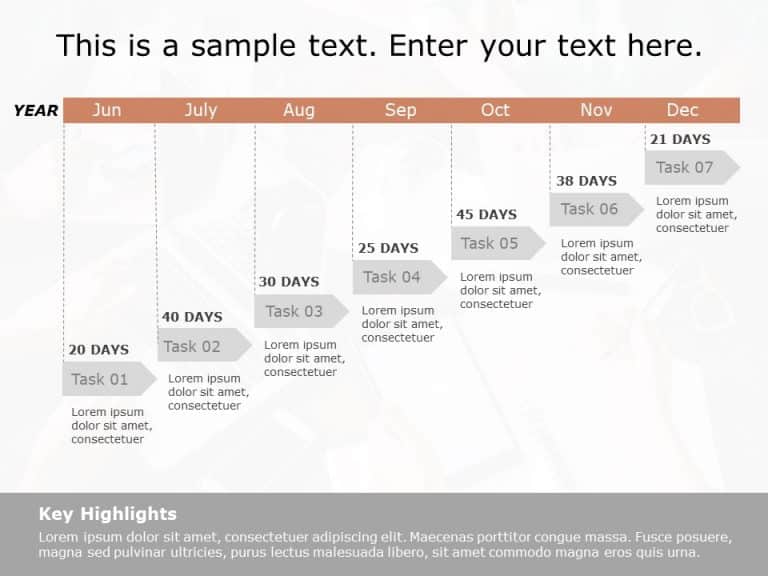
This Gantt Chart Template serves as a resource for arranging and displaying the scheduling of tasks across a timeline. It aids in determining the....

The Brand Strategy Executive Summary PowerPoint Template is crafted for professionals aiming to deliver their brand strategy concisely and transp....

The Marketing Campaign Analysis Dashboard PowerPoint Template is designed to present key metrics and insights related to marketing campaigns. Thi....

Make complex concepts easier to understand using this tool created for successful change management purposes.The layout of this template is circu....

Make sharing information with this RASCI Table template that enhances communication and defines team roles effectively for project managers and t....

Elevate your meetings with this structure crafted for planning and business assessment purposes! This layout offers an contemporary design ideal,....

Create a claim using this captivating chart crafted to simplify intricate details effortlessly! This template, with seven sections is ideal for d....
How To Make Cool PowerPoint Slides?
Infographics are probably the best way to make your business presentations more attractive and attention-grabbing. It results in increased engagement as compared to other visual media. And also make sure to choose the font size appropriately, use strong contrast with the text, and try not to use too much text and too many colors on your PowerPoint slides.
How to make Cool PowerPoint presentation?
To make your presentations more appealing and memorable you need cool backgrounds, simple transitions, clean fonts, & attractive graphics to make the presentation more engaging.
Here are a few ways to make a cool presentation,
- Use a consistent theme
- Use more images & less text
- Use animations to highlight each bullet point
- Convey one message in each slide
- Use 2/4/8 rule - The 2/4/8 rule is-don't spend more than 2 minutes on a one slide, don't use more than 4 bullets per slide, and no more than 8 words per bullet.