 Fall Sale
  Flat 40% off on our Unlimited Access Yearly Membership plan!

Cool PowerPoint Templates

Enhance your meetings with this crafted decision matrix strategy template that will elevate your teams ability to assess and rank ideas efficient....


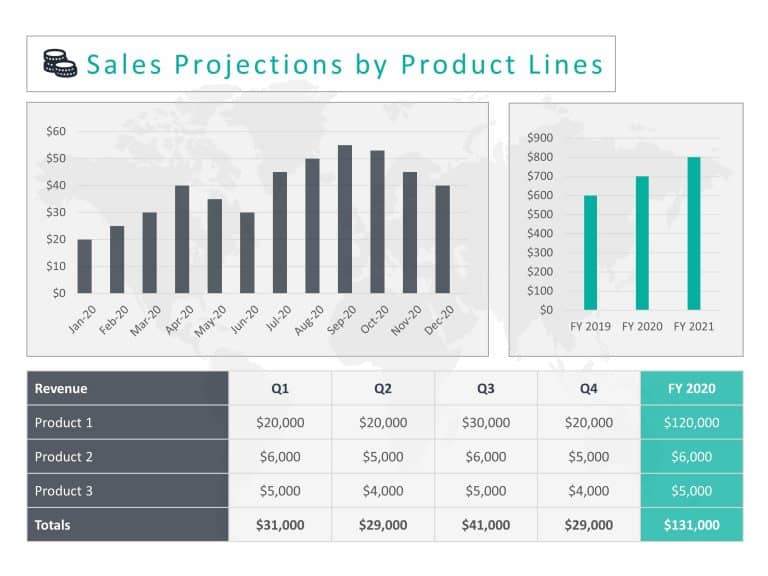
Transform your data into a sales forecast template thats ideal, for business professionals like yourself The template visually conveys your produ....

Enhance your presentations with a flair using this framework tailored for exploring user experience in an engaging manner! This template boasts a....
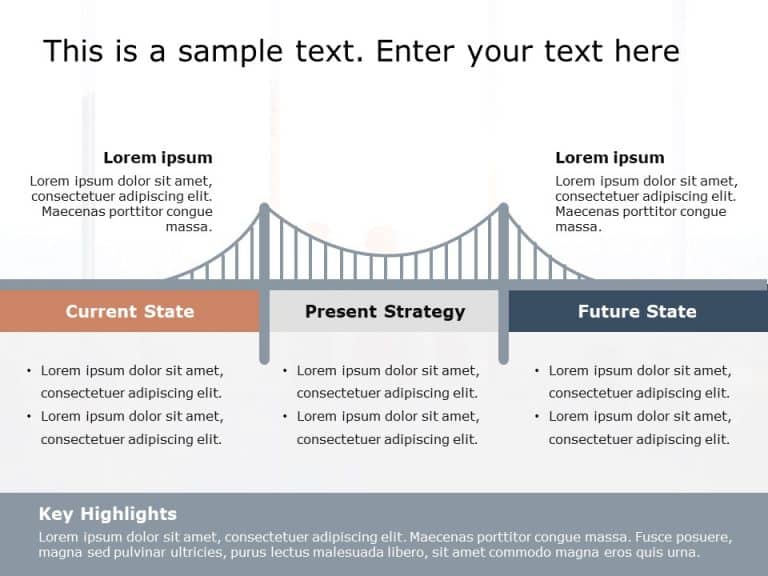
This current future state slide is perfect for bridging the gap between past and future business achievements/goals. This template is having a cr....

Enhance your presentation, with this versatile strategy pillar template to make it more engaging and impactful for your discussions. This slide s....

Challenges Solution Results Icons Challenges Solution Results Icons are a set of high-quality, small images or symbols that can be used to illust....

Upgrade your presentation game with this eye catching pillar template that simplifies sharing information effortlessly! Crafted to enhance your p....

Craft engaging presentations using this template crafted for displaying intertwined processes ! Ideal, for project managers and team leaders alik....

Enhance your presentation, with this eight step node diagram that stands out! This appealing template aims to simplify processes and elevate your....

Elevate your meetings with this eye catching process diagram template thats designed to streamline concepts. With a blend of teal and purple shad....

Engage your audience from the beginning with this grid text box diagram template that’s perfect, for professionals aiming to communicate in....

Create a story using this captivating layered circular diagram template! Ideal, for showcasing processes or plans; this layout enables you to dis....
How To Make Cool PowerPoint Slides?
Infographics are probably the best way to make your business presentations more attractive and attention-grabbing. It results in increased engagement as compared to other visual media. And also make sure to choose the font size appropriately, use strong contrast with the text, and try not to use too much text and too many colors on your PowerPoint slides.
How to make Cool PowerPoint presentation?
To make your presentations more appealing and memorable you need cool backgrounds, simple transitions, clean fonts, & attractive graphics to make the presentation more engaging.
Here are a few ways to make a cool presentation,
- Use a consistent theme
- Use more images & less text
- Use animations to highlight each bullet point
- Convey one message in each slide
- Use 2/4/8 rule - The 2/4/8 rule is-don't spend more than 2 minutes on a one slide, don't use more than 4 bullets per slide, and no more than 8 words per bullet.