
 Fall Sale
  Flat 40% off on our Unlimited Access Yearly Membership plan!


Business PowerPoint Templates That Drive Results
Free Business PowerPoint Templates


Use this Business Risk Factors template to create visually appealing presentations in any professional setting. Its minimalistic design and ready....


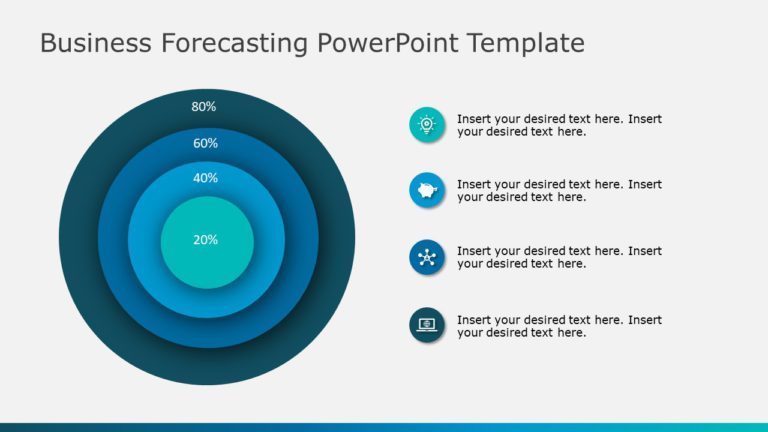
This appealing tool is perfect, for simplifying concepts in business forecasting tasks.The templates distinctive circular design enables you to c....

Enhance your meetings using this four-step approach crafted to streamline concepts easily accessible to a wider audience. Its structure suits wor....
Business Slides Templates
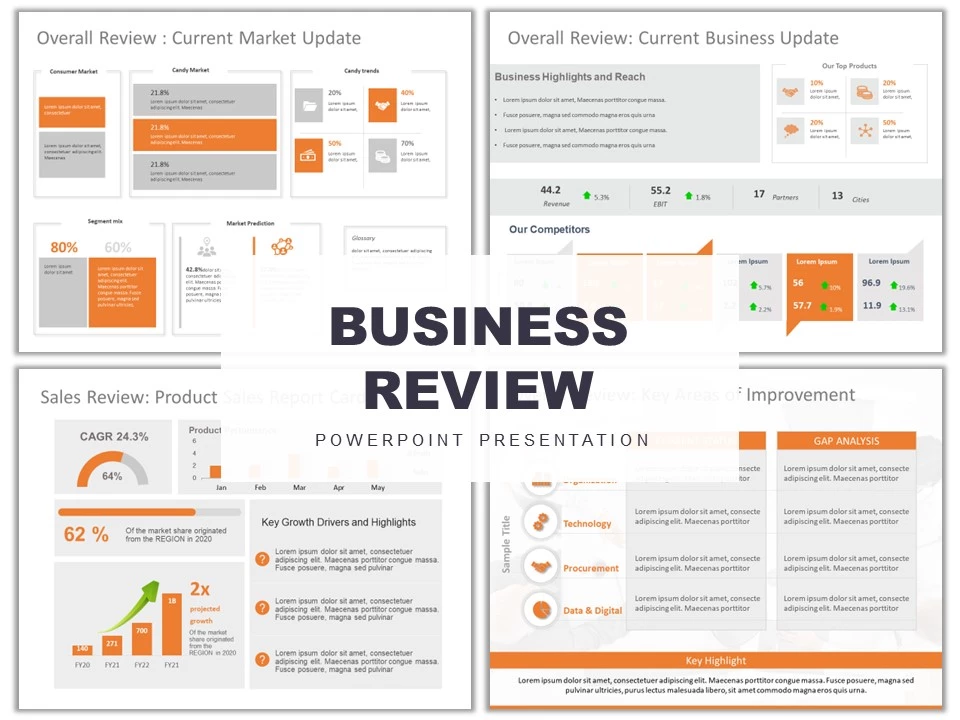
Make sharing information with this dashboard presentation tailored for, in depth business evaluations.The template boasts a color palette of oran....
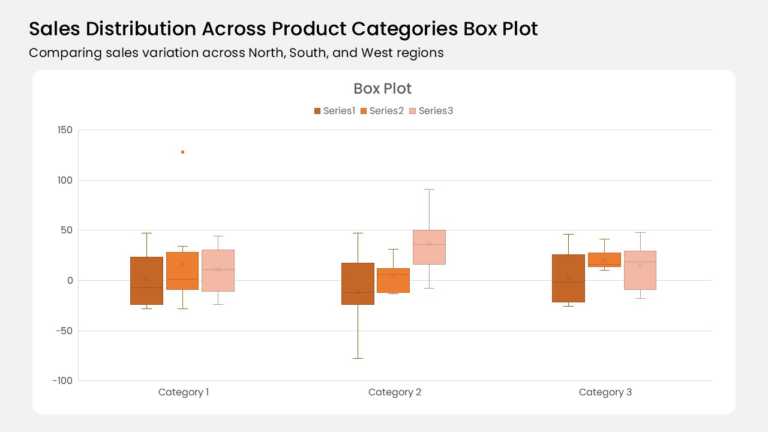
Three category groups anchor this box plot, and each group holds three color-coded boxes. A burnt orange, mid orange, and pale peach series run l....

Seven horizontal bars stack four data series across the months January through July. Yellow-green, medium green, teal, and mint segments mark Soc....
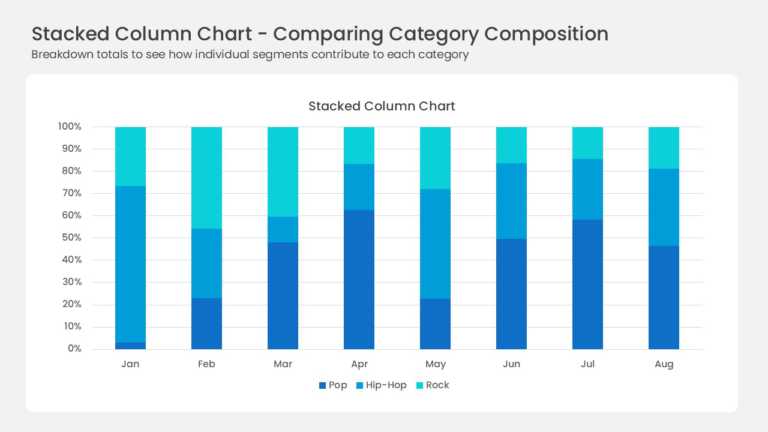
Eight full-height columns run from January to August, each one normalized to 100 percent. Three blue series divide every column: deep navy Pop, b....
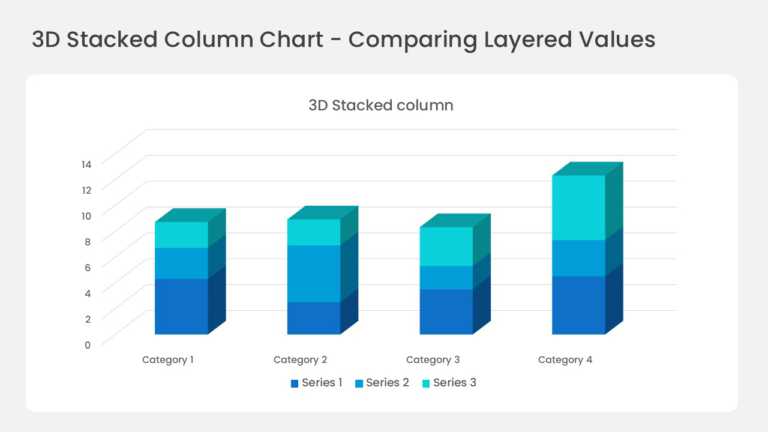
Four three-dimensional columns sit on a perspective floor with gridlines running back into the wall. Each column stacks three series in deep blue....
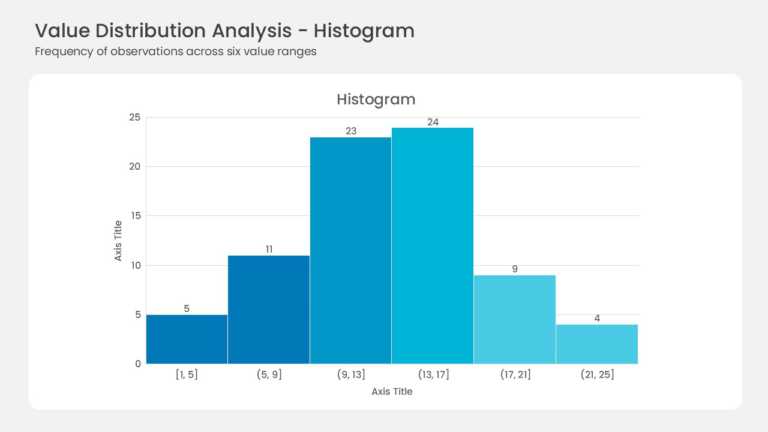
Six adjacent bars form the histogram with no gaps between them. Bin ranges run from [1, 5] up to (21, 25] along the horizontal axis. Frequencies ....

This cover slide opens a market expansion strategy deck with a prominent title area, a subtitle line, and space for presenter or date details. Th....
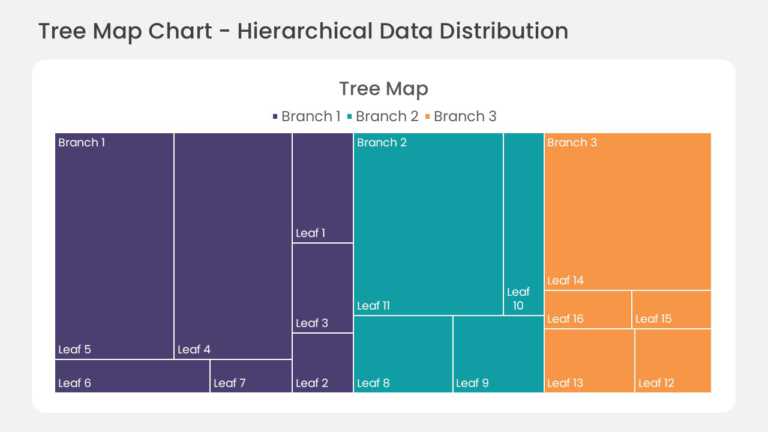
This hierarchical treemap chart divides the slide area into nested rectangles, with each rectangle sized by its share of the total value. Child s....

This section tracker slide lists the main sections of a presentation in sequence and highlights the section currently in progress. Visual markers....
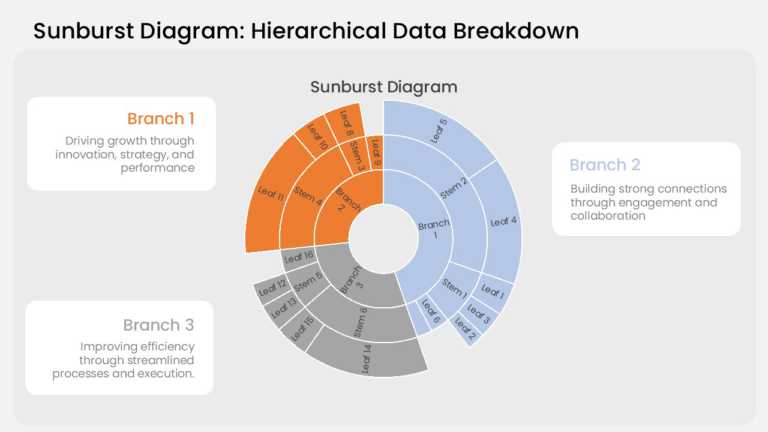
This sunburst chart arranges hierarchical data in three concentric rings. The inner ring holds the top-level categories, the middle ring breaks e....
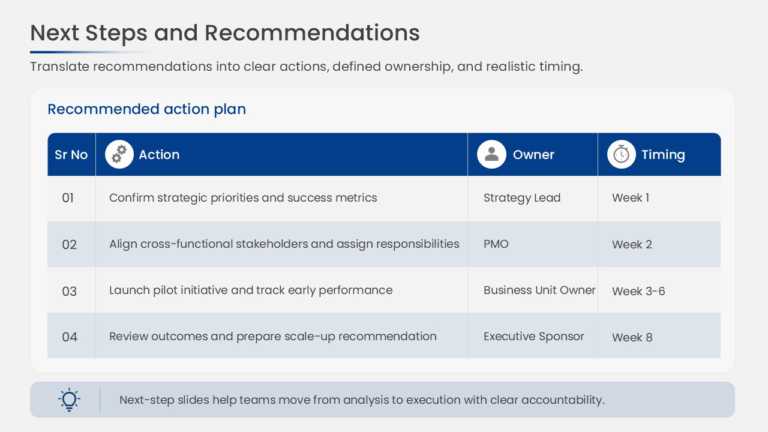
This project action plan uses a structured table with columns for action items, responsible owners, due dates, and status. Each row represents on....
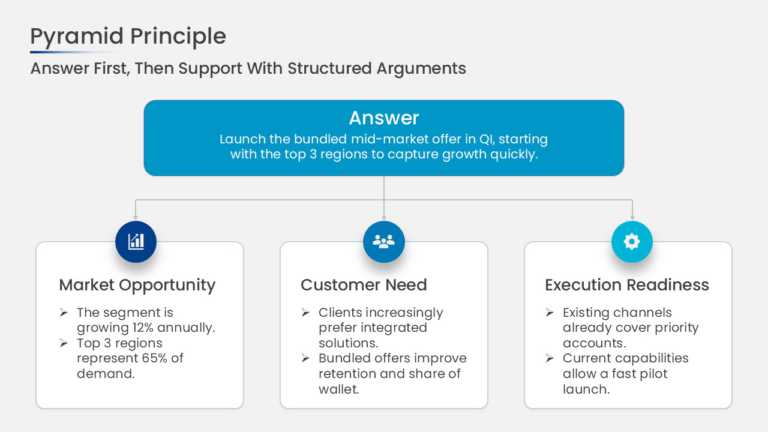
This pyramid principle slide places a single governing thought at the top of the structure with 3 supporting arguments arranged beneath it. Conne....
Related Presentations
-

Professional
8,165 templates>
-
Case Study
75 templates>
-
Executive Summary
256 templates>
-
30 60 90 Day Plan
142 templates>
-
SWOT Analysis
131 templates>





What Is The Role Of Business PowerPoint Templates In Professional Communication?
Business PowerPoint templates play a crucial role in professional communication by providing structured, visually appealing slides that enhance message clarity. They help presenters deliver information effectively while maintaining consistency and professionalism.
- Time-saving & Audience Engagement: With attention spans at just 8 seconds, grabbing interest quickly is crucial. This business PPT template saves time on design, letting you focus on delivering clear, engaging content that holds audience attention.
- Visual Storytelling & Data Presentation: Visuals improve understanding by 43%, making data easier to digest. Templates include charts and infographics that help transform complex information into memorable stories.
- Credibility Through Design: 75% of people judge a company’s credibility based on design. Consistent branding and polished business Google Slides templates and layouts build trust and leave a strong impression.
- Cross-Team Consistency: These slide templates ensure a unified team presentation style, reinforcing brand identity. This consistency enhances professionalism and clarity throughout the organization.
- Adaptability Across Platforms: Modern Google Slides business templates are optimized for various devices and formats, from laptops to mobile screens and virtual meetings. This ensures your presentation always looks sharp and professional.
How To Make A Captivating Business Presentation Template?
Well-designed templates save time, look professional, and keep your audience interested. Here are the must-have elements:
- Consistent Branding & Design: Use your brand’s colors, fonts, and logo on every slide so it looks professional and trustworthy.
- Clear Slide Structure: Keep slides simple with big titles, short bullet points, and clean layouts that are easy to follow.
- Versatile Layout Options: Include different slide types—like for titles, charts, or team info—so you’re ready for any kind of content.
- Visual Engagement: Add charts, icons, and images instead of lots of text to make your message more interesting and easier to understand.
- User-Friendly Editing: Make it easy to change text and images so anyone on your team can use and update the slides—no design skills needed.
What Are The Advantages Of Using Corporate Presentation Templates?
Here are the key advantages of using a corporate business slideshow template:
- Professional and Consistent Design: No more mismatched fonts or clashing colors. Business slides templates keep every slide on-brand, making your company look polished and put-together, like free brand ads in every deck.
- Time Efficiency: Skip the “blank slide” panic. Pre-built layouts mean you just plug in your content. Focus on what to say, not how to design it.
- Improved Clarity and Organization: Templates act like a GPS for your audience. Logical flow, clean headings, and bite-sized information equal fewer confused stares during meetings.
- Enhanced Visual Appeal: Ditch walls of text. Business slides come loaded with charts, icons, and graphics to turn boring stats into eye candy. Pro tip: People remember visuals, not bullet points.
- Brand Alignment Across Teams: Business plan, Sales, HR, or leadership—everyone’s slides look like they’re from the same company. No more design rebels ruining the vibe.
- Ease of Customization: Swap text, tweak colors, and drag in new images. Our slides let anyone edit slides fast—no design PhD needed.
Using corporate presentation templates not only elevates the professionalism of your presentations but also streamlines the creation process, making it easier to deliver impactful messages.
What Are The Common Mistakes To Avoid In Business Presentations?
Effective slide decks for business presentations are about making information easy to receive, absorb, and remember. However, some common mistakes can reduce audience engagement:
- Information Overload: Too much information on one slide can overwhelm and confuse your audience. Focus on a single main idea with bullet points to keep it clear and digestible.
- Ineffective Data Visualization: Messy or complicated charts can confuse your audience. Use clear and simple visuals to make your data easy to understand.
- Low Audience Engagement: Talking nonstop without involving your audience makes them lose interest. Try adding polls, questions, or examples to keep them involved.
- Inconsistent Branding: Mixing fonts and colors makes your slides look unprofessional. Stick to your brand’s style to look clean and trustworthy.
- Cluttered Slide Design: Too much text or too many images on one slide is overwhelming. Keep it clean and focused so your message stands out.
What Should A Business PPT Include?
Here are the key points a business PowerPoint presentation should include:
- Clear agenda to outline the presentation flow
- Concise key points to keep the message focused
- Relevant data supported by visuals like charts and graphs
- Consistent branding for a professional look
- Strong conclusion or call to action to leave an impact
Where Can I Find High-Quality Free Business PowerPoint Templates?
SlideUpLift is a prominent platform offering high-quality business presentation slides, catering to professionals seeking to elevate their presentations. Our extensive collection includes the best PowerPoint templates for business needs, such as project management, marketing, finance, and sales. These slides are designed to be fully customizable, allowing users to tailor them to their specific requirements. Whether you’re preparing for a board meeting, client pitch, or internal presentation, SlideUpLift provides resources to enhance your slides’ effectiveness and visual appeal.
For more information, you can visit us at SlideUpLift!
What Are Some Common Mistakes To Avoid When Using PowerPoint Templates For Business Presentations?
Here are some common mistakes to avoid when using PowerPoint templates for business presentations:
- Overloading slides with too much text or data
- Using inconsistent fonts, colors, or styles outside the template’s design
- Relying too heavily on slides without customizing content
- Ignoring the importance of clear and simple visuals
- Skipping rehearsals and not practicing your delivery
- Neglecting audience engagement by making presentations too one-sided
How Do You Make A Good Business Presentation On PowerPoint?
Below are the key points to make a good business presentation on PowerPoint:
- Plan a clear structure: introduction, main points, conclusion
- Use concise text and relevant visuals to support your message.
- Maintain consistent branding with company colors, fonts, and logos,
- Keep slides clean and avoid overcrowding with information.
- Practice your delivery for confidence and a smooth flow.
How Can I Customize A Business PowerPoint Template To Suit My Brand?
The following are the key points to customize a business PowerPoint template to suit your brand:
- Update the color scheme to match your brand colors
- Replace placeholder logos and images with your company’s assets
- Adjust fonts to align with your brand’s typography
- Modify layouts and content to fit your specific message
- Ensure consistency and maintain a clean, professional design
How Do Business Powerpoint Templates Impact Audience Engagement?
Business PowerPoint templates impact audience engagement by providing clear, visually appealing slides that make information easier to understand and remember. Consistent design and well-organized content help keep the audience focused, while the use of visuals like charts and icons captures interest and breaks up text. These slides also streamline the presenter’s workflow, allowing more time to craft compelling stories and interact with the audience, ultimately making Google Slides templates for business presentations more engaging and effective.