
 Flat 4


9 Box Talent Review Explained [Detailed 9 Box Matrix Guide]
Quick Answer
A 9 box talent review is a talent management tool that plots employees on a 3×3 grid across two dimensions: current performance and future potential. Managers use it to sort employees into nine categories, identify high-potential talent for succession planning, and build targeted development plans for the rest of the team. McKinsey developed the framework for General Electric in the 1970s, and it remains the most widely used tool for annual talent calibration.
Introduction
Performance evaluations let HR teams help people reach their potential early. But across a large workforce, performance management leans on abstract ideas — initiative, engagement, contribution — that are genuinely hard to measure. Different managers read the same behaviour differently, and without a shared frame those judgements do not add up to anything you can act on.
The 9 box talent review exists to solve that. It gives managers one structure for evaluating an employee’s current work and future potential together, so a whole team can be compared on the same two axes.
This guide covers what each of the nine boxes means, what to do about each one, how to run the review in seven steps, a 9 box talent review example, and a 9 box talent review template you can edit in PowerPoint or Google Slides.
What is a 9 Box Talent Review Matrix?
The 9 box talent review is a performance management method that informs talent decisions. It evaluates employees on two dimensions — their current work performance and their potential for future advancement — and plots them on a 3×3 matrix. Some teams refer to this simply as the 9 box talent grid, and the layout is what most people picture when they hear 9 box talent matrix.
The framework originated at McKinsey, which built for General Electric in the 1970s to make consistent talent decisions across a large, decentralised workforce — a heritage it shares with the BCG growth-share matrix, another grid-based framework from the same era. Fifty years later, it is still the default tool for annual talent calibration, which is why you will also see it called the McKinsey 9 box matrix or the GE nine box grid.
HR teams and managers use it during calibration sessions to discuss performance, potential and growth in one conversation. The tool surfaces who is excelling with room to grow, and who needs support.
You may also see the process called a 9 box evaluation, a nine box evaluation, or a nine box performance evaluation. Some organisations describe the same exercise as a 9 box grid talent management process or a 9 box matrix talent management exercise — the terminology varies by company; the underlying nine box matrix does not.
What Each of the 9 Boxes Means (And What to Do About It)
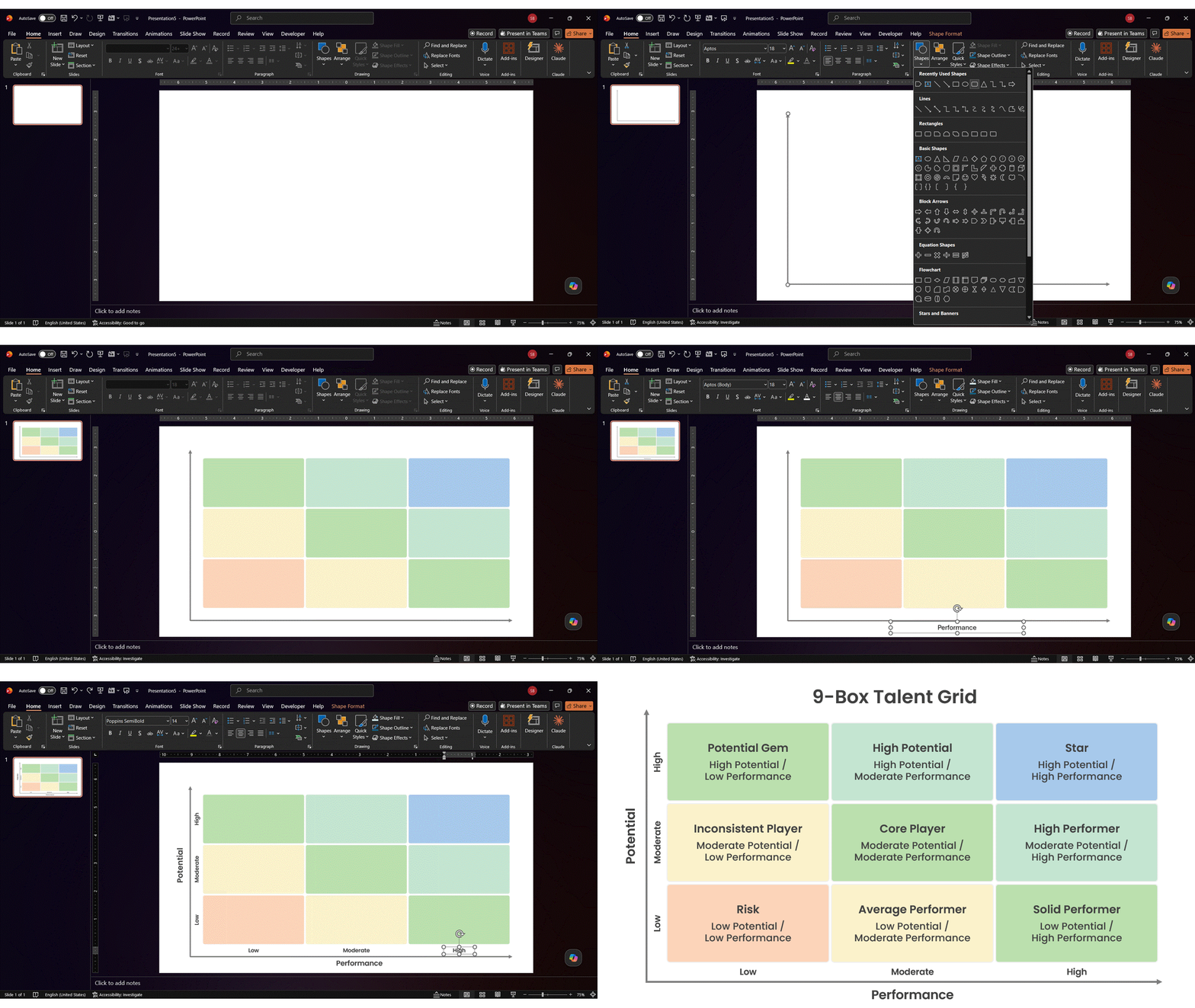
HR and managers place each person on the grid based on current performance (x-axis) and future potential (y-axis). Here is what each box in the 9 box talent grid means and the action it calls for — these are the 9 box talent review definitions every manager on a calibration panel should be working from before scores go on the board.
| Box | Potential / Perf. | What it means | Action | Timeline |
| Star | High / High | Top performer with room to grow further. Your successor bench. | Stretch assignments, leadership exposure, retention planning. | Bigger role in 6–12 months |
| High Potential | High / Moderate | Growing fast, not yet delivering at the top level. | Coach on execution; keep the growth runway open. | 1–2 years |
| Potential Gem | High / Low | Strong signals, weak results — often new, mis-roled or poorly supported. | Diagnose the cause before judging. Usually a role-fit or onboarding problem. | Re-assess in 2 quarters |
| High Performer | Moderate / High | Delivers consistently; growth steadier than a Star’s. | Reward and retain. Consider lateral moves to broaden scope. | Promote when a fitting role opens |
| Core Player | Moderate / Moderate | The reliable centre of the team. Most people sit here. | Skill development, recognition, engagement. Do not neglect them. | Ongoing |
| Inconsistent Player | Moderate / Low | Uneven output despite real capability. | Clarify expectations; find the blocker. | Re-assess in 1–2 quarters |
| Solid Performer | Low / High | Excellent at the current job; unlikely to go further. | Retain and value. Not everyone needs promoting. | Keep in role |
| Average Performer | Low / Moderate | Meets the bar, no upward trajectory. | Targeted development on specific gaps. | Ongoing |
| Risk | Low / Low | Low output, low trajectory. | Performance support plan, then a role change or exit conversation. | Act within 1–2 quarters |

What the Grid Signifies
Employees in the top-right box — high performance, high potential — are your near-term successor candidates and should be ready for senior roles within six to twelve months. The bottom-left box — low performance, low potential — calls for a performance support plan and, if that does not move things, a role change or exit conversation.
The boxes adjacent to the top-right run on a longer timeline. A High Potential or a High Performer can often reach the top-right box within one to two years with the right assignments.
The grid’s value is not the labels. It is what happens after. If the calibration session produces a file that sits in a shared drive until next year, you have created the appearance of talent management without the substance.
Advantages of the 9 Box Talent Review Grid
a) Strategic Evaluation of Talent
Companies can strategically examine their talent pool using this talent review matrix. HR and leadership teams can pinpoint individuals who have the potential to make a significant impact on achieving the organization’s strategic objectives. The organization assigns employees to groups based on their performance and potential, ensuring that talent investments align with long-term goals.
b) Customized Plans for Development
Beyond assessing talent, the 9 box talent review enables the development of personal growth plans for each individual. After grouping employees on the grid, employers can discuss the right action and customize development programs — skill development, mentorship, or leadership training — to meet each employee’s needs.
c) Finding Up-and-Coming Leaders
Finding workers with great potential is one of the best things about the 9 box talent review. These individuals fall into “High Potentials” or “Future Stars.” Action through stretch assignments and early skill identification guarantees a constant supply of capable leaders to take the initiative when needed.
d) Promoting Honest Conversation
The transparency and honesty of an organization’s culture are essential. The 9-box assessment facilitates open communication between HR, managers, and employees regarding potential and success. This transparency encourages constructive criticism and allows employees to direct their own development.
e) Knowledgeable Talent Management
Preparing future leaders for a company is crucial to ensure long-term continuity. The 9-box assessment streamlines the process by highlighting individuals ready for future leadership roles and responsibilities, so leadership transitions cause fewer disruptions.
f) Effective Management of Resources
Some groups struggle with allocating resources. The 9-box talent review makes resource allocation easier and helps ensure development budgets go where they return the most. Workers with great potential can receive extra training, while underachievers may receive further support to advance their careers.
g) A Structure for Development
Ultimately, the 9 box talent review promotes individual and organizational progress. It ensures that individuals are in suitable roles, promotes talent development, and fosters a culture of ongoing improvement — a good tool for managing talent and investing thoughtfully in your workforce.
Pros and Cons of the 9-Box Model
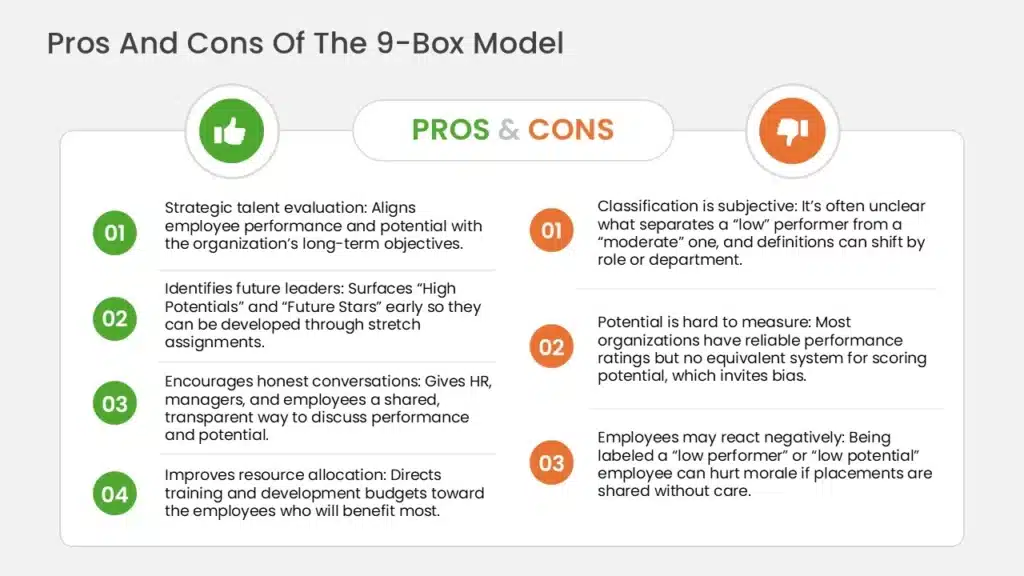
The 9-Box Model offers significant advantages, including a structured framework for assessing talent, guiding succession planning, and identifying high-potential employees. However, it is not without flaws; issues with classification and potential biases can skew results, and employee reactions to placement can lead to dissatisfaction. Awareness of these pros and cons allows HR professionals to refine their talent management strategies.
4 Pros to Know
- Strategic talent evaluation: Aligns employee performance and potential with the organization’s long-term objectives.
- Identifies future leaders: Surfaces “High Potentials” and “Future Stars” early so they can be developed through stretch assignments.
- Encourages honest conversations: Gives HR, managers, and employees a shared, transparent way to discuss performance and potential.
- Improves resource allocation: Directs training and development budgets toward the employees who will benefit most.
3 Cons to Consider
- Classification is subjective: It’s often unclear what separates a “low” performer from a “moderate” one, and definitions can shift by role or department.
- Potential is hard to measure: Most organizations have reliable performance ratings but no equivalent system for scoring potential, which invites bias.
- Employees may react negatively: Being labeled a “low performer” or “low potential” employee can hurt morale if placements are shared without care.
When NOT to Use a 9 Box Grid
The 9 box is not right for every situation:
- Teams under 10 people. The framework adds overhead without adding clarity. You already know your people — have the conversation directly.
- When your performance data is thin. If employees are new or your review process is inconsistent, the inputs are unreliable. Fix the performance data before layering a matrix on top of it.
- When it is being used to justify decisions already made: if calibration is really a process to retroactively validate one senior leader’s call, it erodes trust fast.
- When the culture will not support transparency, if placements will leak but cannot be discussed honestly, the grid does more harm than good.
How to Run a 9 Box Talent Review in 7 Steps
This section covers how to set up a 9-box grid for talent reviews in seven manageable steps.
1. Create your matrix
It’s a good idea to build a real matrix — with software or on paper — before you use one, so you can see the categories for your staff. Seeing how the boxes naturally flow and the labels they include can help you visualize where certain team members belong.
2. Label each of the nine boxes
You can name each box according to how you interpret its significance, even though each has an original label that combines performance and potential. A worker with moderate performance and potential may be considered a consistent member, while a high-potential employee would be viewed as an extraordinary asset. Your own labels help you and your managers understand what each box signifies for the assigned personnel.
3. Compose an action plan
The best way to use your talent matrix effectively is to develop an action plan before you begin. Creating a strategy helps you stay impartial when deciding how to support your team, and lets you determine what fundamental steps to take before classifying members according to how well they operate. Before you start, align on shared definitions so every manager rates performance and potential the same way.
4. Compile personnel data
Once your nine-box matrix and action plan are ready, gather performance data such as ratings and manager feedback, productivity history, and any recent changes in a person’s role. The more information you gather about each person, the better your decisions and the more accurate your read on their potential.
5. Place every employee in a box
Consider whether an employee’s performance and potential are high, moderate, or low before assigning them to one of the nine talent boxes. Evaluating these elements — including any personal circumstances — helps you have more candid, insightful conversations with your team members about their career goals.
6. Take specific circumstances into account
After assigning individuals to each box, review the results and think about anything that might make it difficult for some employees to succeed. If a previously top performer has slipped, consider whether the shift is a long-term change before meeting with them to discuss the data.
7. Use the grid to inform — not make — your decisions
When making judgments about an employee’s future — promotion, support, or an exit conversation — it’s more reliable to draw on several tools and data points than on the nine-box placement alone.
9 Box Assessment Questions to Ask
Use the same 9 box assessment questions for every employee so ratings stay comparable across managers.
To rate performance:
- Did they meet their goals for the review period, and how consistently?
- Is their output quality steady, or does it swing?
- How complex is the work they handle without support?
- Do they hit deadlines reliably?
- How do their results compare to what the role expects — not to their peers?
To rate potential:
- Have they taken on work meaningfully beyond their job description?
- How quickly do they pick up unfamiliar skills?
- Do they seek feedback and act on it?
- Do colleagues turn to them for direction without being told to?
- Do they show interest in — and aptitude for — a broader or more senior role?
- Could they succeed at the next level up if it opened in 12 months?
9 Box Talent Review Example
Here is a 9 box talent review example: how an eight-person marketing team maps onto the grid after a calibration session.
| Employee | Role | Perf. | Potential | Box | Agreed action |
| Priya | Content Lead | High | High | Star | Shadow the Marketing Director; succession candidate |
| Daniel | SEO Manager | High | Moderate | High Performer | Broaden scope to lifecycle marketing |
| Amara | Designer | Moderate | High | High Potential | Coach on delivery consistency; lead one campaign end-to-end |
| Tom | Paid Media | Moderate | Moderate | Core Player | Advanced analytics training |
| Ravi | Copywriter | High | Low | Solid Performer | Retain and reward in role; senior IC track |
| Beatriz | Junior Analyst | Low | High | Potential Gem | Only 4 months in — re-assess next cycle, fix onboarding gaps |
| Chen | Email Marketing | Moderate | Low | Inconsistent Player | Clarify expectations; identify what is blocking consistency |
| Marcus | Social Media | Low | Low | Risk | 90-day performance support plan |
Three things this example illustrates:
Beatriz is the one to watch.
Low performance, high potential, four months in the role. A grid read literally would flag her as a problem. The calibration conversation surfaced that she is new and under-supported — a management issue, not a talent issue. This is exactly why placement should never be the end of the discussion.
Ravi shows why “low potential” is not an insult.
He is excellent at his job and does not want to manage anyone. Labelling him low potential is only damaging if you treat the grid as a ranking rather than a planning tool.
Most of the team is in the middle.
That is normal and healthy. If your grid has everyone in the top-right, your calibration is not working.
Every case here is unique, and fixing onboarding gaps is often the real action item hiding behind a Potential Gem placement like Beatriz’s.
The 9 Box Talent Review Template
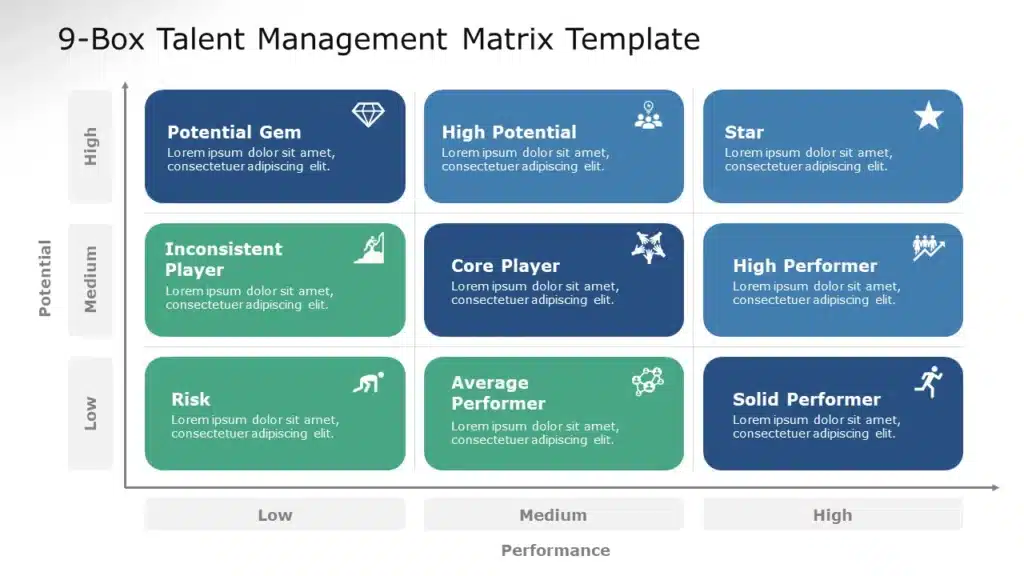
SlideUpLift’s talent management matrix template is fully editable in PowerPoint and Google Slides. All nine boxes come pre-labelled — Potential Gem, High Potential and Star across the high-potential row; Inconsistent Player, Core Player and High Performer across moderate; Risk, Average Performer and Solid Performer across low — and every label, colour and category is editable to match how your organisation defines its own boxes.
Most 9 box assessment templates are Excel files or Miro boards. If your talent review ends in a leadership presentation — and it usually does — a slide-native 9 box talent review template means you are not rebuilding the grid twice.
Teams that run this every cycle often pair it with a succession planning presentation and pull the box layout from SlideUpLift’s Matrix Collection of PowerPoint Templates when they need a different grid framework for the same meeting.
How to Present a 9 Box Talent Review
There are various ways to deliver a 9 box grid talent review. The traditional method is a 3×3 grid on a whiteboard with sticky notes for employee placements — reusable in theory, but prone to disarray in practice. Google Sheets or Excel is another option for displaying the grid and entering staff data, though it isn’t especially presentable. A pre-made template is usually the quickest route, and it holds up well when the review moves from a working session into a leadership readout.
A PowerPoint presentation eases the job of giving a 9-box talent review. When discussing the framework in a meeting, you can add animations to the template to make it more engaging, and store the file for the next cycle.
A well-organised grid is easier to present live, since everyone can see why a person landed where they did.
Applications of the 9 Box Matrix
Whether your team calls it a talent management 9 box matrix or a talent 9 box matrix, the goal is the same: connect performance data to real development decisions. Five places this shows up:
Succession Planning: The matrix helps identify high-potential workers who are prepared to assume leadership positions in the future. Ensuring people can take over critical roles when needed usually starts with the ability to map critical roles on an org chart and match names to them.
Talent Development: By highlighting where workers need additional training, the matrix helps direct development initiatives — unique training and growth opportunities for high-potential employees in particular.
Performance Management: The 9-box matrix evaluates both present performance and future potential in one view, which supports every conversation about goal-setting and development areas.
Workforce Planning: By surfacing possible leadership or skill gaps, the matrix supports training programs, hiring plans, and other workforce decisions.
Improved Employee Engagement: Knowing where each person fits in the matrix helps managers match high-potential, high-performing workers with suitable challenges — which tends to raise both satisfaction and retention.
Best Practices for Implementing the 9-Box Model
Implementing the 9-box model effectively starts with engaging leadership and HR in the planning process, so everyone shares an understanding of the model’s purpose and benefits. Clear implementation timelines and responsibilities streamline the rollout, and regular training keeps the model applied consistently across departments.
Communicate the purpose of the review to employees before running it — how it works, what they can expect, and how their contributions will be valued. Workshops or short informational sessions are a good venue for questions. Encourage self-assessment too: asking employees to reflect on their own performance and set personal goals builds a sense of ownership over their development, and managers need the skills to facilitate constructive conversations during the process.
Shifting from a single annual cycle to moving to more frequent check-ins makes the model more dynamic and responsive. Ongoing reviews give employees timely feedback and let them adjust their development plans as needed, and they give managers a better read on trends in performance over time — which then feeds back into more accurate 9-box placements the following cycle.
A few concrete actions keep the model working between cycles: give continuous feedback rather than saving it all for the calibration meeting; build a personalised development plan for every placement, not just the Stars; track progress with regular check-ins so course corrections happen early; offer real training and mentorship opportunities; and recognise the people who improve, not only the people who were already at the top.
Limitations of the 9 Box Assessment Grid
1. Issues with Classification
Ranking people as low, moderate, or high on performance and potential is inherently fuzzy — it’s often unclear what separates one band from the next, and the line can shift by role or department. Precisely describing the behaviours and competencies behind each category helps, but differences in what a role requires will always introduce some subjectivity.
2. Differentiating Between Potential and Performance
Most companies have a reasonable system for rating performance but no equivalent for potential, which invites bias — a strong performance score can quietly inflate someone’s potential rating even though the two are meant to measure different things.
3. Workers’ Reactions
Being labelled a “low performer” or “low potential” employee can land hard, and it’s a genuine risk of the model. There is no consensus among practitioners on whether to share box placements with employees, and sharing them without care can create a visible hierarchy among peers, which can strain trust and teamwork.
What to Do When an Employee Disagrees With Their Placement
If you share placements, some people will push back. Handle it in this order:
- Ask what they think the gap is. Often they are reacting to the label, not the assessment.
- Show the inputs. If you cannot point to specific evidence, the placement was probably weak — that is on the process, not them.
- Separate the two axes. “Low potential” and “low performance” mean different things, and people conflate them. A Solid Performer hearing “low potential” often thinks they have been told they are bad at their job.
- Make it time-bound. A placement is a snapshot with today’s information, not a verdict. Say so, and mean it — re-assess next cycle.
- If they are right, change it. A calibration process that never changes its mind is not a calibration process.
An Alternate Approach: 360-Degree Feedback
The 360-degree evaluation works alongside the 9-box concept rather than replacing it. Employees who go through 360-degree feedback get input from multiple sources — managers, coworkers, clients, and vendors all provide feedback on their performance.
Best practice is to include reviewers who work directly and consistently with the person being reviewed, so peers are evaluating actual performance rather than handing out high ratings based on friendship. Compared to a 9-box placement alone, 360 feedback offers a more thorough, multi-rater picture of someone’s strengths and growth areas, and it can flag where a manager’s read on an employee differs from everyone else’s — useful information heading into a calibration conversation.
It pairs particularly well with a personal SWOT analysis for the employee’s own development planning, or with SlideUpLift’s HR SWOT analysis template for the HR side of the conversation.
Conclusion
The 9 box talent review is an effective way to locate, develop, and retain your best employees based on the quality of their work. It’s a straightforward, efficient method for evaluating performance and potential together.
Organizations can use it to make well-informed decisions about performance management, succession planning, and development. But it’s worth remembering that the 9 box grid is only one tool in a talent management toolbox — combine it with other techniques, like 360-degree feedback, for a thorough approach.
FAQs
-
What is the 9 box review and how does it work in performance management?
A 9 box talent review is a performance management tool that plots employees on a 3×3 grid using two dimensions: current performance and future potential. Managers collect performance data, place each employee in one of nine boxes, and use that placement to guide development, promotion, or succession decisions.
-
How can I use the 9 box grid to assess my team's potential and performance?
Start by building the matrix, labeling each of the nine boxes, and gathering performance data such as ratings, productivity history, and manager feedback. Then place each employee in the box that reflects their performance and potential level, and use the results to guide individual development conversations.
-
What are the main benefits of using the 9 box review for talent management?
The 9 box review helps identify high-potential employees for succession planning, supports personalized development plans, and gives HR and leadership a shared, visual way to discuss performance and growth. It also promotes transparency by encouraging open conversations between managers and employees about career paths.
-
What are some common limitations or criticisms of the 9 box review model?
Three limitations come up most often: classifying employees as low, moderate, or high can be subjective; potential is harder to define and measure than performance; and employees placed in lower boxes may react negatively if they learn their ranking. Because of this, the grid works best alongside other evaluation tools rather than as a standalone system.
-
How is the 9 box grid used in succession planning for organizations?
Employees in the high-performance, high-potential box are typically flagged as near-term successor candidates, often ready for leadership roles within six months to a year. Employees in adjacent boxes may be developed over a longer timeline as they work toward that top box.
-
What are the best practices for implementing a 9 box talent review process?
Engage HR and leadership early to build a shared understanding of the model, and communicate the purpose and process clearly to employees before running reviews. Pair the grid with regular check-ins rather than a single annual review, and translate each placement into a concrete, individualized development plan.
-
How does the modern 9 box review differ from traditional versions?
Traditional 9 box reviews were often done once a year, sometimes with sticky notes on a whiteboard. Modern versions tend to use digital templates, are paired with more frequent check-ins instead of a single annual cycle, and are increasingly combined with 360-degree feedback for a fuller picture of performance.
-
Can using the 9 box review model negatively impact employee careers?
It can, if placements are communicated poorly or feel arbitrary. Being labeled a low performer or low potential employee can affect morale and working relationships, which is why many organizations weigh carefully whether and how to share box placements with employees directly.
-
Is the 9 box method still relevant, or has it become outdated in today's workplaces?
The 9 box grid is still widely used because it offers a simple, visual way to align performance and potential with succession and development planning. That said, many organizations now pair it with other methods, such as 360-degree feedback, rather than relying on it alone.
-
Are there any free resources for running a 9 box grid review?
The assessment questions in this guide are free to use as-is for your own calibration sessions. SlideUpLift’s 9 box talent management matrix template, which lets you adjust labels and categories to match your organization’s needs, is a paid template ($4.99) rather than a free one
Table Of Content


Related posts from the same category

14 Sep, 2021 | SlideUpLift
Learn How To Give A Great Performance Review To Your Employees
This article defines what is a performance review, explains how to write and present a successful employee performance review. If you work in management or as a supervisor, you may

20 Feb, 2024 | SlideUpLift
Start Stop Continue Retrospective: A Complete Guide With Examples, Templates & Exercises
A Start Stop Continue retrospective is a team reflection exercise where each member names one thing the team should start doing, one it should stop, and one it should continue.
![Org Chart Examples: 12 Real Examples by Type & Industry [+ Free Templates]](https://slideuplift.com/wp-content/uploads/2024/08/COVER-PAGE_12-Org-Chart-Examples-You-Need-To-Check-Out-Templates_JULY26.jpg "Org Chart Examples: 12 Real Examples by Type & Industry [+ Free Templates]")
5 Aug, 2024 | SlideUpLift
Org Chart Examples: 12 Real Examples by Type & Industry [+ Free Templates]
An organizational chart (org chart) is a diagram that shows a company's internal structure — who reports to whom, how teams are grouped, and where each role sits in the

9 Oct, 2022 | SlideUpLift
5 Organizational Chart Archetypes for PowerPoint Presentations (including Templates)
When we think about organizational charts, we frequently think of top-down, pyramid-like charts represented visually. The fact remains, that this is only one of many different variants of business organizational

6 Jan, 2021 | SlideUpLift
7 Tips for Remote Employee Onboarding | (Plus Employee Onboarding Templates )
Virtual work setups are quickly rising in popularity amongst companies worldwide. A report by FlexJobs shows that remote work grew by 44% in the last five years. In the last

28 Feb, 2023 | SlideUpLift
Gardner’s Theory of Multiple Intelligences: All 8 Types Explained
Quick Answer: Gardner's Theory of Multiple Intelligences proposes that intelligence is not one fixed ability but a set of at least eight distinct types — linguistic, logical-mathematical, spatial, bodily-kinesthetic, musical,
8 Dec, 2021 | SlideUpLift
BCG Matrix: An All Time Classic for Portfolio Management
A corporation with a large portfolio must evaluate its product lines on a regular basis to determine which are lucrative, which are losing money, and which require improvement. This method

3 Jan, 2024 | SlideUpLift
How to Build a PMO From Scratch? PMO Setup Explained!
A Project Management Office document (PMO) is pivotal in ensuring organizational success. It provides a centralized hub for standardizing project processes, improving efficiency, and facilitating effective communication. It enhances project

4 Mar, 2024 | SlideUpLift
5 Whys Root Cause Analysis: How It Works (With Examples)
Quick Answer 5 Whys root cause analysis is a problem-solving technique developed at Toyota that asks “why” repeatedly (typically five times) to trace a problem from its symptoms back to

9 Feb, 2024 | SlideUpLift
How To Loop A PowerPoint Slideshow? Detailed Guide
Microsoft PowerPoint is a popular application for creating and delivering presentations. PowerPoint has numerous options for adding flair and taking your presentations a notch higher, such as the ability to