
 Flat 4


What Is a Pecha Kucha Presentation? The Complete 20×20 Guide (With Examples & Ideas)
Quick Answer: A Pecha Kucha presentation (also written PechaKucha) is a format in which you show 20 slides for 20 seconds each, and the slides advance automatically. The whole talk lasts exactly 6 minutes and 40 seconds. “Pecha kucha” is Japanese for “chit-chat.” Architects Astrid Klein and Mark Dytham created the format in Tokyo in 2003, and it is now used in classrooms, conferences and business meetings.
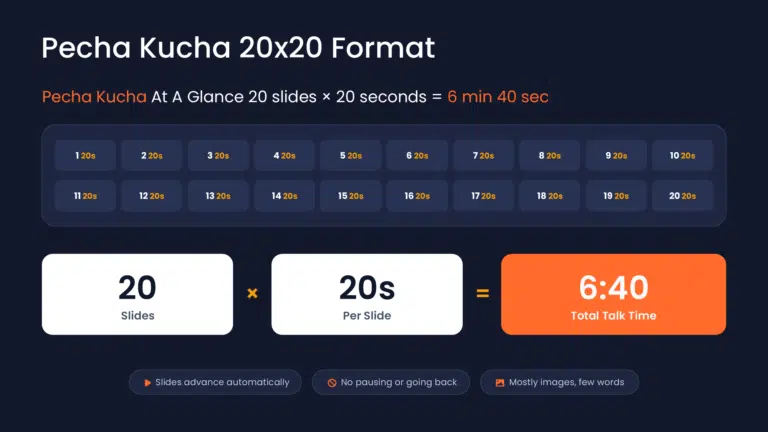
We all know presenting isn’t just about facts; it’s about telling a story. Pecha Kucha turns that idea into a strict set of rules: 20 image-led slides, 20 seconds each, no pausing and no going back. The constraint forces you to cut every line that doesn’t earn its place, which is exactly why audiences remember these talks.
In this guide, you’ll learn what Pecha Kucha means and where it came from, the rules of the 20×20 format, why it works, how to build one step by step, how to set 20-second timing in PowerPoint and Google Slides, topic ideas, real examples to watch, and the common challenges to plan for.
What Is a Pecha Kucha Presentation?
A Pecha Kucha presentation is a short, timed format: you show 20 slides, each for exactly 20 seconds, and the slides advance automatically. That gives you a total of 6 minutes and 40 seconds to get your message across. There’s no pausing and no going back, just a steady, image-led flow in which your voice tells the story.
A Quick Pecha Kucha Example
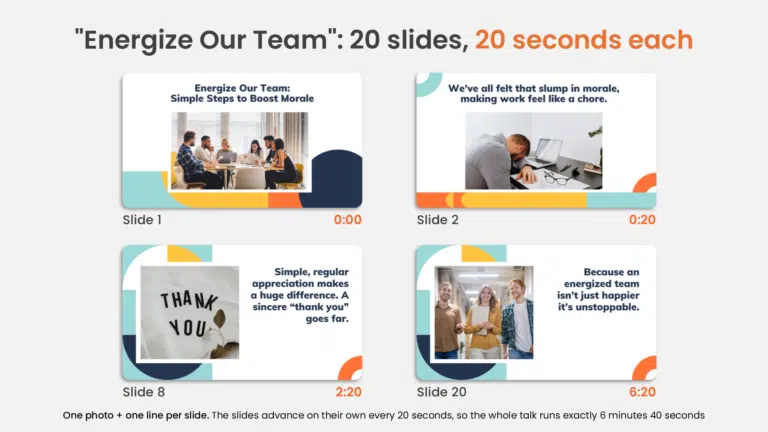
Here’s how it looks in practice. In our “Energize Our Team” Pecha Kucha, slide 1 shows a team around a meeting table with the title “Simple Steps to Boost Morale.” After 20 seconds, it advances on its own to a man slumped over his laptop: “We’ve all felt that slump in morale.” By slide 8, a simple “Thank you” image makes the point that regular appreciation goes far. Slide 20 closes on three smiling colleagues and the message that an energized team isn’t just happier, it’s unstoppable. One photo and one line per slide, 6 minutes 40 seconds in total. See all 20 slides in the full example below.
Pecha Kucha Meaning and Origin
Pecha kucha (ぺちゃくちゃ) is Japanese for “chit-chat.” Architects Astrid Klein and Mark Dytham of Klein Dytham Architecture created the format in Tokyo in February 2003. They wanted to draw people to SuperDeluxe, their event space in Roppongi, and to let young designers show their work and swap ideas without long, rambling talks. Their guiding idea was simple: talk less, show more.
The format spread quickly. Cities in Europe began hosting PechaKucha Nights in 2004, and by April 2019 the events had been held in more than 1,142 cities worldwide. PechaKucha is a registered trademark of PechaKucha, Inc. Today the 20×20 format is also used well beyond design events, in classrooms, team meetings and conferences.
Explore what exactly is a thorough and mindfully done storytelling for business presentations.
Pecha Kucha Rules at a Glance
| Rule | Pecha Kucha standard |
| Number of slides | 20 |
| Time per slide | 20 seconds |
| Total length | 6 minutes 40 seconds |
| How slides advance | Automatically. You can’t pause, skip ahead or go back. |
| What goes on a slide | Mostly images, with little or no text (a strong convention, not a ban) |
| Your role | Narrate the story. Your voice carries the detail; the slide carries the feeling. |
Can a Pecha Kucha have words? Yes. The only fixed rules are 20 slides and 20 seconds per slide. Image-led slides are the norm because the audience can’t read and listen at the same time, so keep any on-slide text to a few words: a label, a single number or a short quote.
Why Does the Pecha Kucha Format Work So Well?
Here are the main reasons the 20×20 format works:
- Enforces Conciseness: Distills messages to their core; ensures precise 6m 40s duration.
- Maximizes Visual Impact: Leverages image-only slides for memorable, impactful content.
- Boosts Audience Engagement: Rapid, auto-advancing slides keep attention hooked, preventing fatigue.
- Promotes Message Clarity: Forces succinct articulation for focused, easy-to-understand ideas.
- Enhances Information Retention: Visuals are processed faster and retained longer than text. (Source: IDF)
- Cultivates Presenter Discipline: Demands rigorous practice for precise, time-bound delivery.
- Ensures Dynamic Pacing: Auto-progression maintains an energetic flow, preventing stagnant moments.
- Reduces Information Overload: Presents information in digestible chunks, avoiding cognitive overload.
- Fosters Creative Storytelling: Constraints encourage innovative, compelling visual narratives.
- Optimizes Time Efficiency: Maximizes value in minimal time, ideal for busy schedules.
There’s research behind this, too. A 2024 study of 230 nursing students in Tanzania, published in BMC Medical Education (Haramba, Millanzi and Seif), found that Pecha Kucha presentations had a significant effect on students’ presentation skills and appeared to boost their confidence. The same paper cites earlier work by Warmuth (2021), in which Pecha Kucha presentations scored an average engagement rating of 4.08, compared with 2.63 for traditional PowerPoint presentations.
Pecha Kucha vs. Ignite vs. Lightning Talk
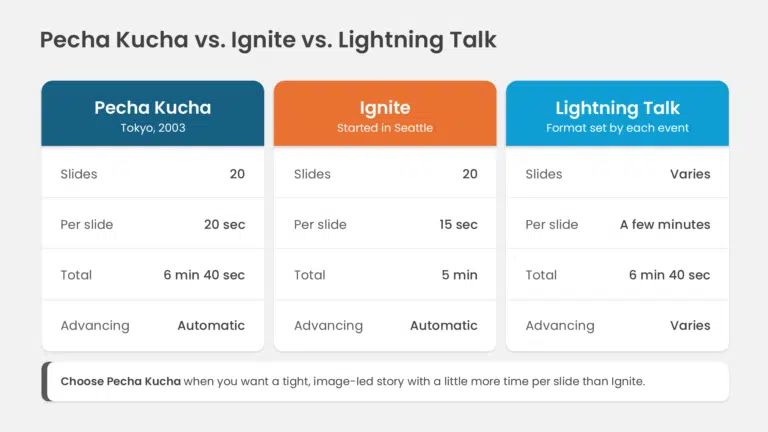
Pecha Kucha is often confused with other short-talk formats. Here’s how they compare:
| Format | Slides | Time per slide | Total length | Advancing |
| Pecha Kucha | 20 | 20 seconds | 6 min 40 sec | Automatic |
| Ignite | 20 | 15 seconds | 5 minutes | Automatic |
| Lightning talk | Varies | Varies | A few minutes (set by the event) | Varies |
If you need a longer or more flexible format, see our guide to types of presentation.
How to Create a Pecha Kucha Presentation?
Creating a Pecha Kucha presentation is all about storytelling. You have exactly 6 minutes and 40 seconds and only 20 images, so the challenge is to boil your message down to its essentials and tell it as a compelling story.
Let’s understand step by step how you can create a typical Pecha Kucha presentation.
Start with a Clear Topic:
To start working on a Pecha Kucha presentation that focuses on storytelling, you must be super clear on what needs to be communicated as the core message; your whole presentation is built on it.
So nail down your main topic, here’s how to do it:
Brainstorm Broadly:
Begin by listing all potential subjects that genuinely excite you or directly relate to your presentation’s goal. Don’t filter yourself at this initial stage – just get ideas down!
Add at the end: Stuck for a starting point? See our Pecha Kucha topic ideas below.
Identify Your “Why”:
For each potential topic, dig deeper. Ask yourself: “Why is this truly important?” “What specific problem does it solve or what value does it offer?” “Why should my audience genuinely care about this?”
Audience Lens Check:
Always consider your specific audience. What do they truly need or want to hear or learn from you? What type of message will resonate most strongly with them?
The “So What?” Test:
Once you’ve narrowed down a potential core topic, summarize it in one concise sentence. Then, ask yourself: “So what?” You’re likely on the right track if your answer is compelling and clear.
The “Can I Tell It Visually?” Check:
Since Pecha Kucha relies heavily on visuals, critically evaluate your topic. Can it be effectively and engagingly illustrated with images? Avoid subjects that are overly abstract or require extensive text to explain.
Structure Your Presentation:
Imagine your talk as a story with 20 distinct moments, each getting its own slide. Plan your message for smooth transitions.
Map your story arc across 20 slides. Each slide must build logically on the last. Use a storyboard (paper or digital) to assign one distinct idea or visual prompt to each ‘beat’ for clarity.
- Execution: (Use the storyboard method)
- Draw 20 boxes (storyboard). Write one core idea per box – be flexible as you can!
- Arrange ideas for a smooth, logical flow from slide 1 to 20.
- Jot down key spoken points for each slide, aiming for ~20 seconds.
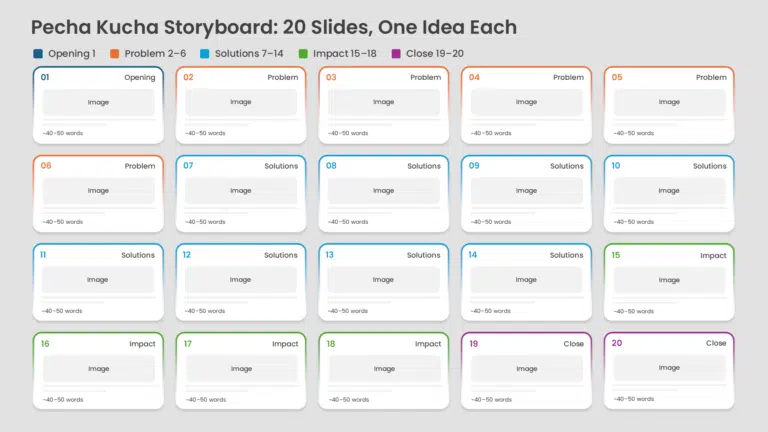
At a typical speaking pace of roughly 130–150 words per minute, 20 seconds is about 40–50 words per slide. Writing to that length first stops you from cramming, and it makes it easier to find an image that matches what you will actually say. Put each slide’s script in the speaker notes so it travels with the deck.
Choose Your Visuals:
Now that your core topic and structure are clear, you can determine how to present them visually for your Pecha Kucha presentations. This step is subconsciously done alongside the structuring.
When structuring the flow, you form a basic ideation of how you will use your pictures. Here’s how to precisely pick those perfect visuals:
- Relevance with the 20-second message (20-second connection): Stick to a single, powerful image per slide that immediately and directly supports the specific point or sub-topic you’re elaborating on within those 20 seconds.
Choosing truly relevant images goes beyond literal depiction. Sometimes, the most powerful visuals connect indirectly to your message, using metaphor, symbolism, or even a touch of subtle humor or wit, always maintaining a professional tone, is your way to go.
Two Main Ways to Use Images in a Pecha Kucha
You can use an image metaphorically, where it symbolises your point, or directly, where it shows the thing you are talking about.
1. Metaphorical image

If discussing ‘company growth in a challenging market,’ you might show a single, vibrant green sprout breaking through cracked earth, rather than a complex bar chart; this image instantly communicates ‘resilience’ and ‘growth,’ allowing your words to detail the specific strategies.
2. Direct image

For a direct, attention-grabbing example, if elaborating on ‘exceptional customer satisfaction,’ instead of a generic survey screenshot, you could display a close-up photograph of a customer’s genuine, delighted expression while interacting with your product; this vividly conveys success without needing words.
- Pick High-Resolution Images: Always pick high-resolution images that immediately impact the visual.
- Emotional Connection: Choose visuals that spark emotion, curiosity, or a strong reaction in your audience.
- Legal & Seamless: Ensure all images are legally sourced and seamlessly blend with your overall message. If a licence requires attribution, here’s how to cite images in PowerPoint.
Keep The Overall Presentation Clean:
Keep your slides simple and image-heavy. One strong photo or graphic per slide works best. Avoid blocks of text; your voice is the main storyteller.
Here are quick tips on how to keep your Pecha Kucha presentation clean:
- Embrace White Space: Let your visuals breathe! Don’t overcrowd slides; ample space makes your image pop and your message clearer.
- Minimalist Design: Stick to clean layouts, simple backgrounds, and avoid distracting animations or complex transitions that steal attention.
- Consistent Aesthetics: Use a consistent color palette, font (if any text), and overall visual style across all 20 slides for a cohesive and professional look.
- No Clutter: Avoid adding multiple images, busy charts, or excessive graphics per slide. If it’s not essential and immediately digestible, leave it out.
With only 6 minutes and 40 seconds on the clock, there’s no room or time for clutter.
Set Your Slides to Advance Every 20 Seconds
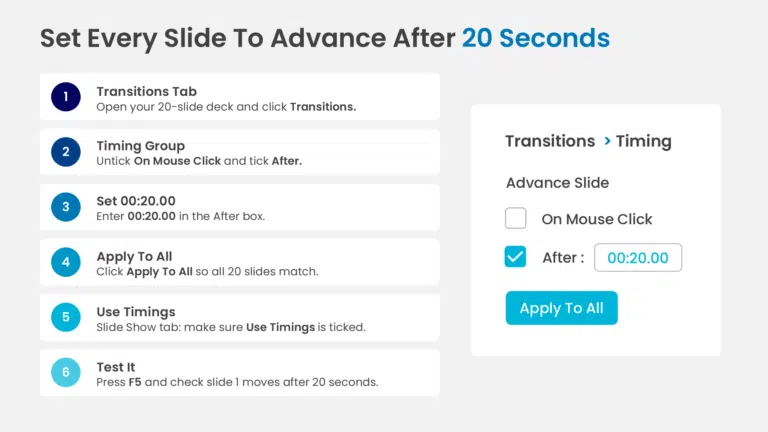
A true Pecha Kucha advances on its own, so set the timing before you rehearse.
In PowerPoint
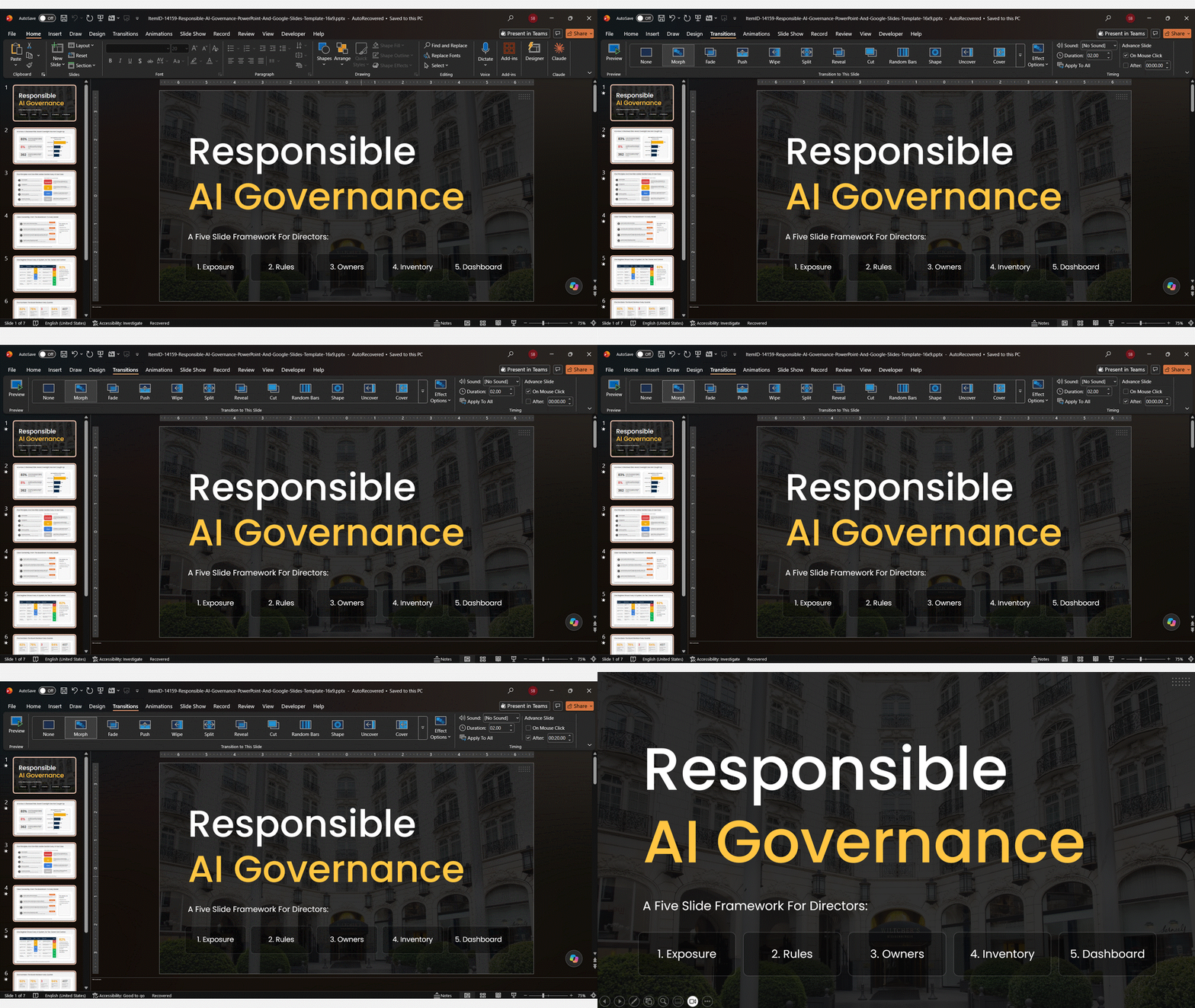
- Open your 20-slide deck and go to the Transitions tab.
- In the Timing group, uncheck “On Mouse Click” and check “After”.
- Set the “After” box to 00:20.00.
- Click “Apply To All” so every slide gets the same 20-second timing.
- On the Slide Show tab, make sure “Use Timings” is checked.
- Press F5 to play from the beginning and confirm slide 1 advances after 20 seconds.
Tip: set the transition to None or a very short Fade so it doesn’t eat into your 20 seconds. More on this in our guide to slide transitions in PowerPoint.
In Google Slides
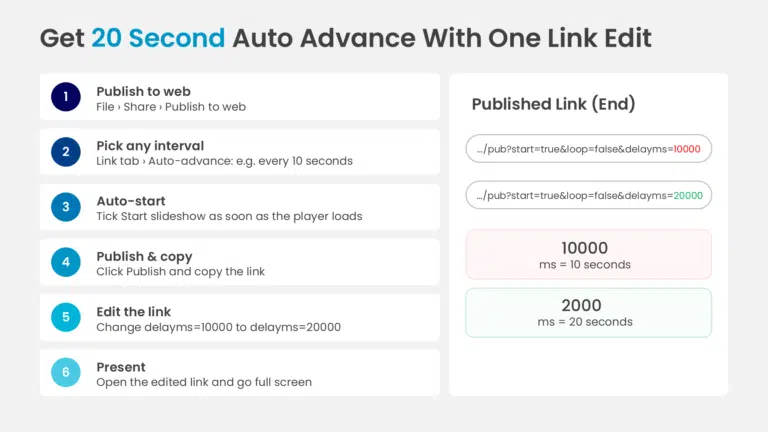
Google Slides’ built-in auto-advance doesn’t offer a 20-second option, so the usual workaround is to publish the deck and edit the timing in the link:
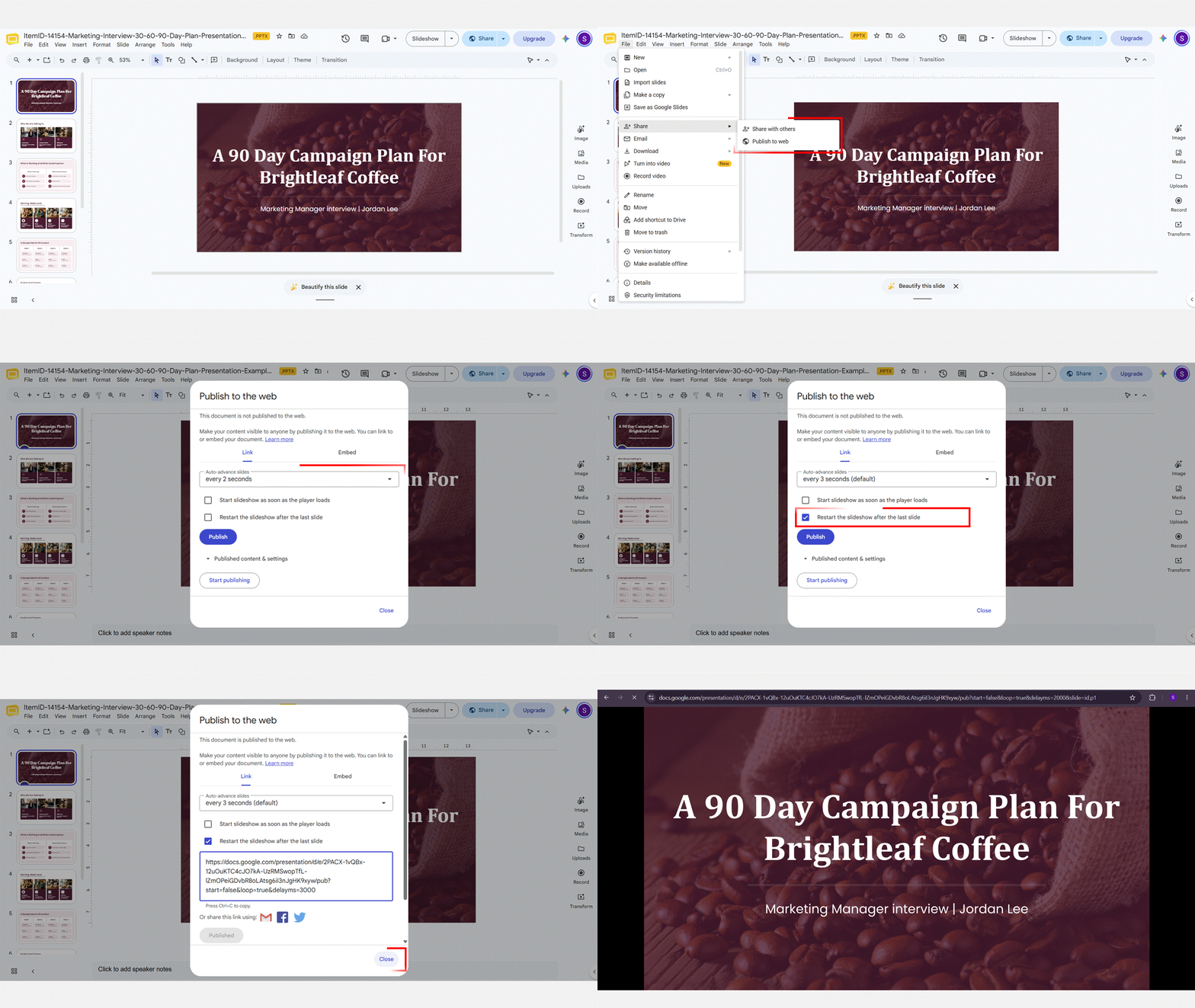
- Go to File > Share > Publish to web.
- On the Link tab, under “Auto-advance slides”, choose any interval (for example, every 10 seconds).
- Tick “Start slideshow as soon as the player loads”. Leave “Restart the slideshow after the last slide” unticked.
- Click Publish, confirm, and copy the link.
- Paste the link into your browser’s address bar. At the end you’ll see “delayms=10000” (10,000 milliseconds). Change it to “delayms=20000” and press Enter.
- Present from this edited link in full screen.
Important: anyone with a published link can view the deck. For confidential content, use PowerPoint instead, or stop publishing after your talk (File > Share > Publish to web > Stop publishing). For other auto-play options, see how to make Google Slides play automatically.
Practice With a Timer:
Practicing with a timer is so important when preparing to present a Pecha Kucha presentation, as this format is strictly time-restricted.
Because the slides move on their own, rehearse with auto-timing switched on, not just your notes against a stopwatch, so you feel exactly when each slide changes. Aim to finish each slide’s script a second or two early, and keep rehearsing until you can hit all 20 changes without looking at the screen.
Recording a practice run is the fastest way to spot slides that feel rushed or drag (here’s how to record a presentation in Google Slides). If you want a visible countdown while you rehearse, you can also add a timer to Google Slides.
Just to summarize, here’s a very brief list of the benefits of practicing your Pecha Kucha presentation:
- Mastering the 20-Second Sprint: Ensures you perfectly fit your message into each strict 20-second slide, preventing rushing or running out of time.
- Perfecting Overall Timing: Helps you flawlessly hit the exact 6-minute 40-second total duration, ensuring a complete and polished delivery.
- Optimizing Content for Brevity: Forces you to refine and make your spoken content incredibly concise and impactful, specifically for this rapid-fire format.
- Building Confidence & Calm: Reduces anxiety and helps you stay calm and on track during the actual presentation, allowing for a smooth and natural delivery.
- Seamless Transitions: Allows you to rehearse the precise flow between slides, making each visual and verbal shift feel natural and impactful.
What Should Each Slide Include?
Since your voice tells the story and the timing is tight, every single Pecha Kucha slide becomes a crucial piece of your narrative. Here’s what each of your 20 slides should aim to achieve:
- One Strong Image: Each slide needs a single, powerful visual that immediately conveys your message, leaving no room for confusion.
- Minimal Text: Think ‘less is more’—a word or two at absolute most, because your compelling voice and the visual should do all the heavy lifting.
- Consistent Style: Maintain a unified design theme across all 20 slides to ensure a professional, cohesive, and seamless visual journey for your audience.
- Emotional Hooks: Select images that not only illustrate but also evoke feelings, curiosity, or a strong reaction, forging a deeper connection with your audience.
- A 20-Second Script (Off the Slide): About 40–50 spoken words per slide, kept in your speaker notes, not on the slide itself.
How Businesses Can Use Pecha Kucha
Even though Pecha Kucha kicked off in artsy circles, its super-fast, visual style is totally perfect for the crazy-busy business world. It’s like your secret weapon for cutting through all the corporate chatter and making sure your message really hits home. Here are just a few ways Pecha Kucha can make you a workplace superstar:
- Project Updates: Seriously, ditch those endless status meetings! Pecha Kucha presentation format lets you keep your team laser-focused and totally clued in on progress, milestones, and challenges, without hogging anyone’s precious time.
- Product Pitches: Got a brilliant idea or a cool new product to sell? Zip through the core benefits with a Pecha Kucha presentation! You’ll present fast, clear, and memorable points, so your audience gets the value right away.
- Team Introductions: Make those new hire intros actually fun! Pecha Kucha is a quick, visual and entertaining way for newcomers to meet the team and understand roles, helping everyone connect from day one. (See also: how to introduce team members in a presentation.)
- Training Sessions: Ready to ditch boring training? The Pecha Kucha presentation style turns dull lessons into dynamic learning experiences. It chops complex stuff into easy-to-digest, visually unforgettable chunks, making sure everyone learns and stays hooked!
Pecha Kucha Topic Ideas
A good Pecha Kucha topic passes two tests: you can say why it matters in one sentence, and you can picture 20 distinct images for it. Here are 20 ideas to adapt:
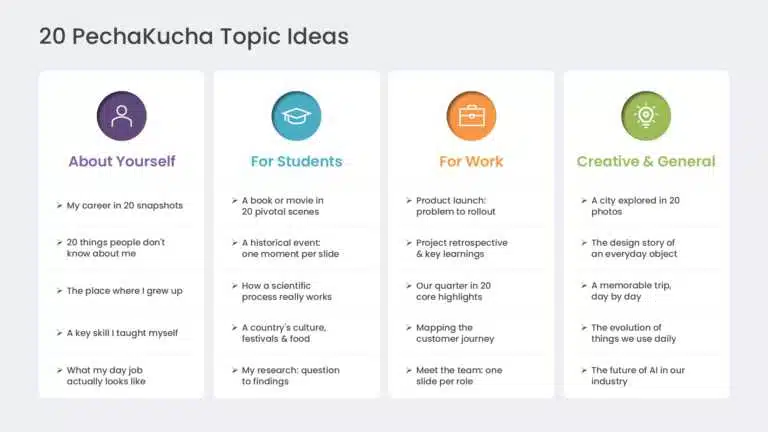
Pecha Kucha About Yourself
- My career in 20 snapshots
- 20 things people don’t know about me
- The place I grew up
- A skill I taught myself
- What my job actually looks like
For a structured career story, see our career presentation guide.
Pecha Kucha Ideas for Students
- A book or film told in 20 scenes
- A historical event, one moment per slide
- How a scientific process works (for example, the water cycle)
- A country’s culture through its food, festivals and landmarks
- My research project, from question to findings
More classroom guidance is in our academic presentation guide.
Pecha Kucha Ideas for Work
- A product launch: problem, feature, proof, rollout
- A project retrospective: what worked and what didn’t
- Our quarter in 20 highlights
- A customer’s journey from first contact to renewal
- Meet the team: one slide per person or role
Creative and General Pecha Kucha Topics
- A city in 20 photos
- The design story behind one everyday object
- A trip, day by day
- The history of something we use every day
- What the future of [AI / work / your industry] could look like
Need more? Browse our informative speech topics and PowerPoint night ideas. Many of them work as Pecha Kucha talks.
Pecha Kucha Example: A 20-Slide Breakdown
Here’s a sample Pecha Kucha you can adapt. The scenario: you’re presenting to corporate leaders on simple steps to boost team morale. Each row shows the image to use and the core message for that slide.
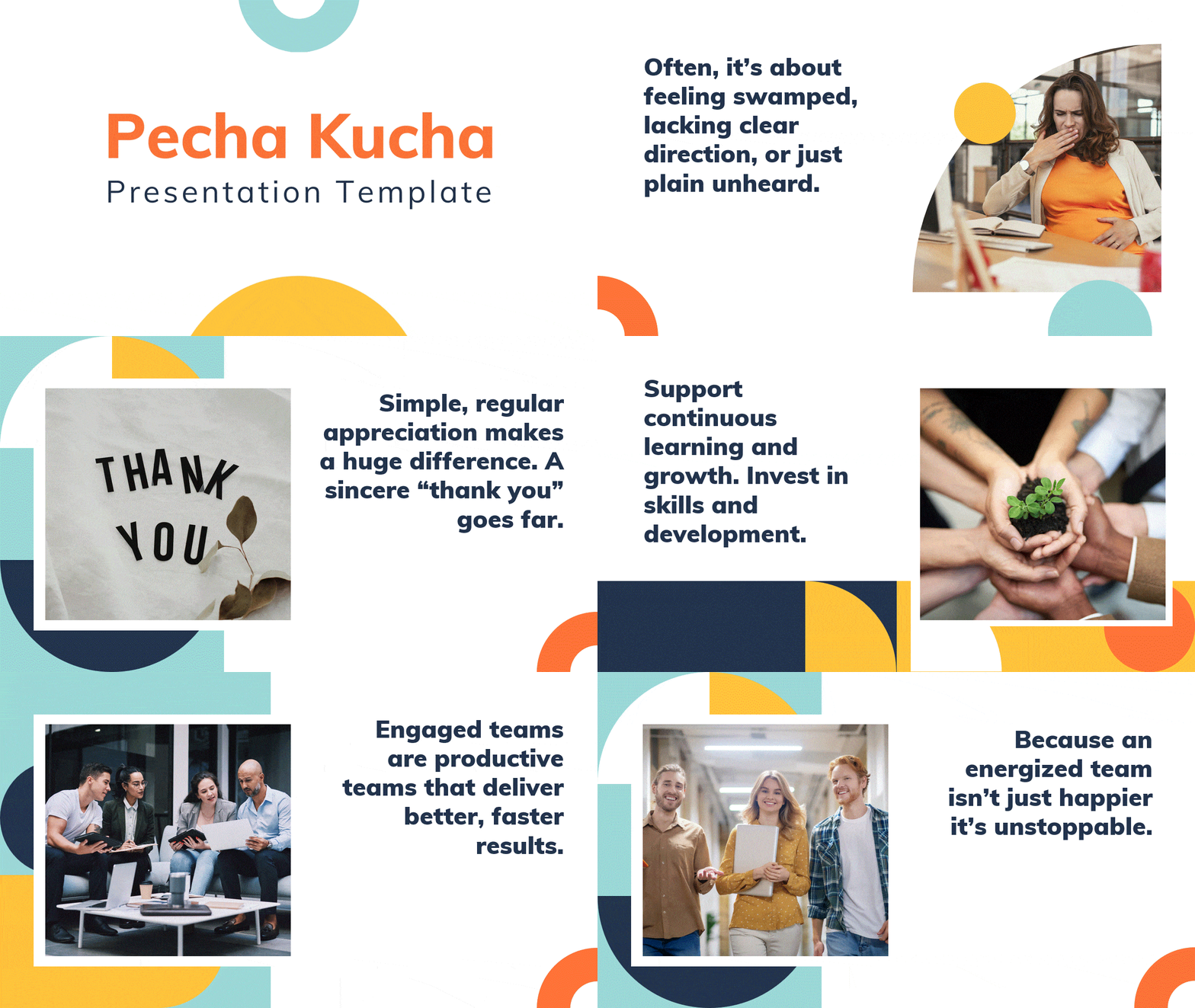
Want to use this deck? Download the Pecha Kucha presentation template and swap in your own photos and script.
Note: these lines are each slide’s headline. When you present, expand each one into about 40–50 spoken words so it fills the full 20 seconds.
Main idea: “Energize Our Team: Simple Steps to Boost Morale”
| Slide | Image to show | What you say (core message) |
| Opening | ||
| 1 | A vibrant, energetic team photo or a bold title graphic | Welcome! Today, we’re talking about something vital: our team’s energy. |
| The problem (slides 2–6) | ||
| 2 | A single, drooping houseplant in a dim office | We’ve all felt that slump in morale, making work feel like a chore. |
| 3 | A question mark hovering over a blurry group of people | When energy dips, focus fades, and we miss opportunities to shine. |
| 4 | A person looking overwhelmed by a mountain of paperwork on a desk | Often, it’s about feeling swamped, lacking clear direction, or just plain unheard. |
| 5 | A closed, slightly rusted door, or a communication icon with a “no” sign | A lack of clear communication or feeling disconnected can create significant distance. |
| 6 | A fast-ticking clock with blurred hands | And sometimes, it’s just feeling rushed or unappreciated for all our hard work. |
| The solutions (slides 7–14) | ||
| 7 | Two hands firmly clasping, symbolizing support | But boosting morale doesn’t need grand gestures. Start with simple peer support. |
| 8 | A close-up of a small, handwritten “Thank You” note | Simple, regular appreciation makes a huge difference. A sincere “thank you” goes far. |
| 9 | A person leaning in, actively listening to another, nodding | Really listen to ideas from every team member, even the quiet ones. |
| 10 | A stylized graphic of a suggestion box or converging speech bubbles | Create easy ways for everyone to share thoughts and feedback freely. |
| 11 | A small group of colleagues laughing during a coffee break | Foster social connections, beyond just work tasks. Build genuine bonds. |
| 12 | An open book on a desk with a glowing light from above | Support continuous learning and growth. Invest in skills and development. |
| 13 | A clear, simple roadmap icon with a “Start” and “Finish” point | Define clear, achievable goals and communicate them transparently. |
| 14 | A small, shiny trophy or a “high-five” icon | Acknowledge and celebrate every step forward. Celebrate milestones, big or small. |
| The impact (slides 15–18) | ||
| 15 | A bright lightbulb turning on, illuminating a dark space | When morale is high, new ideas spark, and innovation thrives naturally. |
| 16 | A bold, upward-trending arrow on a clean graph | Engaged teams are productive teams that deliver better, faster results. |
| 17 | People in a meeting smiling, genuinely engaged, and collaborating | Communication flows effortlessly, leading to stronger teamwork and synergy. |
| 18 | A diverse group of people standing tall, looking confident and empowered | Overall, we built a robust, resilient team ready for any challenge. |
| The close (slides 19–20) | ||
| 19 | Hands reaching forward towards a shared goal or a vibrant “Start” button | So, let’s commit to these simple steps. Let’s energize our team, starting today! |
| 20 | The company logo subtly glowing, surrounded by a high-fiving team | Because an energized team isn’t just happier – it’s unstoppable. Thank you. |
Overall Storytelling:
This Pecha Kucha presentation takes the audience from identifying the subtle signs and common causes of low team morale (like overwhelm or lack of communication) to presenting a series of simple, actionable solutions (such as peer support, active listening, and celebrating victories).
Each image quickly sets the emotional tone or illustrates a specific point, moving from the problem (drooping plant, closed door) through the solutions (clasping hands, suggestion box, learning) to the tangible, positive impact (lightbulb, upward arrow, high-fiving team).
The narrative builds momentum, showing how small, consistent efforts in appreciation, communication, and support lead to significant increases in productivity, innovation, and overall team spirit, ultimately reinforcing the core message that an energized team drives success and a brighter future for the organization.
Tip: your first and last slides do the most work. See our guides on how to start a presentation and how to end a presentation.
Watch Real Pecha Kucha Presentation Examples
The fastest way to understand the rhythm of 20 x 20 is to watch a few. These three examples show very different styles:
- A Pecha Kucha about Pecha Kucha: explains the format while using it.
- What makes a great PechaKucha presentation: advice from the official PechaKucha 20×20 channel.
- “20 Seconds of Courage”: a personal story told in the format at a conference.
You can browse thousands more talks on the official PechaKucha website.
Common Pecha Kucha Challenges (and How to Handle Them)
Running out of time on a slide
The slide moves on whether you’re finished or not. Script each slide to about 40–50 words and end it on a natural pause. If you fall behind, drop the rest of that point and pick up cleanly on the next slide; the audience won’t know what you skipped.
Data-heavy or technical topics
Twenty seconds is rarely enough for a dense chart. Show one number or one simple chart per slide and put the takeaway in the slide title. If your audience needs the full detail, share it separately, for example in an appendix slide or a handout.
Preparation takes longer than expected
Short talks aren’t quick to prepare: scripting, storyboarding, finding 20 strong images and rehearsing all take time. Spread the work over several sessions (see how much time it takes to prepare a presentation).
Reading from the slides
If a slide needs a paragraph to make sense, the image isn’t doing its job. Swap it for a stronger visual and move the words into your script.
Technical hiccups
The most common problems are timings applied to only some slides, or presenting from an old published link. Do one full run on the device you’ll present from, and keep a backup copy (a PDF or a second link) ready.
Presenting a Pecha Kucha as a group
Split the 20 slides into blocks (for example, four people with five slides each), agree on a handoff cue, and rehearse the handoffs with auto-timing on. A handoff that starts late eats into the next speaker’s 20 seconds.
Wrapping Up
Pecha Kucha’s rules are simple (20 slides, 20 seconds each, 6 minutes and 40 seconds in total), but they force the discipline most presentations lack: one idea per slide, visuals that carry meaning, and a script with no filler. Start with a single clear message, storyboard 20 beats, set your slides to advance automatically, and rehearse until the timing feels natural.
Want a head start? Draft your 20 slides with Creatos AI, SlideUpLift’s AI presentation maker, then swap in your own images and script. For more ways to sharpen your delivery, read our guide to presentation skills.
FAQs
-
What exactly is a Pecha Kucha presentation?
A Pecha Kucha presentation is a format in which you show 20 slides for 20 seconds each, with the slides advancing automatically, for a total of 6 minutes and 40 seconds. Slides are mostly images, and the speaker’s narration carries the message.
-
What does Pecha Kucha mean?
Pecha kucha (ぺちゃくちゃ) is Japanese for “chit-chat.” The name was chosen by Tokyo architects Astrid Klein and Mark Dytham, who created the format in 2003. It is also written PechaKucha, a registered trademark of PechaKucha, Inc.
-
Why is the Pecha Kucha format so effective at engaging an audience?
It works by enforcing extreme conciseness and maximizing visual impact. The rapid, auto-advancing slides keep attention hooked, preventing audience fatigue and information overload, while forcing presenters to distill their message to its core.
-
What kind of visuals should I use for my Pecha Kucha slides?
Each of your 20 slides should feature one strong, high-resolution image that directly supports your 20-second message. These images can be metaphorical or direct, should evoke emotion, and must maintain a consistent style while being legally sourced.
-
How long is a Pecha Kucha presentation?
Exactly 6 minutes and 40 seconds: 20 slides x 20 seconds. If your teacher or event organizer sets a different slide count or timing, follow their brief.
-
Can a Pecha Kucha have words?
Yes. The fixed rules are 20 slides and 20 seconds per slide. Image-led slides are a strong convention, not a ban on text. Keep any on-slide text to a few words (a label, a number or a short quote) so the audience listens rather than reads.
-
How do I set 20-second timing in PowerPoint?
Go to the Transitions tab, uncheck “On Mouse Click”, check “After” and set it to 00:20.00, then click “Apply To All”. On the Slide Show tab, make sure “Use Timings” is checked.
-
How do I set 20-second timing in Google Slides?
Go to File > Share > Publish to web, choose an auto-advance interval, tick “Start slideshow as soon as the player loads” and publish. Then change “delayms=” at the end of the published link to 20000 and present from that link. Anyone with the link can view it, so stop publishing afterwards if the content is confidential.
-
What is the difference between Pecha Kucha and Ignite?
Both use 20 slides that advance automatically. Pecha Kucha gives each slide 20 seconds (6 minutes 40 seconds in total); Ignite gives each slide 15 seconds (5 minutes in total).
-
Is it really necessary to practice a Pecha Kucha presentation with a timer?
Yes, practicing with a timer is crucial. It helps you perfectly fit your message into each strict 20-second slide, flawlessly hit the exact 6-minute 40-second total duration, optimize your content for brevity, and build confidence for a smooth delivery.
-
How can businesses use Pecha Kucha presentations?
Businesses use Pecha Kucha for quick, clear project updates, concise product pitches, engaging team introductions and training sessions that break complex information into visual chunks.


Related posts from the same category

14 Aug, 2026 | SlideUpLift
SlideUpLift Launches Creatos AI, the AI Presentation Maker That Never Starts From a Blank Page
Free to try, with 40,000+ professionally designed slides, AI-assisted editing, one-click branding and a fully editable PowerPoint at the end JERSEY CITY, N.J. - Aug. 14, 2026 : SlideUpLift, a

14 Aug, 2026 | SlideUpLift
How to Create an Impactful Career Presentation
Quick Answer: A strong career presentation has three parts: a short intro that states who you are and where you're headed, 3–5 milestones told as brief stories (not a list
3 Aug, 2026 | SlideUpLift
Mekko Chart in PowerPoint: Step-by-Step Guide (2026)
A mekko chart (or marimekko chart) uses variable column widths to show the size of each category, and stacked segments inside each column to show its internal split. PowerPoint has

30 Jul, 2026 | SlideUpLift
The Ultimate Guide to Types of Charts and Their Uses
Quick Answer: There are many types of charts to choose from, and there is no single "best" one — the right choice depends on what you want your data to
16 Jul, 2026 | SlideUpLift
Appendix Slide in Presentations: What It Is and How to Add One
Appendix Slides: Additional data & Q&A for deeper insights An appendix slide is a supporting slide placed at the end of a presentation, after the closing slide, that holds supplementary

6 Jul, 2026 | SlideUpLift
Mastering Masking Images in PowerPoint: Step-by-Step Guide
Quick Answer Masking images in PowerPoint means displaying a picture only within a chosen shape — such as a circle, custom outline, or block of text — instead of a
15 Jun, 2026 | SlideUpLift
How to Add Exponents in Google Slides (3 Methods)
Quick Answer: To add an exponent in Google Slides: Click inside a text box and type your full equation (e.g., x2). Highlight only the character to raise (e.g., the '2').

3 Jun, 2026 | SlideUpLift
How to PowerPoint Shuffle Slides: 3 Easy Methods
Quick Answer PowerPoint has no built-in shuffle button, but you can randomize PowerPoint slides in three ways: Drag and drop in Slide Sorter view — fastest for small decks (under

26 May, 2026 | SlideUpLift
Claude for PowerPoint: A Comprehensive Guide for Users
Quick Answer Claude for PowerPoint is an official AI add-in by Anthropic, installed from the Microsoft Marketplace (AppSource). Once added, it embeds a sidebar directly in PowerPoint — on the

30 Apr, 2026 | SlideUpLift
How to Add a Border in Google Slides (7 Easy Methods)
To add a border in Google Slides, insert a rectangle shape, set its fill to transparent, and customize the border color and weight from the toolbar. You can apply borders

28 Apr, 2026 | SlideUpLift
How to Insert a PDF into Google Slides Every Method That Actually Works
No, Google Slides does not let you insert a PDF directly as an editable PDF object. Instead, you can use one of three practical workarounds. First, convert the PDF pages
24 Apr, 2026 | SlideUpLift
How to Insert a Check Mark in PowerPoint (PPT): 6 Methods
The fastest way to insert a check mark in PowerPoint is to copy and paste this symbol directly: ✓. If you want to insert it from PowerPoint, go to Insert

22 Apr, 2026 | SlideUpLift
How to make a Venn Diagram on Google Slides (3 Easy Methods)
Need to compare two products, contrast competing ideas, or map shared traits for a classroom exercise? The most common question designers and educators ask is how to make a Venn

21 Apr, 2026 | SlideUpLift
How To Lock An Image In Google Slides: Complete Step-By-Step Guide
If you have ever carefully positioned a logo or background graphic in Google Slides — only for an accidental click to send it flying across the slide — you are

15 Apr, 2026 | SlideUpLift
How To Change Opacity in Google Slides (Images, Shapes & Backgrounds)
In Google Slides, images and shapes use different controls for opacity. To change the opacity of an image, select it, open Format options, and adjust the Opacity or Transparency control

14 Apr, 2026 | SlideUpLift
How to Add a Video to Google Slides Step by Step (2026)
Embedding a video in your presentation takes just a few clicks through the Insert menu — but getting it to actually play for your audience requires knowing a few rules

13 Apr, 2026 | SlideUpLift
How To Lock An Image In PowerPoint: Complete Step-By-Step Guide
If you have ever spent time positioning a logo or background graphic perfectly — only for an accidental click to send it flying across the slide — this guide is

8 Apr, 2026 | SlideUpLift
How to Embed YouTube Video in PowerPoint (2026 Complete Guide)
Most PowerPoint videos fail at the worst moment — they don’t play, lag during playback, or force you to switch tabs mid-presentation. This guide shows you exactly how to embed
6 Apr, 2026 | SlideUpLift
How to Make an Interactive Quiz in PowerPoint (No Add-ins Required)
Quick Answer You can build a fully interactive quiz in PowerPoint using only the built-in Action and Hyperlink features — no add-ins or plugins required. Create three slide types (question,

1 Apr, 2026 | SlideUpLift
How to Print Google Slides with Notes: Step-by-Step Guide
Knowing how to print Google Slides with notes gives presenters and audiences a richer, more complete version of any presentation — each printed page shows the slide in the upper

30 Mar, 2026 | SlideUpLift
How to Convert PPT to Video: Complete Guide for 2026
This guide shows how to convert PPT to video using PowerPoint and other tools with simple, step-by-step methods. It covers formats, quality settings, narration, animations, and fixes for common export

26 Mar, 2026 | SlideUpLift
How to Curve Text in Google Slides (5 Methods That Actually Work)
This guide explains how to curve text in Google Slides using simple workarounds like Word Art, text rotation, and external tools, since there’s no built-in feature for curved text. It

24 Mar, 2026 | SlideUpLift
How to Wrap Text in Google Slides — 4 Methods That Actually Work
Learn how to wrap text in Google Slides with simple step-by-step methods to align text around images and create clean, professional layouts. This guide explains practical workarounds since Google Slides

20 Mar, 2026 | SlideUpLift
How to Add Annotations in PowerPoint: The Complete Step-by-Step Guide
This blog explains how to add real-time annotations in PowerPoint presentations using tools like the pen, highlighter, and laser pointer to make slides more interactive and engaging. It provides step-by-step

17 Mar, 2026 | SlideUpLift
How to Create a Project Presentation That Gets Stakeholder Approval
In any business environment, the ability to create a project presentation that actually moves people — securing approvals, aligning teams, and building client confidence — is one of the most
16 Mar, 2026 | SlideUpLift
How to Convert PowerPoint to Google Slides?
This blog explains how to convert PowerPoint to Google Slides using simple step-by-step methods like uploading PPT files to Google Drive or importing them directly into Slides. It helps users

13 Mar, 2026 | SlideUpLift
How to Play Video in PowerPoint Across Single and Multiple Slides
This blog explains how to play a single video across multiple slides in PowerPoint using simple animation and playback settings. It walks through the step-by-step process of inserting the video,

11 Mar, 2026 | SlideUpLift
How to Hide a Slide in Google Slides: Complete Guide
Learn how to hide and unhide slides in Google Slides without deleting them in this step-by-step guide. The blog explains simple methods like using the Skip Slide option, toolbar, and

9 Mar, 2026 | SlideUpLift
How to Hide and Unhide Slides in PowerPoint (Complete Guide)
This blog explains how to hide and unhide slides in Microsoft PowerPoint so you can skip certain slides during a presentation without deleting them. It covers why the hide slide

5 Mar, 2026 | SlideUpLift
Quarterly Business Review (QBR): What It Is, Examples & How to Present One
A QBR, or quarterly business review, is a strategic meeting held every three months to evaluate business performance, review key metrics, and align on goals for the next quarter. QBRs

4 Mar, 2026 | SlideUpLift
What Is a Product Roadmap? A Complete Guide With Types, Examples, and Templates
A product roadmap is a high-level strategic document that communicates a product’s vision, direction, priorities, and planned progress over time. It shows the product team and stakeholders what is being
![How To Broadcast a PowerPoint Presentation Online [6 Working Methods]](https://slideuplift.com/wp-content/uploads/2020/04/Broadcast-Presentation-Online-1.jpg "How To Broadcast a PowerPoint Presentation Online [6 Working Methods]")
27 Feb, 2026 | SlideUpLift
How To Broadcast a PowerPoint Presentation Online [6 Working Methods]
If you have been looking for a way to broadcast a PowerPoint presentation online to a remote audience, you have probably run into tutorials that tell you to click Slide
27 Feb, 2026 | SlideUpLift
How to Change Transparency in PowerPoint (Step-by-Step Guide)
Learn how to use transparency in Microsoft PowerPoint to adjust the opacity of images, shapes, and text for cleaner, more professional slide designs. This step-by-step guide explains how to change

24 Feb, 2026 | SlideUpLift
Which Program Is Used to Open PPTX Files: Complete Guide
This blog explains which program is used to open PPTX files and how to view or edit presentations on Windows, Mac, and mobile devices. It covers tools like Microsoft PowerPoint,

20 Feb, 2026 | SlideUpLift
How to Create Engaging Academic Presentations: 10 Expert Tips + Templates
This blog is a complete guide on how to create engaging academic presentations, offering 10 expert tips for structuring content, designing slides, and delivering with confidence. It covers common mistakes

20 Feb, 2026 | SlideUpLift
How to Make Google Slides Play Automatically On A Loop? (Step-by-Step Guide)
There are two main ways to make Google Slides play automatically on a loop, and the right method depends on how you are showing the presentation. For a live presentation,
18 Feb, 2026 | SlideUpLift
How to Copy a Slide in Google Slides: Step-by-Step Guide
Learn how to duplicate, copy, and paste a slide in Google Slides using simple, step-by-step methods. This guide covers desktop shortcuts, right-click options, toolbar methods, and mobile steps for Android
17 Feb, 2026 | SlideUpLift
How to Round Corners in Google Slides: Complete Guide
Learn how to round corners in Google Slides using both the simple yellow handle method and the advanced Edit Points feature. This guide explains how to adjust the corner radius,
12 Feb, 2026 | SlideUpLift
How To Add plus or minus symbol in PowerPoint Presentations – Step-by-Step Guide
This blog explains how to add the plus or minus symbol (±) in Microsoft PowerPoint using keyboard shortcuts (Windows & Mac), the Symbols menu, equation tools, and copy-paste methods. It
10 Feb, 2026 | SlideUpLift
How To Convert Google Slides Into PDF: Quick & Easy Guide
This guide explains how to convert Google Slides into a PDF quickly and without formatting issues. It covers saving slides with or without speaker notes and methods for desktop and

6 Feb, 2026 | SlideUpLift
How To Make A Professional PowerPoint Presentation With Practical Tips
This blog shows how to make professional presentations with clear structure, engaging visuals, and effective delivery. It highlights using AI tools like ChatGPT and Copilot with ready-made templates to quickly

4 Feb, 2026 | SlideUpLift
How to Write a Sales Pitch That Captures Attention and Converts Leads
This SlideUpLift guide explains how to write an effective sales pitch by identifying your target audience, highlighting your unique value, focusing on benefits over features, and structuring a persuasive presentation

30 Jan, 2026 | SlideUpLift
Sales Presentation: A Complete Guide to Structure, Examples, and Best Practices
This blog is a complete guide to building a high-impact sales presentation, covering everything from structure and slide selection to delivery and follow-up. It explains what makes sales presentations effective,
28 Jan, 2026 | SlideUpLift
Types of Slides That Make Presentations Clear, Engaging, and Impactful
This blog explains why choosing the right slide types is essential for clear, engaging presentations. It covers the most important PowerPoint slide types, when to use them, and how they
23 Jan, 2026 | SlideUpLift
How to Rotate a Slide in PowerPoint: Complete Guide
This blog explains how to rotate slides in PowerPoint using all practical methods, including changing slide orientation, rotating objects, and handling single-slide workarounds. It also covers professional solutions for mixing
21 Jan, 2026 | SlideUpLift
What Is 6×6 Rule in PowerPoint? Complete Guide To Improve Slides
This blog explains what is 6x6 Rule in PowerPoint and how it improves slide clarity and readability. It shows how to apply the rule, avoid common mistakes, and compare it
19 Jan, 2026 | SlideUpLift
How to Add Footnotes in PowerPoint: A Step-by-Step Guide
Adding footnotes in PowerPoint helps you cite sources and add context without overcrowding your slides. Since PowerPoint doesn’t offer an automatic footnote feature, footnotes are created manually using text boxes

16 Jan, 2026 | SlideUpLift
How To Merge PowerPoint Presentations Using Simple Methods and a Free Tool
Learn how to merge PowerPoint presentations quickly and easily using manual methods or a free merge PPT tool. Keep slides, formatting, animations, and transitions intact while creating polished, professional decks.

14 Jan, 2026 | SlideUpLift
McKinsey Slide Deck Guide: Presentation Style, Real Examples and Templates (2026)
The McKinsey presentation style is a structured, minimalist approach designed to help executives understand the main conclusion quickly. A typical McKinsey-style deck uses one clear idea per slide, an answer-first

14 Jan, 2026 | SlideUpLift
How to Add a Timer to Google Slides: Step-by-Step Guide
This blog walks you through how to add a timer to Google Slides using simple, practical methods that actually work. It covers Auto-play timing, visible countdown timers, videos, and add-ons,

8 Jan, 2026 | SlideUpLift
How to Prepare for a Presentation: A Simple Guide for Beginners
This blog explains how to prepare for a presentation step by step. It covers goal setting, content structuring, slide design, practice, and handling questions. Beginners can also learn common challenges,

6 Jan, 2026 | SlideUpLift
Presentation Tips for Structuring Messages and Effective Storytelling
This blog breaks down practical presentation tips to help you plan, design, and deliver slides that truly stand out. It covers how to simplify text, use visuals effectively, and maintain

12 Dec, 2025 | SlideUpLift
18 Best Google Slides Themes for Business & Corporate Presentations
The best Google Slides themes for business are editable, professionally designed decks built around a specific presentation job - a proposal, a QBR, a strategy roadmap, or an investor update.

9 Dec, 2025 | SlideUpLift
How to Change a PowerPoint Template – Quick Step-by-Step Guide
To change a PowerPoint template without rebuilding your presentation, open the Design tab, click the More arrow in the Themes group, choose Browse for Themes, and select the saved theme

4 Dec, 2025 | SlideUpLift
The 5-5-5-Rule-of-PowerPoint: Your Guide to Effective Design
The 5-5-5 rule of PowerPoint is a simple guideline for keeping presentation slides readable: use no more than 5 words per line, 5 lines of text per slide, and avoid

12 Nov, 2025 | SlideUpLift
How to Create a Heat Map in PowerPoint: Beginner-Friendly Guide
Heat maps are one of the easiest ways to turn rows of numbers into visuals people understand quickly. In this blog, you will learn what a heat map is, in

6 Nov, 2025 | SlideUpLift
How to Add Transitions in PowerPoint: Complete Step-by-Step Guide
Do you want to create a seamless flow in your PowerPoint slides and make a strong impression? While adding transitions to PowerPoint slides might seem obvious, transitions are the key

4 Nov, 2025 | SlideUpLift
How to Use Morph in PowerPoint: The Ultimate Guide to Smooth Transitions
If you’ve ever watched a presentation where shapes flow smoothly, images glide effortlessly, and text elegantly shifts between slides, you’ve witnessed the power of Morph in PowerPoint. This feature is
30 Oct, 2025 | SlideUpLift
How To Make A Graph In PowerPoint: Step-by-Step Guide
The goal of impactful graphs is not simply to convey data; rather, it is to tell a story with data that has meaning to the audience. Graphs and charts can

13 Oct, 2025 | SlideUpLift
How to Write a Business Case: A Beginner’s Guide + Examples
Every project needs a passport to get through executive approval. Without it, even the best plans can get grounded before taking off. This very piece of evidence holds the power

10 Oct, 2025 | SlideUpLift
What Is A Project Charter? Definition, Examples & Best Practices
Launching a project without adequate planning can result in confusion, delays, and misaligned expectations. A project charter is a key document in the project documentation process that lays the groundwork

8 Oct, 2025 | SlideUpLift
How to Insert Emoji in Google Slides & PowerPoint for Fun, Eye-Catching Slides
Have you ever thought about how a simple emoji can change the mood or tone of your presentation? You could use a smiley face 😊, that would certainly lighten the

1 Oct, 2025 | SlideUpLift
Insert Calendar In PowerPoint And Google Slides: Quick Guide For Smarter Planning.
Do you want your presentations to be more organized, attractive, and professional? Learning how to add a calendar in PowerPoint or Google Slides will take boring schedules and deadlines and

26 Sep, 2025 | SlideUpLift
What Is a PPTX File? Think of It as PowerPoint 2.0
A .pptx file is Microsoft PowerPoint's Open XML presentation format, introduced with PowerPoint 2007 as the successor to the older binary .ppt format. It can contain slides, text, images, charts,

17 Sep, 2025 | SlideUpLift
Google Slides Strikethrough: Cross Out The Old And Spotlight The New
Ever wished you could just cross something out instead of deleting it? You know, like putting a big line through “boring idea” and replacing it with “brilliant plan”. That’s the
12 Sep, 2025 | SlideUpLift
What is KPI? Step-by-Step Guide with KPIs Examples That Work
Is it hard for you to know if your business is getting to the level it should be? That's where key performance indicators (KPIs) come into play. KPIs indicate how

10 Sep, 2025 | SlideUpLift
Best Fonts For PowerPoint Presentation: The Runway Of Letters
Imagine this: your presentation is a red-carpet event. Your slides are the guests, the content is the message, and the font? That is the outfit; the one builds up the

10 Sep, 2025 | SlideUpLift
Advantages and Disadvantages of Microsoft PowerPoint: Pros, Cons, and AI Features Explained
PowerPoint has been the go-to tool for presentations for decades—but is it keeping up with today’s fast-paced, AI-driven world? PowerPoint makes it easy to take ideas to slides, whether you're

5 Sep, 2025 | SlideUpLift
10 Virtual Meeting Etiquette Rules for Professionals
Introduction Virtual meetings and online meetings are the new normal for remote work teams everywhere. Whether you're chatting with co-workers, giving a client presentation, or taking part in a hybrid

3 Sep, 2025 | SlideUpLift
How to Add Watermark in PPT Like a Pro: Step-by-Step Tutorial
Every presentation tells a story, but it should also say who it belongs to, right? And if we tell you that there is a way to stamp your identity on

29 Aug, 2025 | SlideUpLift
50 ChatGPT Prompts for Presentations (Copy-Paste Ready, Categorized for Professionals)
Most professionals don’t have a ChatGPT problem. They have a prompt problem. If you’ve ever asked ChatGPT to “make me a presentation on quarterly sales” and watched it spit out

29 Aug, 2025 | SlideUpLift
Microsoft Copilot vs ChatGPT-4 Showdown: Who’s Got the Edge?
Not long ago, making a presentation meant spending hours and hours writing content, formatting slides, finding visuals, and tweaking layouts. Tools like PowerPoint and Google Slides gave us templates, but

29 Aug, 2025 | SlideUpLift
14 Best Presentation Software Tools in 2026: In-Depth Comparison Guide
The fact is, giving a great presentation is not only about how you choose your words, but rather involves expressing those very words. With the right PowerPoint presentation software, you

28 Aug, 2025 | SlideUpLift
Password Protect PPT: How To Secure Your Presentations (Easy Guide)
Have you ever shared a PowerPoint and then worried, “What if someone changes my slides?”, or even worse, “What if the wrong person opens it and leaks the content?”. Frustrating,

26 Aug, 2025 | SlideUpLift
Track Changes In PowerPoint And Keep Your Team In Sync
Ever spent hours perfecting a PowerPoint, way too much time that you then forget to track who made what change? You aren't alone. Unfortunately, unlike Word or Gmail slides, PowerPoint
14 Aug, 2025 | SlideUpLift
Curved Arrow PowerPoint: How to Make, Draw, and Customise Arrows Step by Step
Quick Answer: To make a curved arrow in PowerPoint, go to Insert > Shapes > Block Arrows, select a curved arrow shape, and drag to draw it on your slide.

13 Aug, 2025 | SlideUpLift
How To Create Infographics In PowerPoint For Smarter Visual Storytelling?
As a professional, you might have to host meetings and deliver presentations to your stakeholders and team members. As a host, it's crucial to deliver presentations in a way that

6 Aug, 2025 | SlideUpLift
How To Edit Footer In PowerPoint For Consistent Presentation Design
Footers are an important part of a PowerPoint presentation. They give the same footer text, like the date or slide numbers, on all slides. This helps people understand the talk

31 Jul, 2025 | SlideUpLift
Google Slides vs PowerPoint: Which Is Better in 2026?
Google Slides vs PowerPoint at a Glance If you need…PickWhySeveral people editing at onceGoogle SlidesReal-time co-editing, comments and suggestions in the browser.Work with no internetPowerPointThe installed desktop app works fully

25 Jul, 2025 | SlideUpLift
How Many Slides For A 30 Minute Presentation? Timing, Tips, and Structure
One of the biggest challenges in presentations is staying on time. Whether it’s 5 minutes or 45, running over means rushing key points or losing your audience. Here’s the good

21 Jul, 2025 | SlideUpLift
PowerPoint Slide Size 101: Why It Matters More Than You Think
The default PowerPoint slide size is Widescreen (16:9), which measures 13.33 x 7.5 inches and is commonly used at 1920 x 1080 px for Full HD screens. The older Standard

15 Jul, 2025 | SlideUpLift
Google Slides Shortcuts Cheat Sheet To Boost Workflow
Google Slides is already a go-to tool for everything. From classroom projects to business decks and online workshops. It is a one-stop platform to create and share your ideas, thoughts,

7 Jul, 2025 | SlideUpLift
PowerPoint Shortcuts: The Beginner-to-Pro Keyboard Cheat Sheet
PowerPoint is one of the most powerful tools for creating presentations. However, working in PowerPoint can become time-consuming, especially when you have to click through menus for every small task.

4 Jul, 2025 | SlideUpLift
Why Your Conclusion Slide Matters—And How To Get It Right
Picture this: You've delivered an amazing presentation. Great start solid middle... but then... the ending just... flops. The energy drains. People shuffle out, already thinking about lunch. Sad, isn't it?
3 Jul, 2025 | SlideUpLift
How to Change Text Color in Google Slides for Maximum Impact – Quick Guide
Using Google Slides to build presentations is now widely practiced across the digital world. It is clean, collaborative, and performs its tasks fairly well. Be it a business pitch, a

30 Jun, 2025 | SlideUpLift
A Simple Guide On How To Change Margins In PowerPoint
Margins—those often-overlooked borders framing your slides—play a crucial role in creating polished, professional presentations. Adjusting margins helps you control your layout. This is important for printed handouts and projections. It
![How to Make an Org Chart in PowerPoint: Step-by-Step Guide [+ Templates]](https://slideuplift.com/wp-content/uploads/2021/01/How-to-create-an-org-chart-in-powerpoint.jpg "How to Make an Org Chart in PowerPoint: Step-by-Step Guide [+ Templates]")
13 Jun, 2025 | SlideUpLift
How to Make an Org Chart in PowerPoint: Step-by-Step Guide [+ Templates]
Without a clear org chart, even small teams feel messy. People start asking: “Who’s responsible for what?” Whether you are a manager, HR professional, or team lead, explaining the team

12 Jun, 2025 | SlideUpLift
How to Make an Org Chart in Google Slides: A Step-by-Step Guide
Want to map out any type of organizational structure—whether it's a company, project team, or even a hierarchy? An org chart helps visualize relationships between roles, departments, or functions in

28 May, 2025 | SlideUpLift
Beginner’s Guide: How To Make A Venn Diagram In Powerpoint
What Is A Venn Diagram? In today’s fast-paced business world, clarity is currency, and Venn diagrams deliver just that. Whether you're analyzing market segments, comparing competitors, or aligning team strategies,

27 May, 2025 | SlideUpLift
How to Create a Roadmap Diagram in PowerPoint? (Step-by-Step Guide)
Need to build a professional roadmap slide for your next presentation? You are in the right place. This tutorial walks you through every method for creating a roadmap diagram in

14 May, 2025 | SlideUpLift
How To Crop A Picture Into A Circle In The Presentation: Step-By-Step Guide
To crop a picture into a circle in PowerPoint, select the image, go to Picture Format -> Crop -> Crop to Shape, and choose Oval. Then use a 1:1 aspect

9 May, 2025 | SlideUpLift
Mastering SVG in PowerPoint for Sharp & Professional Slides
SVG vs PNG in PowerPoint SVG in PowerPoint refers to inserting Scalable Vector Graphics — images built from mathematical paths instead of pixels — directly into your slides. Because SVGs

6 May, 2025 | SlideUpLift
VBA in PowerPoint: How to Automate Your Slides
Quick answer: VBA (Visual Basic for Applications) is the programming language built into PowerPoint. You use it to write macros that automate repetitive tasks — formatting every slide, inserting logos,

2 May, 2025 | SlideUpLift
150+ Informative Speech Topics for 2026 (Students, College & Work)
Picking the right informative speech topic is half the battle: it decides how easy your research will be, how confident you'll sound, and whether your audience leans in or checks
22 Apr, 2025 | SlideUpLift
18 Timeline Examples for Presentations (+ Free Templates)
Quick answer: A timeline is a visual that shows events in chronological order, making milestones, schedules, and progress easy to follow at a glance. Presenters use them for project plans,

28 Mar, 2025 | SlideUpLift
Can ChatGPT Make a PowerPoint Presentation? Step-by-Step Guide
Yes, ChatGPT can help you make a presentation by generating the outline, slide-by-slide content, key messages, and speaker notes. It can also produce a basic downloadable PowerPoint file through supported
![How to Present an Action Plan in PowerPoint: Templates, Design Tips & Examples [2026]](https://slideuplift.com/wp-content/uploads/2024/12/Blog-Header-Image_How-To-Present-An-Action-Plan_Dec24-1-1.jpg "How to Present an Action Plan in PowerPoint: Templates, Design Tips & Examples [2026]")
2 Jan, 2025 | SlideUpLift
How to Present an Action Plan in PowerPoint: Templates, Design Tips & Examples [2026]
Why Presentation Matters You’ve created a solid action plan. Now comes the critical part: presenting it effectively to stakeholders, team members, and leadership. Here’s the reality: A brilliant action plan
![How to Write an Action Plan: 5-Step Guide with Examples [2026]](https://slideuplift.com/wp-content/uploads/2024/12/Header-Images-Blog-1.jpg "How to Write an Action Plan: 5-Step Guide with Examples [2026]")
2 Jan, 2025 | SlideUpLift
How to Write an Action Plan: 5-Step Guide with Examples [2026]
What Is An Action Plan? An action plan is a detailed roadmap that transforms your goals into concrete, executable steps. It’s not just a wish list—it’s a strategic document that

10 Dec, 2024 | SlideUpLift
How to Make a PowerPoint Presentation Attractive: 11 Design Techniques (2026)
Quick Answer: Making a PowerPoint attractive comes down to a set of repeatable layout techniques — visual bullets, split layouts, chunking, full-bleed images with overlays, icon systems, focal points, and

22 Nov, 2024 | SlideUpLift
Personal Timeline Examples: 15+ Ideas to Map Your Life Story
A personal timeline is a visual map of the key moments in your life — births, milestones, achievements, and turning points — arranged in chronological order. People use them for
![Org Chart Examples: 12 Real Examples by Type & Industry [+ Free Templates]](https://slideuplift.com/wp-content/uploads/2024/08/COVER-PAGE_12-Org-Chart-Examples-You-Need-To-Check-Out-Templates_JULY26.jpg "Org Chart Examples: 12 Real Examples by Type & Industry [+ Free Templates]")
5 Aug, 2024 | SlideUpLift
Org Chart Examples: 12 Real Examples by Type & Industry [+ Free Templates]
An organizational chart (org chart) is a diagram that shows a company's internal structure — who reports to whom, how teams are grouped, and where each role sits in the

24 Jul, 2024 | SlideUpLift
SWOT Analysis: The Complete Guide to Strengths, Weaknesses, Opportunities & Threats
One of the biggest challenges professionals face is a lack of structured thinking when strategizing plans, conducting competitor analysis, or evaluating current strategies. This often leads to wasted time, inconsistent

25 Jun, 2024 | SlideUpLift
Best PowerPoint Color Palettes for 2026 (Trends, Examples & Psychology)
The best PowerPoint color palette depends on the purpose and tone of your presentation. For corporate decks, use dependable blues, teals, whites, and neutrals to create a clear, credible look.

24 Apr, 2024 | SlideUpLift
How to Create a Project Timeline: Steps, Types & Examples
A project timeline is a visual schedule that lays out a project's phases, tasks, milestones, and deadlines in chronological order, so your team can see what is due and when.
![How To Make A Flow Chart In Google Slides [Step-by-Step Guide]](https://slideuplift.com/wp-content/uploads/2021/11/How-to-make-a-flowchart-in-google-slides.jpg "How To Make A Flow Chart In Google Slides [Step-by-Step Guide]")
19 Apr, 2024 | SlideUpLift
How To Make A Flow Chart In Google Slides [Step-by-Step Guide]
If you have been manually sketching process flows or copying shapes one by one, there is a faster way. Google Slides has everything you need to build a clean, professional

19 Mar, 2024 | SlideUpLift
How To Make A Flow Chart in PowerPoint Presentation?
To make a flowchart in PowerPoint, go to Insert → SmartArt → Process, select a layout, click OK, fill in your steps, and apply a color scheme under SmartArt Design.

5 Mar, 2024 | SlideUpLift
SWOT Analysis Examples: Real-World Examples for Business, Projects & Products
The fastest way to understand a SWOT analysis is to see completed ones. Below are five detailed SWOT examples — two well-known companies, a small business, a project, and a

4 Mar, 2024 | SlideUpLift
5 Whys Root Cause Analysis: How It Works (With Examples)
Quick Answer 5 Whys root cause analysis is a problem-solving technique developed at Toyota that asks “why” repeatedly (typically five times) to trace a problem from its symptoms back to

29 Feb, 2024 | SlideUpLift
How to Create Harvey Balls in PowerPoint: A Complete Step-by-Step Guide
Quick Answer: What Are Harvey Balls and How Do You Create Them? Harvey Balls are circular ideograms — partially filled circles — used to represent qualitative data such as project

20 Feb, 2024 | SlideUpLift
Start Stop Continue Retrospective: A Complete Guide With Examples, Templates & Exercises
A Start Stop Continue retrospective is a team reflection exercise where each member names one thing the team should start doing, one it should stop, and one it should continue.

9 Feb, 2024 | SlideUpLift
60+ Best Business Presentation Topics to Captivate Your Audience (2026)
Imagine standing in front of a room full of people waiting to hear what you have to say. Instead of feeling nervous, you feel confident and prepared — because you
![9 Box Talent Review Explained [Detailed 9 Box Matrix Guide]](https://slideuplift.com/wp-content/uploads/2024/01/9-Box-Talent-Review-Explained-and-detailed-guide.png "9 Box Talent Review Explained [Detailed 9 Box Matrix Guide]")
30 Jan, 2024 | SlideUpLift
9 Box Talent Review Explained [Detailed 9 Box Matrix Guide]
Quick Answer A 9 box talent review is a talent management tool that plots employees on a 3x3 grid across two dimensions: current performance and future potential. Managers use it

24 Jan, 2024 | SlideUpLift
How to Make a Roadmap Presentation That Wins Buy-In
Quick answer: To make a roadmap presentation that lands, tailor it to your audience, build it around a narrative instead of a list of dates, present at the right level

24 Jan, 2024 | SlideUpLift
How to Make a Business Plan Presentation: Guide, Examples & Free Template
Quick Answer A business plan presentation is a concise, visual slide deck — usually 10 to 12 slides — that communicates a company's business model, market analysis, competitive position, marketing

24 Jan, 2024 | SlideUpLift
What Is a Project Roadmap? A Complete Guide With Examples and Free Templates
A project roadmap is a high-level visual plan that shows a project’s goals, major milestones, key deliverables, and timeline at a glance. Unlike a detailed project plan that tracks tasks

21 Dec, 2023 | SlideUpLift
25+ Project Management Presentation Topics for 2026
Project management presentation topics span everything it takes to deliver work successfully — planning methods, team collaboration, risk management, leadership, and the trends reshaping how projects get done. Whether you're

18 Dec, 2023 | SlideUpLift
Project Proposal Presentation: How to Make One That Gets Approved
Quick Answer: A project proposal presentation is a slide deck that pitches a project to decision-makers — investors, management, or stakeholders — to win approval, funding, or resources. It covers

20 Nov, 2023 | SlideUpLift
How to Add Superscript and Subscript in Google Slides
Quick Answer: To add a superscript in Google Slides: Click inside a text box and type your full expression (e.g., x2). Highlight only the character to raise (e.g., the 2).

18 Nov, 2023 | SlideUpLift
How to Insert Icons in Google Slides Presentations
Quick Answer There are 5 ways to insert icons in Google Slides quickly and effectively: Install the Flaticon or Noun Project add-on via Extensions > Add-ons > Get add-ons Use
12 Oct, 2023 | SlideUpLift
How to Do Hanging Indent on Google Slides: 4 Easy Methods (Complete Guide)
Have you ever tried to format citations or multi-line bullet points in Google Slides, only to end up with text that wraps messily back to the left edge? You are

13 Sep, 2023 | SlideUpLift
How to Write a Presentation: Outline, Script & Examples
Quick Answer To write a presentation, work in this order: (1) write your message as one full sentence with a verb, (2) build an outline of 3–5 main points before

28 Feb, 2023 | SlideUpLift
Gardner’s Theory of Multiple Intelligences: All 8 Types Explained
Quick Answer: Gardner's Theory of Multiple Intelligences proposes that intelligence is not one fixed ability but a set of at least eight distinct types — linguistic, logical-mathematical, spatial, bodily-kinesthetic, musical,

21 Feb, 2023 | SlideUpLift
PowerPoint Design Ideas: Layouts, Colors, Charts & the Design Ideas Feature (2026)
A great message can still fail on a bad slide. Design is what carries your idea from your head into your audience's — the color choices, the layout, the way

14 Feb, 2023 | SlideUpLift
How to Make a Presentation: A Step-by-Step Guide
Quick answer: To make a presentation, work in this order — (1) write your one-sentence takeaway before you open any software, (2) outline your slides as plain text, (3) set

13 Oct, 2022 | SlideUpLift
Agile vs Traditional Project Management: Key Differences and Which Is Better
Agile project management is an iterative, flexible approach that delivers work in short cycles and adapts to change as it goes. Traditional (Waterfall) project management is a linear, plan-driven approach

8 Sep, 2022 | SlideUpLift
How to Add Background Music in PowerPoint: The Complete Guide (All Versions)
You've spent hours building the perfect presentation — your slides are polished, your data is solid, your design is on point. But something still feels flat. That missing ingredient? Background

1 Sep, 2022 | SlideUpLift
How To Group & Ungroup In Google Slides (Step-by-Step Guide)
This blog walks you through how to group and ungroup elements in Google Slides in a simple, practical way. It covers grouping images, shapes, text boxes, and objects, along with

25 Oct, 2021 | SlideUpLift
How To Make a Quiz in Google Slides? (Step-by-Step Guide)
Quick Answer: To make a quiz in Google Slides, create a question slide with answer options, then build separate “Correct Answer” and “Wrong Answer” feedback slides. Use Insert → Link

3 Mar, 2021 | SlideUpLift
30-60-90 Day Plan for Interview: Examples, Templates & Sample Answers
A 30-60-90 day plan for an interview is a short presentation or one-page document that outlines what you will accomplish in your first 30, 60, and 90 days in the
6 Jan, 2021 | SlideUpLift
Mastering Zoom in PowerPoint: Tips for Engaging Presentations
Quick Answer 1: How to use the PowerPoint Zoom navigation feature Go to Insert tab → Links group → Zoom Choose Slide Zoom, Section Zoom, or Summary Zoom Select your
17 Feb, 2020 | SlideUpLift
PowerPoint Arrows: How to Make an Arrow Diagram in PowerPoint | Step-by-Step Tutorial
Quick Answer — How to Insert Arrow in PowerPoint To insert arrow in PowerPoint and build a diagram: Go to Insert > Shapes and select a Rectangle. Duplicate it (Ctrl+D)

4 Dec, 2019 | SlideUpLift
How to Do Hanging Indent on PowerPoint: 5 Easy Methods (Windows & Mac)
Whether you're formatting an APA reference list on a slide, polishing multi-line bullet points, or creating a clean agenda, knowing how to do a hanging indent in PowerPoint is one

25 Mar, 2019 | SlideUpLift
16 PowerPoint Hacks You Didn’t Know for More Effective Presentations
Quick Answer: The most useful PowerPoint hacks include playing a video continuously behind your content, using Sections and Summary Zoom for smooth navigation, applying Morph transitions, embedding fonts before sharing,